

What Are Sales Automation Tools? How They Work + Top Picks
Every sales rep has a version of the same problem: too much time spent on repetitive tasks and not enough time actually selling. Manual data entry, follow-up scheduling, lead sorting, it adds up fast. That's exactly why more teams are asking what are sales automation tools and whether the right software can reclaim those lost hours. The short answer: yes, it absolutely can.
Sales automation tools handle the busywork, things like sending follow-up emails, routing leads, triggering SMS sequences, and logging call activity, so your team can focus on conversations that close deals. But not all tools work the same way, and picking the wrong one can create more friction than it removes. Understanding how these platforms actually function, and what separates a solid option from an overhyped one, matters before you commit your budget and workflow to any single system.
At LeadMailbox, we've spent over 20 years building a platform that brings lead management, telephony, email, SMS campaigns, and AI-powered agents into one place, specifically for sales teams that need to move fast without stitching together five different apps. So we know this space well. In this article, we'll break down what sales automation tools are, how they work under the hood, which features actually drive results, and our top picks for tools worth considering right now.
Why sales automation tools matter
Sales teams lose a significant chunk of productive time to tasks that have nothing to do with actual selling. Updating contact records, sorting incoming leads, sending the same introductory email repeatedly, scheduling follow-up calls - these tasks are necessary, but they don't require a trained sales rep to execute them. When your team spends hours each week on manual admin work, the direct cost is fewer conversations, fewer closed deals, and a pipeline that crawls when it should be moving.
The real cost of manual processes
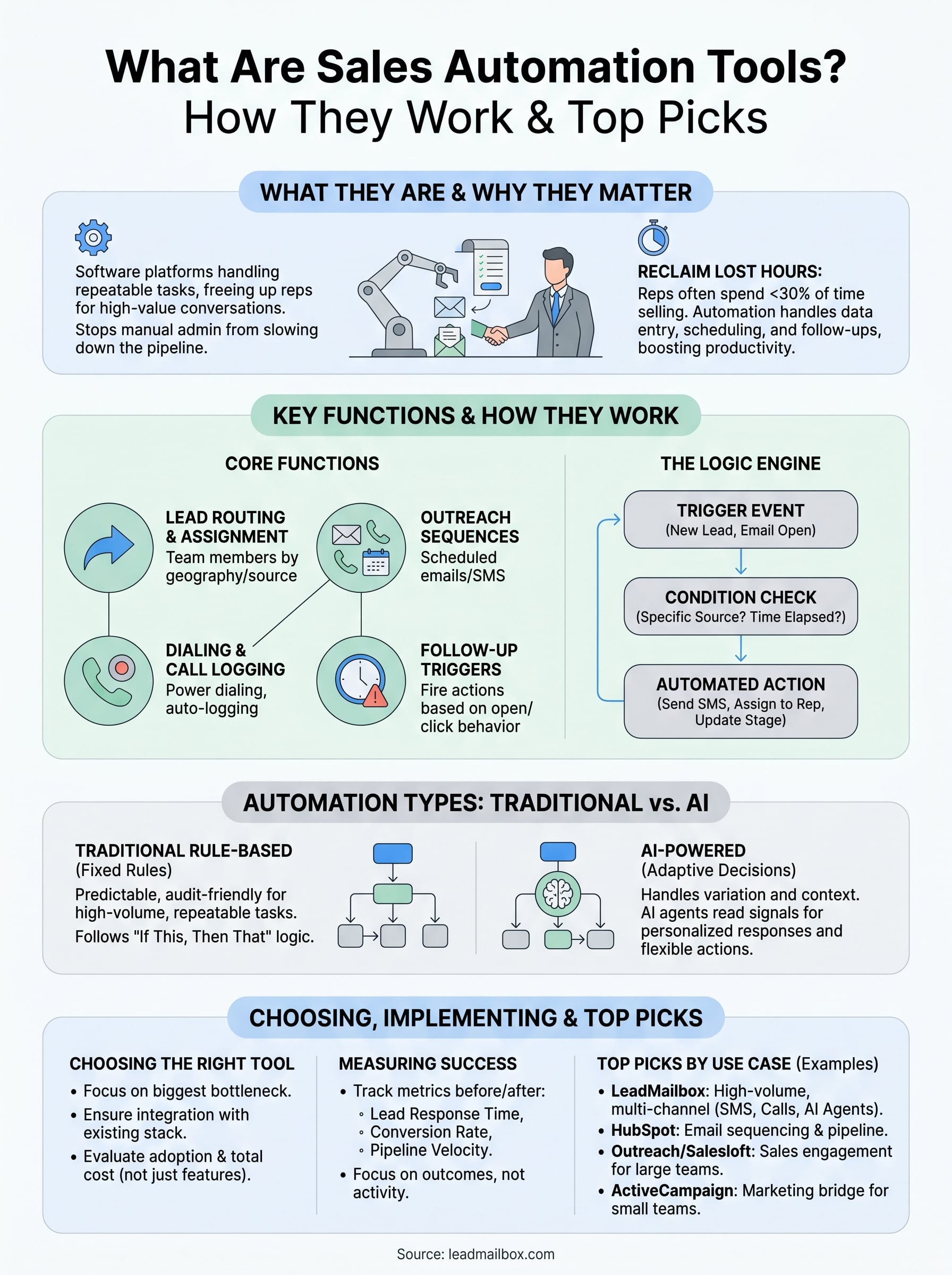
Studies on sales productivity consistently show that reps spend less than 30% of their working time actually selling. The rest goes to data entry, research, internal coordination, and follow-up logistics. For a team of five reps, that's roughly equivalent to losing three full-time sellers every single week. The problem compounds quickly because leads go cold while reps are buried in admin, and follow-up timing is one of the strongest predictors of whether a lead converts.
The longer you wait to contact a new lead, the lower your chances of ever reaching them. Speed-to-contact is a competitive advantage that manual processes consistently undermine.
How consistency breaks down without automation
People are not consistent by nature, and even your best rep will forget a follow-up, skip a step in an outreach sequence, or let a warm lead sit too long because they're focused on a different deal. This is not a performance problem. It's a systems problem. Without a structured process enforced by software, your sales workflow depends entirely on individual memory and discipline, and both of those break down under volume and pressure.
When you start exploring what are sales automation tools in practice, the core value becomes obvious: they remove the dependency on individual consistency. An automated sequence fires at the right time, every time, regardless of how busy the team is or how many leads came in that morning. Your follow-up cadence stays intact even when your reps are handling ten other priorities simultaneously.
Growth becomes harder to manage manually
Scaling a sales operation without automation creates a different kind of ceiling. As lead volume grows, the manual workload grows with it at roughly the same rate. Hiring more reps provides temporary relief, but you're essentially bringing on people to do work that software could handle at a fraction of the cost. The math stops working at a certain point, and growing businesses hit that ceiling faster than they expect.
Automation breaks that ceiling. When your platform handles lead routing, sends initial outreach, logs call activity, and triggers follow-up sequences without human input, your existing team can handle significantly more volume without a proportional headcount increase. That's a structural shift in how your business scales, not just a productivity boost. Teams that build this infrastructure early create a durable advantage by removing unnecessary friction from every stage of the sales process rather than simply working longer hours to compensate for a broken system.
What sales automation tools are
When people ask what are sales automation tools, the answer is simpler than most software vendors make it sound. Sales automation tools are software platforms, or features built into a platform, that handle specific, repeatable tasks in your sales process without requiring a human to trigger them manually. Think of them as programmable workflows that run in the background: a new lead comes in, the system routes it to the right rep, sends an initial text, logs the contact record, and schedules a follow-up call, all without anyone clicking a button.
The difference between automation and a CRM
A lot of teams confuse sales automation with a CRM, and while the two overlap, they are not the same thing. A CRM is primarily a database that stores contact information, deal history, and pipeline data. It helps you see what happened. Automation is the engine that makes things happen without you initiating each step. Many CRMs include some automation features, but a standalone CRM with no automation still requires your team to manually move leads through each stage, send every message, and update every record.
The practical difference: a CRM tells you what happened; automation tools make things happen on schedule.
What these tools actually handle
Sales automation tools cover a wide range of functions depending on the platform, but the most common capabilities fall into a few clear categories that directly address where manual effort slows your pipeline down.
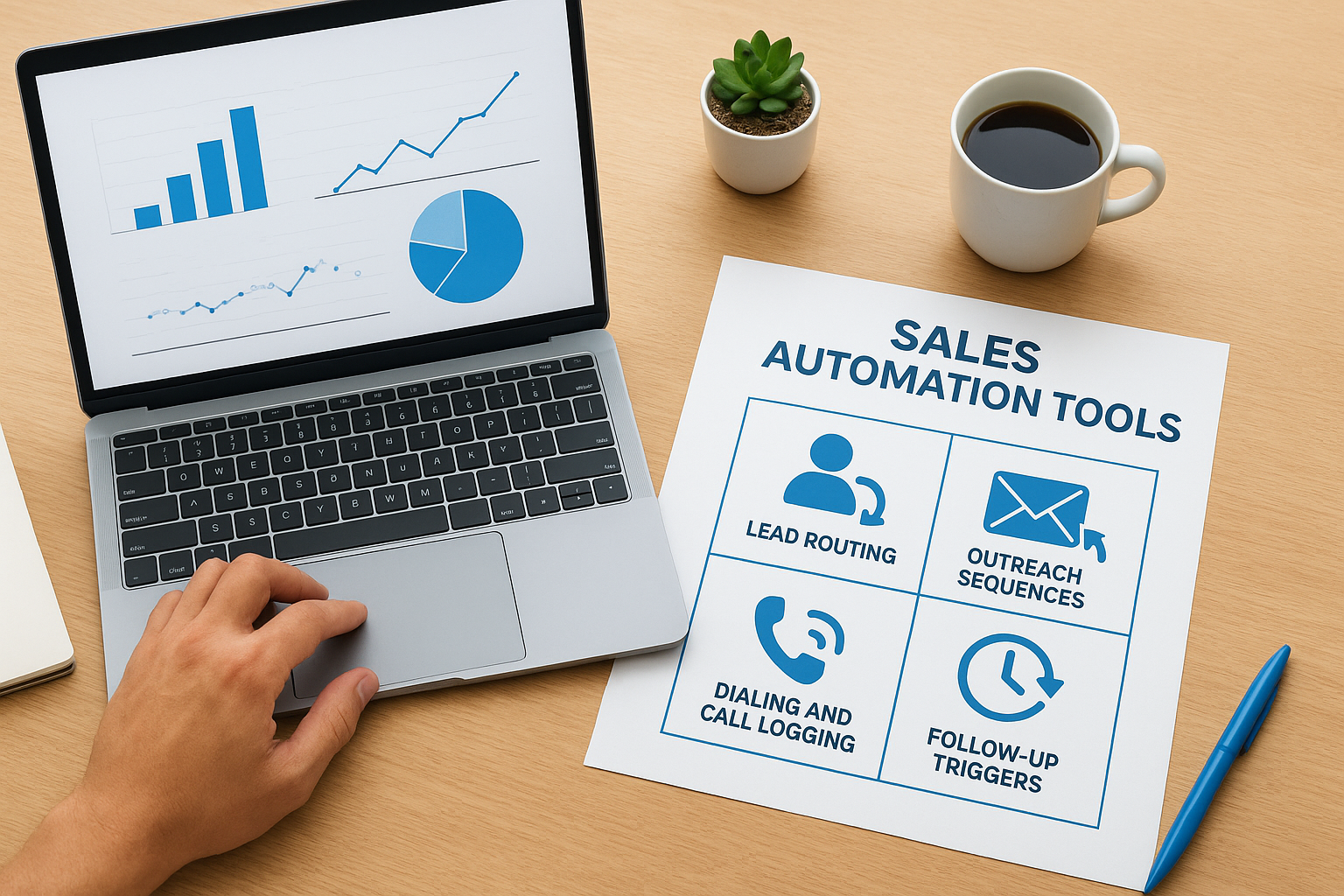
- Lead routing and assignment: New leads are sorted and sent to the right rep or queue based on rules you define, such as geography, lead source, or product interest.
- Outreach sequences: Automated email and SMS campaigns go out at scheduled intervals, keeping leads warm without manual effort from your team.
- Dialing and call logging: Power dialers move through call lists automatically, and call activity gets logged in the contact record without the rep doing it manually.
- Follow-up triggers: If a lead opens an email, clicks a link, or fails to respond after a set period, the system fires a follow-up action based on that behavior.
Knowing what falls inside this category helps you spot gaps in your current process and identify which type of tool solves the specific problem you're dealing with, rather than adding unnecessary complexity to an already crowded tech stack.
How sales automation tools work
Most people picture automation as a simple "if this, then that" setup, and at a basic level, that description is accurate. Sales automation tools run on logic-based rules that connect an event (something that happens) to an action (what the system does about it). The moment you understand that structure, the whole category of software becomes much easier to evaluate. What are sales automation tools doing under the hood? They are executing predetermined logic at scale, faster and more reliably than any person can.
Triggers and conditions set everything in motion
A trigger is the event that starts an automated workflow. Common triggers include a new lead submission, an incoming call, a specific link click, or a rep marking a deal stage as changed. Conditions narrow down when the automation fires. For example, you might set a trigger for any new lead, but apply a condition so that only leads from a specific source get routed to a particular rep. This combination of triggers and conditions gives you precise control over which leads get which treatment without managing it manually on a case-by-case basis.

Here are the trigger types you will encounter most often across sales automation platforms:
- Event-based triggers: A lead fills out a form, books a meeting, or replies to an email.
- Time-based triggers: A follow-up fires 24 hours after no response, or a check-in goes out 30 days after close.
- Behavior-based triggers: A contact opens an email three times in one day, signaling high intent.
- Status-based triggers: A deal moves from "contacted" to "proposal sent," kicking off the next sequence step.
Actions execute without anyone pressing send
Once a trigger fires and conditions are met, the system runs the action. An action can be sending an SMS, assigning a lead to a rep, logging a call, updating a field in the contact record, or adding a lead to a new sequence. Actions chain together into workflows, so a single trigger can kick off five sequential steps over two weeks without any manual input.
The real power is not in any single action but in the chain: one trigger sets off a full sequence that keeps your pipeline moving while your team focuses on live conversations.
Most platforms let you build these workflows visually, using a drag-and-drop interface, so you do not need technical skills to set up and adjust the logic as your sales process evolves.
What to automate across the sales cycle
The question of what are sales automation tools becomes most useful when you map specific automation types to specific stages in your sales process. Not every task deserves automation, and handing the wrong moments over to software can strip out the human judgment that actually closes deals. But there are clear categories across the sales cycle where manual effort delivers zero competitive advantage and automation handles the job faster and more consistently.
Top of funnel: lead capture and initial outreach
When a new lead enters your system, speed matters more than almost anything else. Automating lead capture and routing means the contact goes to the right rep within seconds, not hours. Initial outreach, whether a text message, an email, or a dialer sequence, fires immediately while the lead's interest is still high, before they move on to your competitor.
- Route leads by source, geography, or product type automatically
- Send a personalized SMS or email within 60 seconds of lead submission
- Assign follow-up tasks to the designated rep without any manual step
Research consistently shows that contacting a lead within the first five minutes dramatically increases your odds of reaching them compared to waiting even an hour.
Mid-funnel: follow-up and pipeline movement
Mid-funnel automation focuses on keeping deals moving without requiring your rep to manually track every open opportunity. Time-based triggers fire follow-ups after a set number of days with no response. Behavior-based triggers send a targeted message when a prospect opens an email multiple times or revisits a key page. These signals indicate purchase intent, and automation lets you act on them the moment they appear rather than catching them during a weekly pipeline review.
You can also automate pipeline stage updates. When a rep logs a call with a specific outcome, the system moves the deal to the next stage and queues up the next action, removing one more manual step from your rep's workload every single day.
Bottom of funnel: closing tasks and handoffs
Closing activities involve a different kind of automation: confirmations, proposal follow-ups, meeting reminders, and contract check-ins. Automated reminders reduce no-show rates without your rep personally chasing every prospect. Once a deal closes, automated onboarding sequences and handoff notifications ensure the customer experience stays consistent without relying on anyone remembering to send the right files or introductions at the right time.
Across every stage, the principle stays the same: automate what is predictable and repeatable, and keep your reps focused on conversations that require human judgment.
AI sales automation vs traditional automation
When people research what are sales automation tools today, they quickly encounter two distinct approaches: traditional rule-based automation and AI-powered automation. Both reduce manual work, but they operate on fundamentally different logic, and understanding where each one fits helps you build a smarter stack rather than layering in technology that duplicates effort or creates blind spots.

What traditional automation does well
Traditional automation follows fixed, predetermined rules that you define upfront. If a lead comes in from source X, assign to rep Y and send template Z. The system does exactly what you programmed, every time, with complete predictability. This makes traditional automation reliable and straightforward to audit: you know precisely what will fire, when, and why.
For high-volume, repeatable tasks where the right action is always the same, traditional automation handles the work cleanly. Lead routing, scheduled follow-up sequences, and call logging are strong examples. The logic is simple, the outcome is consistent, and the setup requires no significant technical expertise. The limitation appears when your leads start sending signals that fall outside the rules you defined, because a traditional workflow has no mechanism to adapt on the fly.
What AI adds to the equation
AI-powered automation introduces adaptive decision-making into your sales workflow. Instead of following a fixed rule, an AI agent reads context, evaluates signals, and generates a response or action that fits the specific situation. This shows up in practice as a text agent that handles inbound SMS replies, an email writer that personalizes outreach based on lead data, or a call assistant that surfaces relevant information in real time based on what the prospect says.
The core advantage is handling variation at scale. A prospect who replies to your initial SMS with a question does not fit neatly into a standard "no response" follow-up sequence. An AI agent reads that reply and responds appropriately, keeping the conversation moving without requiring a rep to intervene. This closes the gap that traditional rule-based systems leave open when real-world behavior does not match your workflow's assumptions.
AI automation is not a replacement for traditional automation; it fills in where fixed rules run out and human judgment is needed at scale.
The most effective setups combine both approaches. Traditional automation handles the predictable, repeatable steps, while AI layers in where context and variation require a more flexible response, giving your team a complete system rather than a partial one.
How to choose the right sales automation tool
Choosing the wrong tool does not just waste your budget; it wastes your team's time during setup, training, and eventual migration. When you understand what are sales automation tools designed to solve, the selection process becomes more focused. Your goal is not to find the most feature-rich platform available but to find the one that directly addresses the specific friction points slowing your pipeline down right now. Starting from that angle keeps you from paying for capabilities you will never use.
Start with your biggest bottleneck
Before you evaluate any software, map out where your current process breaks down most often. Is it lead response time? Inconsistent follow-up? Manual call logging? Every platform has a different strength, and the one that solves your primary problem should rank higher than the one with an impressive demo. Write down your three most time-consuming manual tasks and use that list as your filter when comparing options.
Ask vendors these questions before committing to anything:
- Can the platform handle your current lead volume without performance issues?
- Does the automation logic cover your specific triggers and conditions, or will you need workarounds?
- How long does a typical implementation take for a team your size?
- What does the support experience look like after the sale?
Check for integration with your existing stack
A sales automation tool that runs in isolation creates duplicate data entry and disconnected reporting, two problems that automation is supposed to eliminate. Before you finalize any decision, confirm that the platform connects cleanly with the tools your team already uses, whether that is your CRM, your lead sources, or your phone system. Poor integrations are one of the most common reasons sales teams abandon a platform within the first year.
Choosing a platform that integrates with your lead sources and communication channels from day one saves you weeks of manual reconciliation work later.
Evaluate ease of use and total cost
A powerful platform that your team will not use consistently is not a solution. Prioritize tools with interfaces your reps can learn quickly without extensive onboarding, because adoption determines ROI far more than the feature list does. Factor in total cost, which includes the base subscription, any per-seat fees, add-ons for advanced features, and the time your team spends getting up to speed. A straightforward, affordable platform with strong adoption will consistently outperform an enterprise tool that sits half-configured because the learning curve pushed your reps back to their old habits.
How to implement sales automation step by step
Knowing what are sales automation tools is one thing; actually getting them running inside your sales process without disrupting your team's daily workflow is another. Most implementations fail not because the software is bad but because teams try to automate everything at once before they understand what they actually need. A phased approach, starting narrow and expanding as you confirm results, consistently produces better adoption and faster payback than a full rollout on day one.
Step 1: Document your current process before you touch any software
Before you configure a single workflow, map out every step your team currently takes from the moment a lead enters your system to the moment a deal closes or a contact goes cold. Write it down in plain terms. This exercise reveals the exact points where delays happen, where manual steps pile up, and where handoffs between people break down. Those gaps are your automation priorities, and going in without this map means you will automate the wrong things first.
- Identify your three highest-volume, most repetitive tasks
- Note where leads wait the longest with no action taken
- Flag every step that requires no human judgment to complete
Step 2: Start with one workflow and prove the results
Pick the single most impactful manual task from your list and build one automated workflow around it. Lead response is almost always the right starting point because it delivers measurable results quickly, including faster contact rates, more live conversations, and improved conversion on new leads. Running one workflow first lets you test the logic, catch errors early, and confirm that your team understands how the system behaves before you layer in more complexity.
Getting one workflow right and watching the numbers improve builds internal confidence faster than launching a fully automated system that nobody trusts yet.
Step 3: Expand systematically and review on a schedule
Once your first workflow runs cleanly for a few weeks, add the next layer of automation based on where you still see manual friction. Follow-up sequences, pipeline stage triggers, and call logging are natural next steps after lead routing is running well. Set a monthly review cadence where you check open rates, response rates, and conversion data tied to each active workflow. Automation that nobody measures is automation nobody manages, and the data will tell you clearly what to fix before small inefficiencies compound into bigger problems.
Top sales automation tools by use case
Rather than ranking tools by popularity, matching them to specific use cases tells you far more about what will actually work for your team. Understanding what are sales automation tools in practice means recognizing that the best platform is the one that fits the job you need done, not the one with the longest feature list or the most name recognition. Your bottleneck, not the market's opinion, should drive the decision.
For high-volume lead management and multi-channel outreach
LeadMailbox is built specifically for sales teams that need to manage leads from multiple sources and reach them fast across several channels. The platform combines lead aggregation, power dialing, SMS campaigns, email outreach, and AI agents in a single system, which removes the coordination overhead that comes from running separate tools for each function. If your primary problem is lead response time and follow-up consistency across high lead volumes, this setup addresses both without requiring a complex integration layer between disconnected platforms.
For email sequencing and pipeline automation
HubSpot Sales Hub covers email sequences, deal pipeline automation, and meeting scheduling in one connected place. It works well for teams that run primarily email-based outreach and want tight integration between marketing data and sales activity without switching platforms. Salesforce Sales Cloud fits larger organizations that need deep customization, advanced reporting, and enterprise-level workflow automation across a big, distributed sales team with complex territory structures.
The right tool for your team is determined by your current bottleneck, not by which platform gets the most attention in trade publications.
For sales engagement and conversation management
Outreach and Salesloft focus on multi-step sales engagement sequences, call recording, and performance analytics for teams that run structured outreach cadences at volume. Both platforms are designed for larger sales organizations that need detailed sequence analytics and manager-level visibility into rep activity at every touchpoint. They work best when your team already has a defined playbook and needs software to enforce it consistently at scale.
ActiveCampaign serves teams that need a bridge between marketing automation and sales follow-up, with strong email personalization and behavioral triggers that move leads through the pipeline based on how they interact with your content. It suits smaller teams that want sophisticated automation without the pricing and complexity of an enterprise-level platform.
Pricing, ROI, and measuring success
Understanding what are sales automation tools worth to your business requires looking past the monthly subscription line and connecting the cost directly to measurable outcomes. Most platforms charge between $50 and $300 per user per month depending on the feature set, with enterprise-level tools often requiring annual contracts and custom pricing on top of that. Knowing what you pay is easy. Knowing whether it is actually working is where most teams fall short.
What sales automation tools actually cost
Pricing structures vary significantly across platforms, and the advertised rate is rarely the full picture. Per-seat fees, add-on charges for advanced automation, and usage-based billing for SMS or calling minutes all contribute to a total cost that can be two to three times higher than the base plan once your team is fully operational. Before signing anything, map out your expected usage and build the full cost based on actual volume rather than the minimum tier.
Common cost components to factor into your budget:
- Base platform subscription (monthly or annual)
- Per-user or per-seat fees that scale with team size
- SMS and calling credits or per-minute rates
- Onboarding and implementation support fees
- Integration costs for connecting with your existing tools
How to measure whether automation is working
The most direct way to evaluate ROI is to compare the metrics that matter before and after implementation. Start with lead response time: how long does it take your team to make first contact after a lead enters the system? That number should drop significantly once automated outreach is running. Track it weekly for the first 90 days and look for a consistent improvement.
The metrics you choose to track determine what you optimize for, so connect your KPIs directly to the manual problems automation was supposed to solve.
Beyond response time, conversion rate from lead to conversation and pipeline velocity are the two indicators that reflect whether automation is moving deals forward or just creating activity. If response time drops but conversion rate stays flat, your sequences need adjustment, not more automation. Run a monthly review that compares these three numbers against your pre-automation baseline. Keep the evaluation tied to the specific problem you set out to solve rather than tracking every available metric, which spreads your attention across data points that do not connect to revenue.
FAQs about sales automation tools
This section covers the questions that come up most often when sales teams start evaluating automation software. If you have been researching what are sales automation tools and still have specific questions, the answers below address the points most people need before making a decision.
Is there a difference between a CRM and a sales automation tool?
Yes, and the distinction matters when you are building your stack. A CRM stores your contact data, deal history, and pipeline information, giving you a record of what happened. A sales automation tool actively executes tasks on your behalf, sending messages, routing leads, and triggering follow-up sequences without anyone manually initiating each step. Many platforms combine both functions, but buying a CRM and expecting it to handle automation without checking its workflow capabilities is a common and expensive mistake.
Treat your CRM as the database and your automation tool as the engine that keeps that database updated and your pipeline moving.
Can small businesses actually benefit from sales automation?
Absolutely. Small teams often benefit more from automation than larger ones because every hour saved goes directly back to a rep who is already stretched thin. You do not need enterprise-level volume to justify the cost. Even a two-person sales team dealing with inbound leads from multiple sources will see immediate gains from automated routing, initial outreach, and follow-up sequences that run without anyone having to remember to send the next message.
How long does implementation take?
It depends on how many workflows you try to launch at once. Starting with a single workflow, such as automated lead response, typically takes a few days to configure and test before you run it live. A full implementation covering routing, multi-step sequences, and CRM integrations usually takes two to four weeks for a small team. Rushing the setup to automate everything immediately is the most common reason implementations stall, so a phased rollout almost always produces better results.
Do sales automation tools replace your sales reps?
No. Automation handles the repeatable, time-consuming tasks that do not require human judgment, things like sending a scheduled follow-up or logging a completed call. Your reps still own the conversations that actually close deals. The goal is to remove the admin burden so your team spends more time on the high-value interactions where their judgment, listening skills, and relationship-building ability create outcomes that no automated workflow can replicate on its own.
What to do next
You now have a complete picture of what are sales automation tools, how they function inside a sales process, and which platforms fit specific use cases. The next step is practical: identify the one manual task that costs your team the most time each week and build a single automated workflow around it. Start narrow, measure the results over 30 days, and expand from there.
If lead response time, follow-up consistency, and multi-channel outreach are the gaps slowing your pipeline down, you do not need to stitch together five separate tools to fix them. LeadMailbox brings lead management, power dialing, SMS, email campaigns, and AI agents into one platform built specifically for sales teams that need to move fast without a complicated setup. You can explore how it works and see whether it fits your process by visiting LeadMailbox and getting started today.