

Best Simple Customer Relationship Management Software (2026)
Most CRMs try to be everything to everyone, and end up being a nightmare for the people who actually have to use them. If you've ever stared at a dashboard full of features you'll never touch, you know the feeling. What small businesses and lean sales teams actually need is simple customer relationship management software that handles contacts, tracks deals, and stays out of your way. No bloated feature sets, no six-month onboarding process, no enterprise pricing.
We built LeadMailbox around that same idea. Since 2004, our platform has helped sales teams organize leads from multiple sources, manage outreach across phone, SMS, and email, and close more deals, all without the complexity tax that comes with most CRMs. So when it comes to evaluating what makes a CRM genuinely simple and effective, we have opinions backed by two decades of experience.
This guide breaks down the best simple CRM options available right now. We looked at ease of use, core features, pricing, and how quickly a small team can get up and running without dedicated IT support. Whether you're a solo operator tracking prospects in a spreadsheet or a growing team that's outgrown sticky notes, you'll find a CRM on this list that fits.
1. LeadMailbox
LeadMailbox is a lead management and sales enablement platform built specifically for small to mid-sized sales teams that need to handle high volumes of leads across multiple sources without getting buried in complexity. It has been in the market since 2004, which means the core workflows have been refined over two decades of real-world use rather than theoretical product planning.
What LeadMailbox does best
LeadMailbox shines when your main goal is turning leads into conversations as fast as possible. The platform pulls leads from hundreds of integrated lead partners into a single organized queue, so your team stops wasting time copying data between tools. Where most simple customer relationship management software falls short on communication features, LeadMailbox covers the full outreach cycle with phone, SMS, and email built directly into the platform.
If your team relies on phone-based sales, having telephony and lead management in one place eliminates the constant tab-switching that slows reps down.
Standout features for simple lead management
The telephony suite sets LeadMailbox apart from lightweight CRMs that only track contacts. You get click-to-call, a power dialer, insta-call functionality, and inbound number management all in one place. Reps can move from one call to the next without switching tools or manually logging activity.

On the automation side, AI agents can respond to incoming text messages, answer calls, and draft emails on your behalf. This matters for small teams where one rep often handles more leads than they can manually respond to within the first few minutes. SMS and email campaign tools let you build personalized outreach sequences without needing a separate marketing automation subscription.
LeadMailbox also handles lead aggregation cleanly. Whether your leads come from web forms, paid lead vendors, or partner integrations, they land in one organized system so nothing slips through the cracks during high-volume periods.
Trade-offs and limits to know
LeadMailbox is built around lead management and outreach, which means it prioritizes sales pipeline activity over project management or customer support ticketing. If you need deep reporting dashboards, advanced forecasting models, or complex custom objects, you will find the platform more focused than feature-heavy enterprise CRMs. That focus is a deliberate design choice, not a gap, but it is worth knowing before you sign up.
The platform is also more suited to teams that actively work inbound and outbound leads than to businesses managing long-term account relationships with minimal outreach activity.
LeadMailbox pricing
LeadMailbox runs on a month-to-month subscription model, which means you are not locked into annual contracts while you figure out whether the platform fits your team. This pricing structure makes it a realistic option for small businesses that need to control costs and avoid long-term commitments before proving out their sales process.
Specific plan pricing is available directly on the LeadMailbox website at leadmailbox.com, where you can review what each tier includes and request a demo if you want to see the platform in action before committing.
2. Less Annoying CRM
Less Annoying CRM lives up to its name. Built specifically for small businesses that want to track contacts and follow up on leads without learning a complex system, it strips the CRM down to its core function: keeping your pipeline organized and your follow-ups on schedule.
What Less Annoying CRM does best
This tool works best when you want dead-simple contact management without a learning curve. The interface presents everything on a single screen, so you are not hunting through menus to find what you need. It is one of the few options that genuinely qualifies as simple customer relationship management software in both name and practice, not just in its marketing copy.
If you are switching from a spreadsheet or a bloated CRM, Less Annoying CRM gives you structure without forcing you to rebuild your entire sales process from scratch.
Standout features for simplicity
The standout feature is the daily agenda email, which sends each user a morning summary of their tasks and scheduled follow-ups. You do not need to log in and navigate a dashboard to know what needs attention that day. The contact and pipeline views are clean and easy to customize, and everything lives in one place so leads do not slip through the cracks.
Every user also gets access to a shared team calendar and basic reporting without needing to upgrade to a higher tier. That built-in accessibility helps small teams stay aligned without adding extra tools.
Trade-offs and limits to know
The platform is intentionally limited in scope. You will not find built-in email campaigns, telephony tools, power dialers, or AI features here. If your sales process involves heavy outbound calling or automated follow-up sequences, you will likely outgrow this tool faster than you expect. It also lacks native integrations with many popular business applications, which can create friction as your tech stack grows.
Less Annoying CRM pricing
Pricing is a flat $15 per user per month with no tiered plans and no annual commitment required. That straightforward structure makes it easy to budget, particularly for teams of one to five people just getting started with structured lead tracking.
3. HubSpot CRM
HubSpot CRM is one of the most widely recognized names in the CRM space, and it earned that reputation by making contact management and deal tracking accessible to teams with no prior CRM experience. It works well as a starting point if you want structure without a steep learning curve and are open to expanding your toolset over time as your business grows.
What HubSpot CRM does best
HubSpot CRM does its best work as an entry-level system for teams building their first organized sales process. The setup takes minutes rather than days, and the interface guides you through adding contacts, creating deals, and logging activity without requiring a manual. For businesses moving away from spreadsheets, it offers a natural first step into structured pipeline management.
If you need a free starting point that gives your team a shared view of every contact and deal in progress, HubSpot CRM is one of the strongest options on this list.
Standout features for beginners
The free plan includes contact and company records, deal pipelines, task management, and basic email tracking, which covers the core needs of most small teams without any upfront cost. HubSpot also offers a live chat widget and form builder that you can embed on your website to capture leads directly into your CRM without a third-party tool.

The reporting dashboard gives you a clear view of where deals stand and which reps are most active, even on the free tier. That visibility helps new sales teams build good habits early.
Trade-offs and limits to know
The free plan has real limits. Automation, sequences, and advanced reporting are locked behind paid tiers that scale up in price quickly. Teams that start on the free plan often find themselves hitting a wall as soon as they want to do anything beyond basic contact management. HubSpot is not the ideal simple customer relationship management software if you need built-in telephony or SMS outreach, since those features require separate add-ons.
HubSpot CRM pricing
HubSpot offers a free plan with no time limit, which makes it easy to test before committing. Paid Sales Hub plans start at $15 per user per month for the Starter tier, with pricing increasing significantly for Professional and Enterprise plans that unlock advanced automation and reporting.
4. Pipedrive
Pipedrive was built around the idea that sales teams work best when they can see exactly where every deal stands at a glance. It focuses almost entirely on pipeline visualization and activity-based selling, which makes it a strong option if your primary need is moving opportunities through a structured sales process rather than managing a large volume of inbound leads from multiple sources.
What Pipedrive does best
Pipedrive does its best work as a visual deal-tracking tool for teams that run a defined sales cycle. The kanban-style pipeline board lets you drag deals from stage to stage and see the full picture in one view. For sales professionals who want simple customer relationship management software that keeps their focus on closing rather than administrative work, Pipedrive delivers a clean, intuitive layout that keeps friction low from day one.
Standout features for pipeline tracking
The activity reminder system is one of Pipedrive's most practical features. It automatically prompts you to schedule a next action every time a deal moves forward, so deals never go cold simply because a rep forgot to follow up. The smart contact data feature also pulls publicly available information about your contacts automatically, reducing manual data entry when you add new leads to the system.

If your sales team loses deals because follow-ups fall through the cracks rather than because of poor lead quality, Pipedrive's activity-driven workflow directly addresses that problem.
Trade-offs and limits to know
Pipedrive's focus on pipeline management means it offers limited built-in marketing tools compared to more all-in-one platforms. You will not find native SMS outreach, a power dialer, or AI-driven communication features without connecting third-party integrations. Teams that handle high-volume inbound leads from multiple sources may find the platform less suited to their workflow than a dedicated lead management system.
Pipedrive pricing
Pipedrive's Essential plan starts at $14 per user per month when billed annually. Higher tiers unlock automation, reporting, and additional features, with pricing scaling up to the Power and Enterprise plans for larger teams that need more configuration options.
5. OnePageCRM
OnePageCRM is built around a single idea: every contact needs a next action. The platform converts the traditional CRM database into an action-focused task list, which keeps sales reps moving forward rather than browsing static contact records. It is a strong fit for small teams that lose deals to inaction rather than to competition.
What OnePageCRM does best
This tool excels at keeping your team in motion. The "Next Action" system assigns a required follow-up step to every contact in your pipeline, so you always know what needs to happen next without digging through notes or deal histories. For teams looking for simple customer relationship management software that enforces accountability without being heavy-handed, this approach works well.
Standout features for follow-ups
The core differentiator is the action stream, a single scrollable list that ranks every contact by their next scheduled action date. You can call, email, or log notes directly from that view without navigating to separate contact pages. OnePageCRM also includes a bulk email tool that lets you send personalized messages to multiple contacts at once without needing a separate email marketing platform.
If your sales process stalls because reps forget to follow up rather than because leads are low quality, OnePageCRM's action-first interface directly addresses that specific problem.
Trade-offs and limits to know
OnePageCRM keeps its feature set deliberately lean, which means you will not find built-in telephony, SMS outreach, or AI-driven communication tools on the platform. Teams that handle inbound leads from multiple external sources may find the lead aggregation capabilities limited compared to more outreach-focused platforms. The reporting suite also stays fairly basic, which can be a constraint if your team needs detailed pipeline analytics to make resourcing decisions.
OnePageCRM pricing
OnePageCRM offers a 21-day free trial with no credit card required, which gives you enough time to evaluate whether the action-stream workflow fits your team's habits. Paid plans start at $9.95 per user per month when billed annually, making it one of the more affordable structured CRM options on this list.
6. Zoho Bigin
Zoho Bigin is Zoho's answer to businesses that find full-scale CRMs overwhelming. Designed specifically for small teams, it strips down the Zoho CRM ecosystem to the core pipeline and contact management features that actually matter when you are just trying to keep leads organized and deals moving forward.
What Zoho Bigin does best
This tool does its best work as a pipeline-first CRM for very small businesses that need more structure than a spreadsheet but less complexity than a full CRM suite. You can set up a working pipeline in under an hour, and the interface keeps everything visible without overwhelming you with configuration options. For teams looking for simple customer relationship management software that connects easily with other tools, Bigin benefits from Zoho's broad ecosystem of business apps.
Standout features for small teams
Bigin gives you multiple pipeline support, which means you can track different sales processes, like new customers and renewals, as separate pipelines inside the same account. That flexibility helps small teams manage different types of business without building separate systems for each. The platform also includes built-in telephony with call logging, which is a feature most entry-level CRMs leave out entirely.
If your business runs more than one type of sales process simultaneously, Bigin's multiple pipeline feature saves you from maintaining separate tools for each workflow.
Trade-offs and limits to know
The platform is built for very small teams, and you will feel that constraint as your operation grows. The automation capabilities stay basic compared to full CRM platforms, and the reporting features are limited to simple pipeline summaries. Teams that need AI-driven outreach tools, SMS campaigns, or high-volume lead intake from multiple external sources will find Bigin underpowered for those specific needs.
Zoho Bigin pricing
Bigin offers a free plan for a single user, which makes it a realistic starting point for solo operators testing a structured CRM for the first time. Paid plans start at $7 per user per month when billed annually, making it one of the most affordable options on this list for teams that need multiple pipelines without a large budget commitment.
7. Freshsales
Freshsales is a CRM built by Freshworks that targets small to mid-sized sales teams looking for a system that handles both contact management and lead intelligence without requiring a complex setup. It fits well in the middle of the market, offering more capability than bare-bones tools while keeping the onboarding experience accessible enough for teams without a dedicated CRM administrator.
What Freshsales does best
Freshsales earns its spot on this list by combining AI-powered lead scoring with a clean, approachable interface that new users can navigate without extensive training. The platform helps your team prioritize which leads deserve attention first, rather than treating every contact in your pipeline as equally urgent. For sales teams managing a steady flow of inbound leads, that built-in prioritization reduces the mental overhead of figuring out where to focus each day.
Standout features for lead capture and routing
The Freddy AI feature analyzes your contacts and deals, then assigns scores based on engagement signals and deal data, which means your reps spend less time manually qualifying leads and more time having conversations. Freshsales also includes a built-in phone and email system that logs activity automatically, so your contact records stay current without relying on reps to update them manually after every interaction.
If your team struggles to identify which leads are worth calling today versus which ones need a longer nurture sequence, Freshsales' lead scoring gives you an objective starting point.
Trade-offs and limits to know
Freshsales is a solid option for standard sales workflows, but it is not a dedicated lead aggregation platform. If your business pulls leads from dozens of external partners or relies on high-volume power dialing, you will likely need additional tools to fill those gaps. The free plan also limits you to three users, which can feel restrictive for growing teams testing whether this qualifies as the right simple customer relationship management software for their operation.
Freshsales pricing
Freshsales offers a free plan for up to three users that includes basic contact and deal management. Paid plans start at $9 per user per month when billed annually, with higher tiers unlocking automation workflows, advanced reporting, and additional AI features.
8. Capsule CRM
Capsule CRM sits in a practical middle ground between a contact organizer and a lightweight project tracker. It gives small sales teams and service-based businesses a clean way to manage relationships, track deals, and handle some of the task coordination that typically spills into a separate project tool. If your sales cycle involves a handful of follow-up steps after the deal closes, Capsule CRM covers that without requiring a second subscription.
What Capsule CRM does best
Capsule CRM works best when you need simple customer relationship management software that does not stop the moment a deal is won. The platform handles the handoff between selling and delivering by letting you attach tasks, milestones, and notes to contacts even after they move out of an active pipeline. That makes it a solid option for small businesses where the same person who closes a deal also manages the work that follows.
Standout features for sales plus light projects
The cases feature is what separates Capsule CRM from most lightweight tools. Cases let you group tasks, emails, and notes under a single contact or deal, which functions like a basic project record without requiring you to open a separate project management app. You also get a customizable sales pipeline with drag-and-drop deal cards and a visual milestone tracker that keeps your team aligned on where each opportunity stands.
If your business delivers a service after closing a sale, Capsule CRM's ability to track both the deal and the post-sale work in one place removes a real organizational headache.
Trade-offs and limits to know
Capsule CRM does not include built-in telephony, SMS campaigns, or AI-driven outreach tools. Teams that rely on high-volume calling or automated lead intake from external partners will hit limits quickly. The reporting suite stays basic on lower-tier plans, which can make it harder to spot pipeline trends as your team scales.
Capsule CRM pricing
Capsule CRM offers a free plan for up to two users with basic contact and pipeline features. Paid plans start at $18 per user per month when billed annually, with higher tiers unlocking additional pipelines, workflow automation, and more detailed reporting.
9. Streak
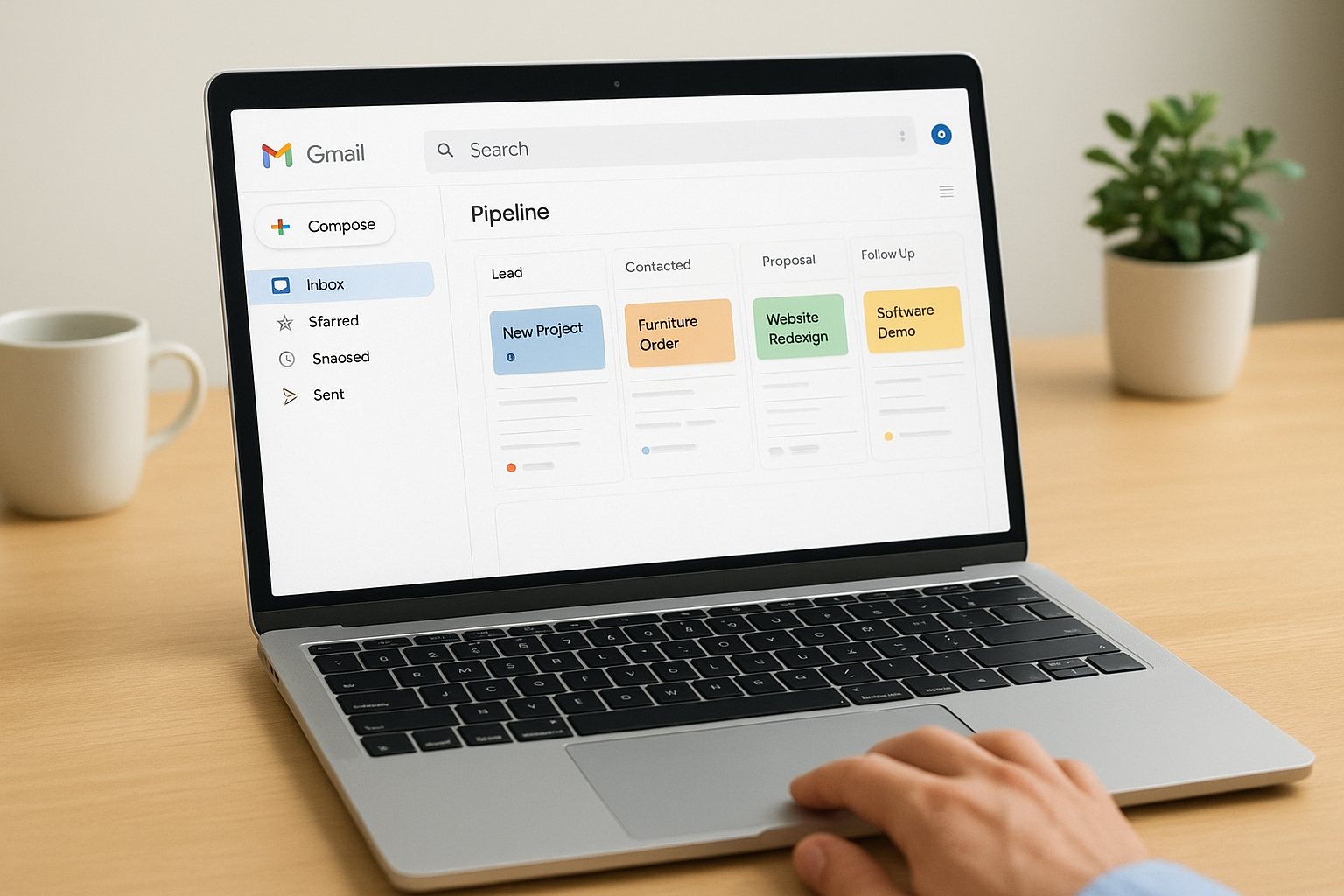
Streak is a CRM that runs entirely inside Gmail, which makes it one of the more unusual options on this list. Rather than asking you to log into a separate platform, it embeds pipeline management, contact tracking, and deal workflows directly into your inbox. If your team already lives in Gmail and wants to add structure without opening another tool, Streak removes that barrier entirely.
What Streak does best
Streak works best for individuals and small teams who conduct most of their communication through Gmail and want to track deals without leaving their inbox. It converts email threads into deal records automatically, which means you spend less time copying information between your email client and a separate CRM. For someone looking for simple customer relationship management software that requires zero context switching, this approach is genuinely practical.
If you already manage your workday inside Gmail, Streak turns a tool you already know into a functional sales pipeline without any learning curve.
Standout features for Gmail-based selling
The pipeline view inside Gmail lets you create custom stages, drag deals forward, and log notes without navigating away from your inbox. Streak also includes email tracking, which notifies you the moment a contact opens your message, so you can time follow-ups based on actual engagement rather than guesswork. Mail merge functionality lets you send personalized outreach to multiple contacts at once directly from Gmail.
Trade-offs and limits to know
Streak's reliance on Gmail is its biggest constraint. If your team uses Outlook or another email provider, this tool simply does not work for your operation. The platform also lacks built-in telephony, SMS outreach, and lead aggregation from external partners, which limits it to teams where email is the dominant communication channel.
As your sales volume grows, managing everything inside an inbox can become harder to maintain even with pipeline views in place. Reporting capabilities stay fairly limited on lower tiers, and you will likely need additional tools if you want to run multichannel outreach campaigns alongside your pipeline tracking.
Streak pricing
Streak offers a free plan for individual users that covers basic pipeline tracking and email tools inside Gmail. Paid plans start at $15 per user per month when billed annually, with higher tiers unlocking data validation, custom permissions, and more detailed reporting features for growing teams.
10. Nimble
Nimble takes a different angle than most tools on this list. Rather than focusing purely on deal pipelines, it prioritizes relationship context, pulling together contact information, social data, and interaction history into a unified profile for every person in your network. It suits small businesses and solo professionals who sell through relationships more than structured funnels.
What Nimble does best
Nimble does its best work when you want to know the full picture of a contact before reaching out. The platform automatically enriches contact records by pulling in publicly available social and professional data, so you are not starting every conversation cold. For teams that want simple customer relationship management software built around knowing people rather than just tracking deals, Nimble's contact intelligence approach sets it apart from more pipeline-focused tools.
Standout features for relationship tracking
The standout feature is Nimble's Prospector tool, which lets you hover over a name anywhere on the web and instantly create a contact record with pre-filled data pulled from publicly available sources. That removes a significant amount of manual data entry for teams that source new contacts through LinkedIn, email, or web research.
If your sales process depends on warm outreach and genuine relationship-building rather than cold volume, Nimble's contact enrichment features directly support that workflow.
The platform also provides a unified inbox that collects messages from email and social channels in one place, which helps you stay responsive without jumping between multiple apps throughout the day.
Trade-offs and limits to know
Nimble is built around relationship intelligence, not high-volume lead management. You will not find a built-in power dialer, SMS campaigns, or AI agents that handle inbound communication on your behalf. Teams that pull leads from multiple external partners or run outbound calling at scale will need to supplement Nimble with additional tools to cover those gaps.
Nimble pricing
Nimble offers a 14-day free trial so you can test the platform before committing. Paid plans start at $24.90 per user per month when billed annually, which covers the full feature set including contact enrichment, pipeline tracking, and the Prospector tool.
Next steps
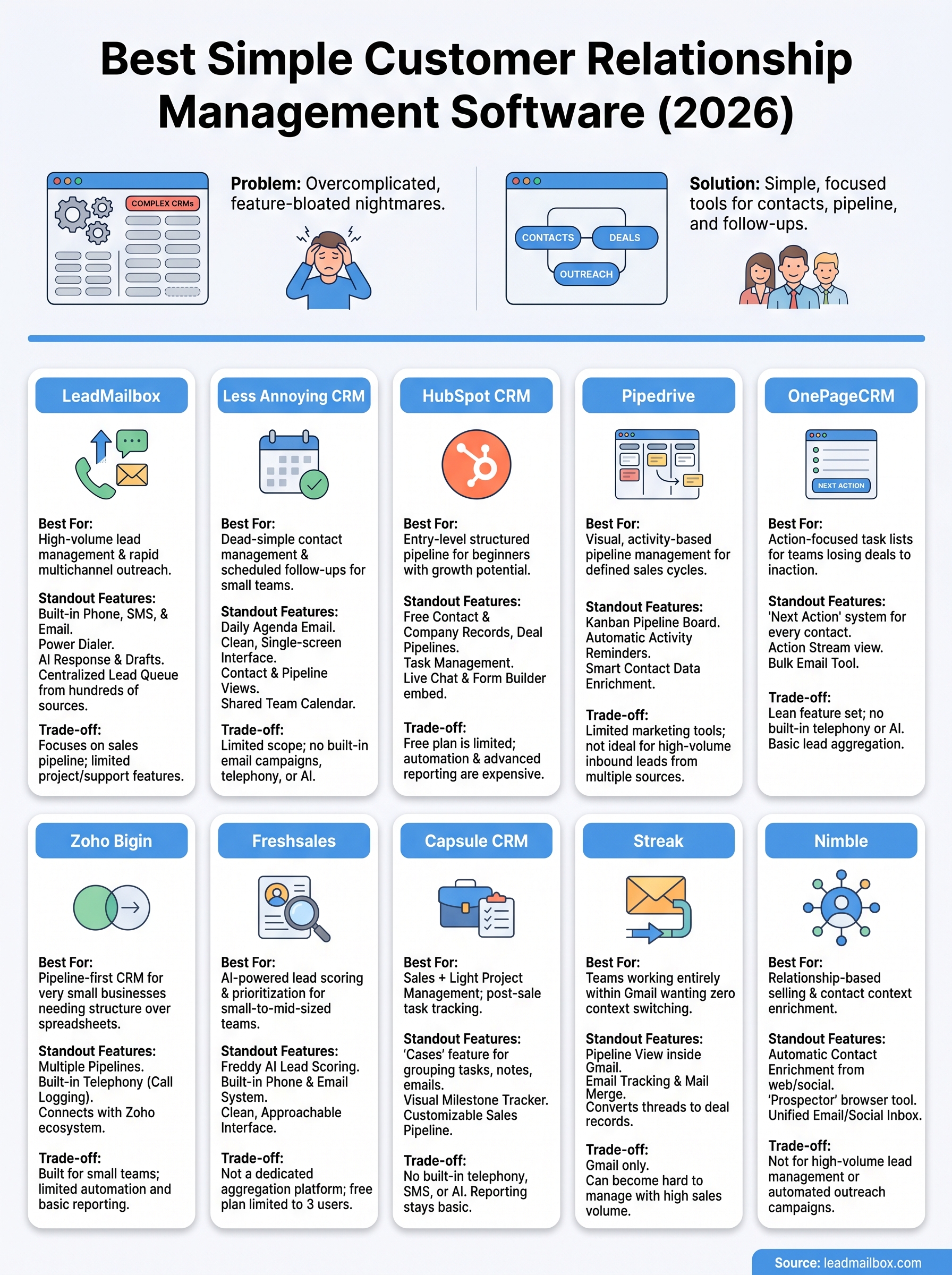
Every tool on this list solves a different version of the same problem: keeping your sales process organized without burying your team in software complexity. The right simple customer relationship management software depends on where your biggest friction point actually sits. If you lose deals because follow-ups fall through the cracks, tools like OnePageCRM or Less Annoying CRM address that directly. If you need multichannel outreach at scale with phone, SMS, email, and AI all working together inside one platform, LeadMailbox covers ground that most lightweight CRMs simply cannot match.
Start by identifying the one thing that costs your team the most time or deals right now, and match that problem to the tool built to solve it. If high-volume lead management and outreach automation fit your situation, see what LeadMailbox can do for your sales team and request a demo to test it against your real workflow before committing.