

10 Sales Automation Best Practices to Close More Deals
Your sales reps spend roughly two-thirds of their time on tasks that have nothing to do with actually selling. Data entry, follow-up scheduling, lead sorting, it adds up fast and eats directly into revenue. That's exactly why sales automation best practices matter: they help you reclaim those hours and put them back where they count, in conversations that close deals.
But automation only works when it's done right. Flip the wrong switches, and you end up with robotic outreach, missed leads, and a CRM full of junk data. The goal isn't to automate everything, it's to automate the right things so your team can focus on building relationships. At LeadMailbox, we've spent over 20 years helping sales teams do exactly that, combining lead management, built-in dialers, and AI-powered communication tools in one platform designed to eliminate busywork.
This article breaks down 10 proven practices for implementing sales automation effectively, from lead scoring and follow-up sequences to choosing tools that actually integrate with your workflow. Whether you're setting up automation for the first time or tightening a system that's already running, these tips will help you sell smarter without losing the human touch.
1. Centralize leads and outreach in LeadMailbox
When your leads live in five different places, your team wastes time hunting instead of selling. Fragmented lead data causes missed follow-ups, duplicate outreach, and zero visibility into what's working. Centralizing everything in one platform is the foundation every other sales automation best practice builds on.
What this best practice means
Centralizing means every lead, regardless of where it came from, lands in one system where your team can see it, act on it, and track it. LeadMailbox connects with hundreds of lead partners, so leads from web forms, paid ads, third-party vendors, and inbound calls all flow into a single pipeline. Your reps stop switching tabs and start focusing on conversations.
When your data is scattered, your automation breaks. One source of truth is what makes every downstream workflow reliable.
Steps to implement it
Start by listing every source where leads currently enter your business, then connect each one to LeadMailbox using its native integrations. Assign ownership rules from day one so every lead routes to the right rep automatically without manual sorting.
- Audit all current lead sources and note where data gets stuck
- Set up integrations for each source inside LeadMailbox
- Define routing logic by territory, rep capacity, or lead type
- Test each integration with sample leads before going live
Automations to set up first
Once your leads are centralized, activate automations that cut immediate manual work. Instant lead notifications alert reps the moment a new lead arrives. Auto-tagging by source helps you segment and report without lifting a finger.
- Lead source tagging on entry
- Automatic rep assignment based on routing rules
- Duplicate detection and merging
Mistakes to avoid
The biggest mistake teams make is connecting sources without cleaning their data first. Messy field names and inconsistent formats break automations downstream and make reporting unreliable. Fix your data structure before you flip any switch.
- Skipping field mapping between source and platform
- Importing old, unqualified leads that pollute the active pipeline
- Setting up routing without testing edge cases
Metrics to watch
Tracking the right numbers tells you whether centralization is working. Focus on lead response time since faster responses directly correlate with higher conversion rates. Watch your duplicate lead rate monthly to catch data quality issues early.
- Lead response time after centralization
- Percentage of leads auto-routed vs. manually assigned
- Duplicate lead rate month over month
2. Map your sales process before you automate it
Automation amplifies whatever process you already have. If your sales process is unclear or inconsistent, automating it just makes mistakes faster. Before you touch a single workflow, get a clear picture of how leads move from first contact to closed deal.

What this best practice means
Mapping your process means writing down every step a lead takes and every rep action required to advance it. Most teams skip this step and build automations on assumptions, creating workflows that don't match how deals actually move and triggers that fire at the wrong moment.
Automate your real process, not the idealized version you think should exist.
Steps to implement it
Walk one deal through your pipeline from start to finish before building anything. Document every touchpoint, who owns it, and what event triggers the next step.
- List each stage with clear exit criteria
- Identify handoff points between marketing, sales, and follow-up
- Note every step that currently depends on memory rather than defined rules
Automations to set up first
Once your process is documented, start with stage transitions on predictable conditions. Moving a lead to "Contacted" after a call is logged is a simple first automation that removes manual updates and keeps your pipeline accurate.
Mistakes to avoid
Building workflows around a broken process is one of the most common sales automation best practices mistakes teams make. Fix your process gaps first, then build automation around a solid foundation rather than hoping automation will fix the gaps for you.
Metrics to watch
Track average time in each pipeline stage before and after automation goes live. Stage duration shows you exactly where leads stall and tells you whether your process needs refinement or just better execution.
3. Standardize your data and fields for clean automation
Automation runs on data, and inconsistent field names, mismatched formats, and missing values will break workflows before they start. Standardizing your data structure means every lead record follows the same format so your triggers, filters, and reports work exactly as intended.
What this best practice means
Standardization means defining a fixed set of field names, accepted values, and required inputs across every lead source. When "phone number" appears as "Phone," "Cell," and "Mobile" depending on the source, your automated follow-up sequences can't reliably find the number they need to dial.
Clean data going in means reliable automation coming out. Fix the structure once and every workflow downstream benefits.
Steps to implement it
Start by auditing your current fields and mapping every variation back to a single standard name. Then enforce those standards at the point of entry so new leads arrive clean.
- Define required fields for every lead record
- Create a field naming convention and document it
- Validate data at the source using intake forms or integration field mapping
Automations to set up first
Set up automatic field normalization rules that format phone numbers, capitalize names, and flag incomplete records on entry. These rules save your team from fixing records manually before they can act on them.
Mistakes to avoid
Letting each rep enter data their own way kills sales automation best practices before they take hold. Enforce standards at the system level rather than relying on individual discipline to keep records consistent.
Metrics to watch
Track your record completion rate (the percentage of leads with all required fields filled) and review it weekly. A sudden drop signals a broken integration or a new lead source that hasn't been mapped correctly yet.
4. Set lead scoring and routing rules you can explain
Lead scoring and routing are two of the highest-leverage automations in any sales process, but they fail when no one on your team can explain how they work. If your scoring model is a black box, reps stop trusting it, and high-intent leads sit untouched while lower-priority contacts get all the attention.

What this best practice means
Scoring assigns a numeric value to each lead based on fit and behavior signals like job title, company size, or form submission type. Routing sends that scored lead to the right rep automatically. Both rules should be simple enough that any new hire can read them and understand exactly how a lead gets prioritized.
If you can't explain your scoring rules in two sentences, they're too complex to maintain reliably.
Steps to implement it
Build your scoring model around a small number of high-signal criteria rather than dozens of weighted variables. Start simple and add complexity only when you have data to justify it.
- Define two or three lead fit criteria (industry, company size, role)
- Assign point values for key actions (form fill, call answered, email opened)
- Set routing rules by territory, rep capacity, or lead score tier
Automations to set up first
Activate automatic score-based routing so leads above your threshold go directly to your top closers without waiting for manual review or manager approval.
Mistakes to avoid
Overcomplicating your model is the most common sales automation best practices failure at this stage. Ten scoring criteria with fractional weights guarantees inconsistency and rep distrust that quietly undermines every downstream workflow you build.
Metrics to watch
Track your lead-to-opportunity conversion rate by score tier monthly to confirm your model actually predicts intent rather than just sorting leads by arbitrary numbers.
5. Automate follow-ups with triggers, not generic blasts
Generic follow-up blasts treat every lead the same, sending the same message at the same time regardless of what that lead has actually done. Trigger-based follow-ups fire based on specific lead actions, making your outreach feel relevant instead of robotic.
What this best practice means
A trigger sends your next message based on something real, like a form submission, an email open, or 48 hours of silence after first contact. This is one of the highest-value sales automation best practices because it aligns your timing with actual lead behavior rather than a fixed schedule you set and forgot.
A follow-up tied to a real signal consistently outperforms a blast sent on a fixed calendar day.
Steps to implement it
Map your triggers to the behaviors you see most often before building any sequence, so every action a lead takes has a defined next step waiting for it.
- Pause the sequence automatically the moment a lead replies
- Send a second touchpoint after 48 hours of no response
- Route high-intent signals like link clicks to a rep for a live call
Automations to set up first
Start with a two-step sequence: an immediate confirmation when a lead submits a form, then a personalized check-in if they go silent for two days. Expand your sequences based on real response data rather than assumptions.
Mistakes to avoid
Sending more than three unreplied messages in a row without a behavioral signal damages your sender reputation and burns leads that cost real budget to acquire. Build in an automatic stop rule for non-responders to protect your list.
Metrics to watch
Track reply rate by trigger type to see which signals produce the most engagement. Comparing triggered sequence results against your previous blast campaigns shows you the exact lift behavioral automation delivers.
6. Use calling and SMS automation to speed to connect
Speed-to-contact is one of the strongest predictors of lead conversion. Calling a lead within the first five minutes of their inquiry dramatically increases your chance of reaching them compared to waiting even 30 minutes. Calling and SMS automation remove the delay between a lead arriving and your rep connecting.

What this best practice means
This practice means using automated dialers and SMS triggers to reach leads the moment they show intent, rather than relying on reps to notice a new entry and dial manually. LeadMailbox's insta-call feature and power dialer handle this gap automatically.
The rep who calls first wins. Automation makes sure that rep is always you.
Steps to implement it
Connect your lead sources so inbound leads trigger an automatic call or SMS sequence the instant they arrive. Configure your power dialer for high-volume outreach and insta-call for your highest-intent leads.
- Enable insta-call on priority lead sources
- Set your SMS trigger to fire within 60 seconds of lead entry
- Apply time zone restrictions to every dialing window
Automations to set up first
Start with an immediate SMS confirmation when a lead submits a form, followed by an auto-dialer task assigned to the routed rep. This two-step setup is one of the most effective sales automation best practices for cutting contact lag.
Mistakes to avoid
Dialing outside business hours without time zone rules violates compliance requirements and burns leads your team paid to acquire. Build time restrictions into your calling automation before going live.
Metrics to watch
Track average time from lead entry to first call attempt and your contact rate by delay bracket to confirm automation is closing the gap between arrival and conversation.
7. Keep personalization and guardrails in every sequence
Automation without personalization produces outreach that feels cold and generic, and sequences without guardrails run unchecked until they damage your reputation with the leads you worked hard to acquire. Keeping both in every sequence is one of the most overlooked sales automation best practices teams skip when they're moving fast.
What this best practice means
Personalization means every automated message uses real lead data like first name, company name, or the specific product they inquired about. Guardrails are rules that stop a sequence when a lead replies, opts out, or hits a defined contact limit.
Sequences that run without guardrails treat active conversations the same as cold leads, and that erodes trust fast.
Steps to implement it
Build personalization tokens into every template before activating any sequence, then set hard stops for each path.
- Add first name and lead source tokens to every message
- Set a maximum contact limit per lead per sequence
- Configure an automatic stop when a reply or opt-out is detected
Automations to set up first
Activate a reply detection rule that pauses the sequence the moment a lead responds. This single automation prevents your system from sending a follow-up to someone already in a live conversation with your rep.
Mistakes to avoid
Using personalization tokens without validating your field data first means leads receive messages with blank fields or broken placeholder text. Clean your records before enabling any sequence that pulls dynamic data.
Metrics to watch
Track your opt-out rate per sequence monthly to catch guardrail failures early. A rising opt-out rate signals that either your contact frequency or your message content needs immediate adjustment.
8. Automate pipeline updates and reminders to prevent stalls
Deals don't die from bad pitches alone. They stall because no one noticed the lead went quiet, or a rep forgot to log a follow-up after a busy week. Automating pipeline updates and task reminders keeps every deal moving without relying on manual discipline to catch what slips through.
What this best practice means
This practice means your system automatically updates deal stages, creates rep tasks, and sends internal alerts based on lead activity rather than waiting for someone to remember. It's one of the most practical sales automation best practices because it removes the silent gap between a rep's last action and the deal going cold.
A stalled deal rarely announces itself. Automated reminders catch the silence before it costs you a close.
Steps to implement it
Set your pipeline to trigger a manager alert or rep reminder whenever a lead sits in a stage past a defined threshold, such as three days without a logged activity.
- Define a maximum stage duration for each pipeline step
- Create auto-tasks when a deal advances or a deadline passes
- Route overdue lead alerts to the assigned rep and their manager
Automations to set up first
Start with a stall detection rule that fires a task reminder when a lead hits 72 hours without activity. This single automation surfaces forgotten deals before they go cold.
Mistakes to avoid
Setting reminder thresholds too short floods reps with noise and trains them to ignore alerts entirely. Calibrate your timing based on your actual average sales cycle length.
Metrics to watch
Track your average deal age per stage and your percentage of deals closed from stall recovery to confirm your reminders are moving deals forward rather than just generating ignored notifications.
9. Track the right metrics and audit automations monthly
Running automations without reviewing them is like setting a campaign live and never checking if it's working. Workflows drift, data changes, and sequences that performed well six months ago can quietly underperform today. A monthly audit keeps your sales automation best practices working as designed rather than silently generating bad data.
What this best practice means
Tracking the right metrics means focusing on outcomes tied to revenue, not activity volume. Sent emails, logged calls, and tasks completed tell you how busy your system is. Reply rates, connection rates, and stage conversion rates tell you whether it's actually driving deals forward.
Measuring the wrong numbers gives you the confidence to keep running a broken process.
Steps to implement it
Set a recurring monthly review and assign one person to own it. Cover every active workflow during each session.
- Review sequence reply rates and opt-out rates by automation
- Check stage conversion rates for any drop compared to the prior month
- Identify which automations haven't triggered in over 30 days and confirm they're still needed
Automations to set up first
Build a monthly reporting dashboard that pulls conversion rate, average response time, and contact rate automatically so your audit starts with data already in front of you.
Mistakes to avoid
Auditing every metric at once wastes time and produces no clear action. Focus each monthly review on three to five core numbers tied directly to pipeline outcomes.
Metrics to watch
Track sequence-to-meeting conversion rate and pipeline stage drop-off rate monthly. These two numbers expose which automations are moving deals forward and which ones are losing leads you paid to acquire.
10. Build in compliance, permissions, and fail-safes
Automation moves fast, and compliance violations move faster. Without built-in rules for consent, contact limits, and opt-out handling, your system can break laws like the TCPA and CAN-SPAM before anyone on your team notices. Building compliance into your workflows from the start protects your business and keeps your leads from becoming a legal liability.
What this best practice means
This practice means your automations have hard rules baked in that prevent outreach to contacts who haven't consented, have opted out, or fall outside permitted contact windows. It's one of the most critical sales automation best practices to get right before you scale anything else.
A single compliance failure can cost more than the revenue your automation was built to generate.
Steps to implement it
Treat compliance as infrastructure, not an afterthought you add once something goes wrong.
- Flag opt-outs immediately and suppress those contacts across every active sequence
- Enforce time zone-based contact windows on all calling and SMS automations
- Document your consent source for every lead entering your system
Automations to set up first
Activate an automatic opt-out suppression rule that removes a contact from all active sequences the moment they reply with a stop request. Pair this with a daily compliance audit log that records every triggered outreach for review.
Mistakes to avoid
Assuming opt-outs sync automatically between disconnected tools is a common failure point. Verify suppression lists update in real time across every channel your automation touches.
Metrics to watch
Track your opt-out rate and compliance flag count monthly. A rising flag count tells you a workflow is firing outside its permitted rules before a formal complaint ever reaches you.
What to do next
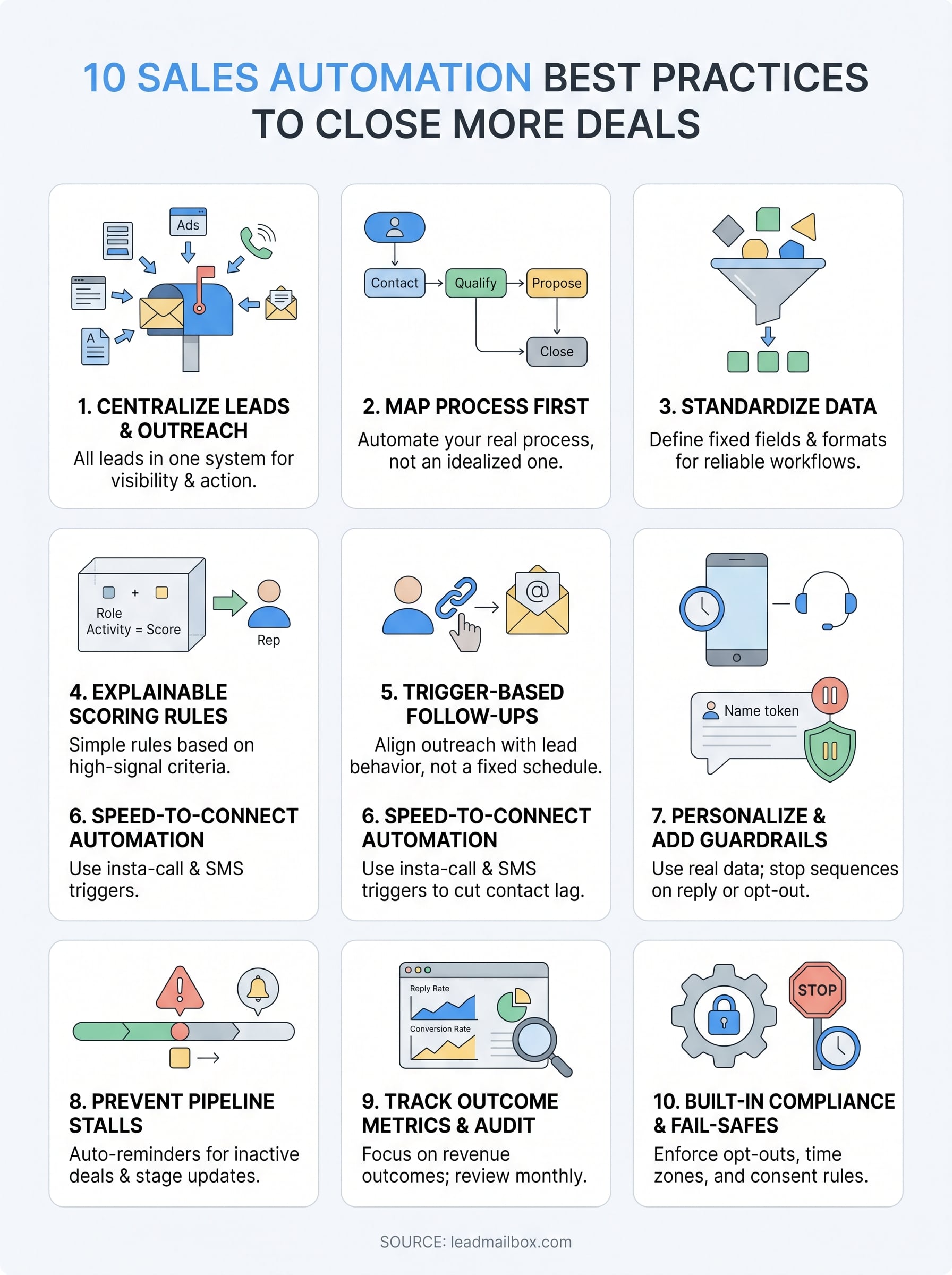
You now have a complete picture of what separates sales automation that drives revenue from automation that just adds noise. The ten practices in this guide work together: clean data feeds accurate scoring, accurate scoring powers better routing, and better routing makes every follow-up sequence more effective. Skipping steps early creates problems you'll spend months untangling later.
Start with one practice, not all ten. Pick the highest-friction point in your current sales process, whether that's a slow lead response time or a pipeline full of stalled deals, and apply the relevant practice from this list first. Build from there once you see results.
If you want a platform that handles these sales automation best practices without requiring multiple disconnected tools, LeadMailbox combines lead management, built-in dialers, SMS automation, and AI-powered communication in one system. Take a closer look and see how it fits your sales process.