

Power Dialer Vs Auto Dialer: Key Differences for Sales Calls
Choosing between a power dialer vs auto dialer can make or break your team's calling efficiency. Both tools speed up outbound dialing, but they work in fundamentally different ways, and picking the wrong one leads to wasted money, compliance headaches, or burned-out sales reps who can't keep up with the call flow.
The core question comes down to control. Power dialers let agents drive the pace, dialing one number at a time as they become available. Auto dialers launch multiple calls simultaneously, connecting agents only when someone picks up. Each approach fits different team sizes, call volumes, and sales strategies, and the right choice depends on how your operation actually runs, not just what sounds faster on paper.
At LeadMailbox, our telephony suite includes power dialer functionality built directly into the lead management platform, so we've spent over 20 years watching how sales teams use these tools in practice. This article breaks down the real differences between power dialers and auto dialers, how they work, where each one shines, and which setup makes sense for your outreach goals.
What auto dialers and power dialers do
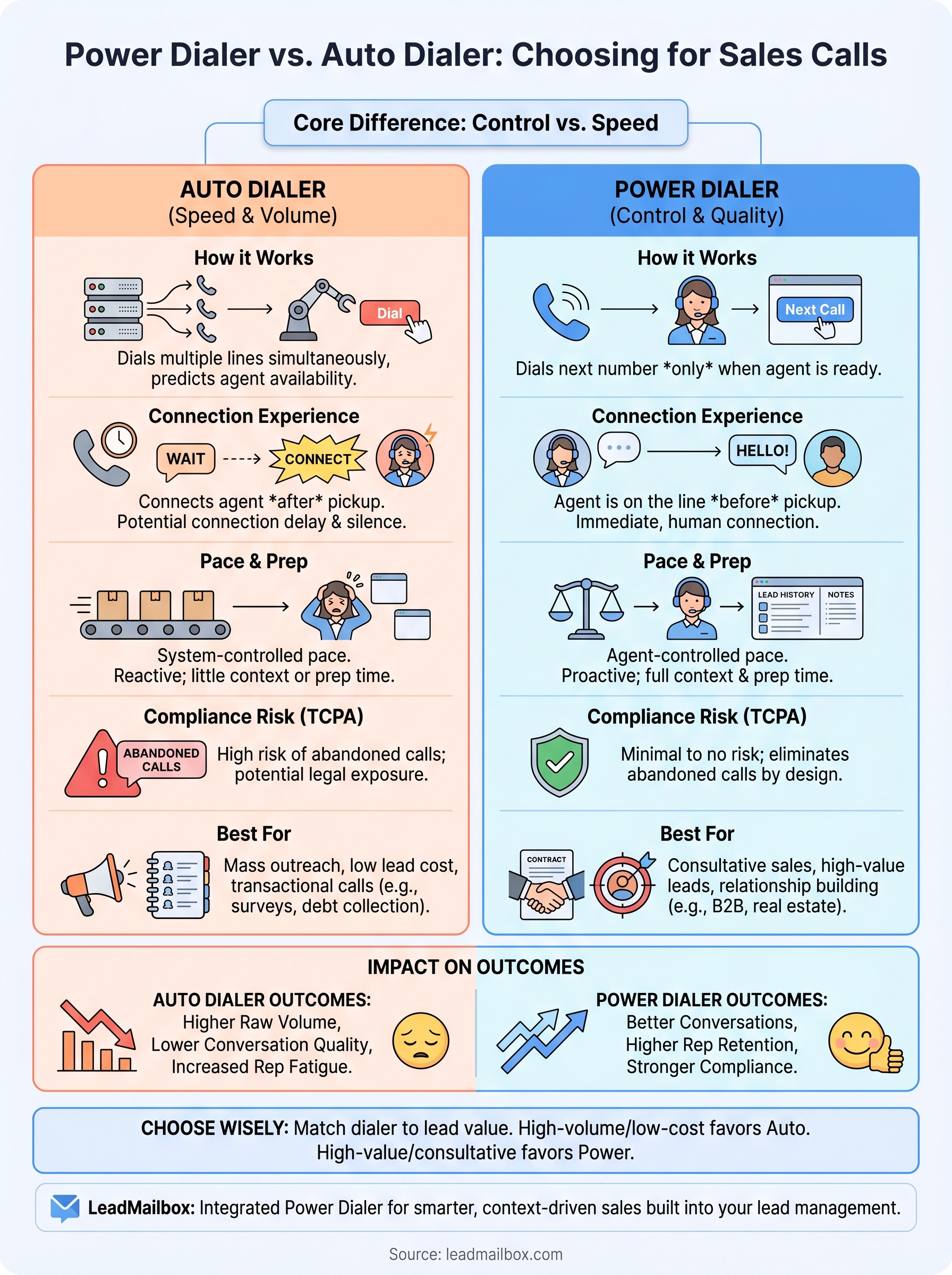
Both tools automate the dialing process so your sales reps spend less time punching numbers and more time talking to people. The automation works differently under the hood, though, and that distinction shapes everything from call quality to legal risk. At the core, auto dialers launch calls automatically without waiting for agent availability, while power dialers dial the next number only when a specific agent is ready to take the call. Understanding what each system actually does mechanically is the foundation for making the right choice for your team.
How auto dialers work
An auto dialer pulls numbers from a contact list and dials them automatically, typically running ahead of your available agents. The system predicts how many calls to place based on expected answer rates and agent availability, which is why the most common type is called a predictive dialer. When someone answers, the system routes that call to a free agent. If no agent is ready, the call gets dropped or a recorded message plays instead.
Auto dialers are built for volume, not conversation quality, and that tradeoff defines every decision you make around them.
Some auto dialers also function as progressive dialers or preview dialers, which offer slight variations in how aggressively the system dials ahead. With a progressive dialer, the system waits until an agent is free before placing the next call, making it slightly more conservative than a full predictive setup. Regardless of the variation, the underlying logic stays consistent: the technology controls the pace, not the person picking up the phone. That setup works well when your primary goal is coverage across a large list rather than depth of conversation on each call.
How power dialers work
A power dialer still automates dialing, but it keeps your agents in full control of the pace. When a rep finishes a call, the system immediately dials the next number on the list without the rep lifting a finger. If no one answers, the dialer logs the attempt automatically and moves to the next contact. This keeps your team moving at a consistent pace while making sure every connected call has a live, prepared agent on the other end from the first second.
Power dialers also integrate tightly with your CRM or lead management system. Before the call connects, the agent sees the lead's full contact history, source, and notes, so the conversation starts with real context instead of a blank-slate cold pitch. That context window is one of the biggest practical differences in the power dialer vs auto dialer experience for reps doing any kind of consultative or relationship-based selling.
What separates them at a technical level
The table below summarizes the core technical distinctions that drive every downstream decision around compliance, rep workflow, and call outcomes.
| Feature | Auto Dialer | Power Dialer |
|---|---|---|
| Dialing pace | System-controlled | Agent-controlled |
| Simultaneous calls per agent | Multiple | One |
| Call abandonment risk | High | None |
| Agent readiness required before dial | No | Yes |
| CRM integration depth | Varies | Typically deep |
| Best fit | Mass outreach | Consultative sales |
Each of these differences carries real consequences for compliance exposure, rep satisfaction, and conversion rates. The sections below dig into exactly how those consequences play out in practice.
Why the difference matters for sales calls
The way your dialing system works shapes every conversation your team has. Speed and control pull in opposite directions in outbound calling, and the system you choose forces a trade-off between the two. Whether you're running a high-volume lead list or working through a carefully segmented prospect pool, the mechanics of your dialer determine how your reps show up on each call.
How dialing speed affects conversion rates
Faster dialing does not automatically mean more conversions. Auto dialers push raw call volume up significantly, but they also increase the number of abandoned calls and awkward connection delays, both of which damage your answer rates over time. When a prospect picks up and hears silence for a second before an agent connects, that delay signals "robo-call" and most people hang up immediately.
The first three seconds of a connected call carry more weight than any script your reps rehearse.
Power dialers eliminate that delay entirely because your agent is already on the line when the call connects. That immediate human presence builds credibility fast, which matters most when you're selling anything with a longer consideration cycle. In the power dialer vs auto dialer comparison, this single difference in connection experience often drives measurable lift in contact rates for teams doing consultative outreach.
The rep experience and what it costs you
Your reps' experience during calls directly affects how well they perform. Auto dialers put agents in a reactive posture, waiting for calls to land in their headset with little time to review context or prepare. Over a full shift, that reactive pace produces fatigue that shows up in shorter calls, less discovery, and lower close rates.
Power dialers give your team a natural rhythm between calls. Reps see the next lead's information before the call connects, review prior notes, and enter each conversation with a clear intent. That preparation time is not wasted time. It is the margin that separates a transactional call from one that actually moves a deal forward. Teams that switch to a power dialer structure often report not just better numbers but higher rep retention, which matters more to your bottom line than most managers account for.
Key differences that impact results and compliance
The gap between these two systems goes beyond speed. Call abandonment rates, regulatory exposure, and conversion data all shift depending on which dialer you run, and understanding those downstream effects helps you make a choice that holds up under real-world pressure, not just demo conditions.
TCPA compliance and abandoned call rules
The Telephone Consumer Protection Act (TCPA) places strict limits on how auto dialers can be used, particularly around abandoned call rates. The FTC's telemarketing sales rules require that no more than 3% of connected calls can be abandoned in any 30-day period. Auto dialers running predictive algorithms regularly push against that threshold when call volume spikes or agent staffing drops unexpectedly.
In the power dialer vs auto dialer comparison, compliance risk is the difference between a manageable process and a costly legal exposure.
Power dialers carry far lower TCPA risk because they never dial without a live agent ready. Every connected call has someone on the other end from the first ring, which eliminates the abandoned call problem by design. If your team works with consumer leads, operates in a regulated industry, or has faced compliance scrutiny before, that structural safety margin is not a small detail.
Call quality and what the data shows
Connection quality affects every metric downstream, including answer rates, talk time, average handle time, and conversion percentage. Auto dialers create a brief but damaging delay between when a prospect answers and when an agent connects. That gap often causes prospects to hang up before the conversation starts, which inflates your dial count without adding any real pipeline value.
Power dialers remove that delay entirely. Your rep is active and engaged the moment the call connects, which produces longer average talk times and higher conversion rates on connected calls. Many sales teams also see improved data quality with power dialers because reps have time between calls to log accurate notes and update lead records, which directly improves how you segment and follow up with your list over time. Clean data compounds, and every call builds on the one before it when your reps have the space to actually record what happened.
Best use cases by team, industry, and lead type
No single dialer fits every sales operation, and the power dialer vs auto dialer decision ultimately comes down to how your team works, what you're selling, and what kind of leads you're calling. Matching your dialer to your actual use case prevents the common mistake of choosing a tool based on maximum call volume when your conversion rate actually depends on conversation depth and lead quality.

When auto dialers make sense
Auto dialers perform well in environments where raw contact volume drives revenue and where the pitch is short, transactional, and consistent across every call. If your team runs political outreach, debt collection, appointment reminders, or large-scale market research campaigns, a predictive or auto dialing setup gives you the reach you need without overstaffing.
The more standardized your conversation flow, the less risk you take on with an auto dialer's hands-off pacing.
Industries like insurance lead generation at the top of the funnel, utilities, and survey research often benefit from auto dialing because the goal is simply contact, not a nuanced conversation. These teams work from large, often cold lists and measure success in contacts per hour rather than deal size per rep. If that describes your operation, auto dialing delivers results that a power dialer's one-at-a-time structure cannot match at scale.
When power dialers make sense
Power dialers fit sales teams where each lead carries real value and where a single conversation can close a significant deal. Financial services, real estate, B2B software, and home services are strong examples. In these industries, your leads often come from paid sources or inbound channels, which means every wasted call costs you real money and every strong conversation moves real pipeline.
Teams working warm leads, referrals, or re-engagement lists also see strong returns with a power dialer setup. These contacts already have some familiarity with your brand or product, which means the rep's first words carry more weight than in a cold context. A power dialer gives your reps the context window and mental space to open with relevance instead of scrambling to figure out who they're talking to after the call connects. That preparation gap separates average contact rates from consistently strong ones.
How to choose and implement the right dialer setup
Selecting the right dialer starts with an honest look at what your leads are worth and how your team operates. If your reps work high-value leads from paid sources, inbound channels, or referral networks, a power dialer gives you the control and context you need to protect that investment on every call. If you run large cold lists where cost per contact matters more than depth per conversation, an auto dialer may deliver the volume your model requires. The power dialer vs auto dialer decision is not about which tool is better in general; it's about which one matches your actual revenue model.
Start with your lead economics
Before you configure any system, map out your average lead cost and expected conversion rate per call. A lead that costs $50 per acquisition deserves a rep who arrives at the conversation prepared. One that costs $0.50 from a broad list may just need a quick human touch and a fast follow-up sequence. These numbers tell you where your dialer choice sits before you ever evaluate features. High-value leads favor power dialers; high-volume, low-cost lists favor auto dialers. Use that math as your first filter.
Your lead economics should drive your dialer choice before your vendor does.
Once you know your lead profile, test your dialer against a real segment of your list before committing fully. Run a 30-day pilot with three clear metrics: contact rate, average talk time per connected call, and conversions per dial. Those numbers tell you whether the dialer setup works for your specific list and rep workflow, not just in a sales demo.
Connect your dialer to your lead management system
Implementation only pays off when your dialer and your lead management platform share data in real time. If your reps toggle between a dialer and a separate CRM, they lose the context window that makes each call better than the last. Look for a setup where call outcomes, notes, and dispositions write back to the lead record automatically. That closed loop turns every call into a data point that sharpens your segmentation and follow-up strategy over time.
Your team also needs clear call disposition rules from day one. Define what counts as a qualified contact, a callback request, and a dead lead in your system before you start dialing. Without those definitions in place, your data fragments and your list management breaks down faster than your reps can rebuild it.
Next steps
The power dialer vs auto dialer decision comes down to two things: what your leads cost and how your reps sell. If you run high-value leads that require a prepared, context-aware conversation, a power dialer gives you the structure to protect that investment on every dial. If you work large cold lists where volume matters more than depth, an auto dialer may deliver the reach your model needs.
Either way, your dialer only performs as well as the lead management system behind it. Disconnected tools create data gaps that compound over time, dragging down the metrics every dialing setup depends on. Your team needs a platform that ties your calling workflow directly to your lead records, dispositions, and follow-up sequences in one place.
LeadMailbox gives you power dialer functionality built directly into a full lead management platform, so your team can dial smarter and track every outcome without switching between tools.