

Lead Management Software Pricing: 2026 Costs Per User & Plan
Picking the right lead management tool is one decision. Figuring out what you'll actually pay for it? That's a different challenge entirely. Lead management software pricing varies wildly across the market, from free tiers with hard limits to enterprise plans that run hundreds of dollars per user, per month. Without a clear breakdown, it's easy to either overspend on features you'll never touch or underspend on a tool that can't keep up with your pipeline.
The problem is that most vendors don't make pricing straightforward. You'll see "contact us" buttons where numbers should be, per-seat costs that balloon with add-ons, and annual contracts buried in the fine print. For small to mid-sized sales teams trying to budget accurately, this lack of transparency wastes time. You need actual numbers, not a sales call. And you need to understand what drives those numbers, user counts, feature tiers, integrations, AI capabilities, so you can compare options on equal footing.
That's exactly what this guide covers. We've compiled 2026 pricing data across major lead management platforms, broken down by plan level and per-user cost, so you can see where your budget fits. As a company that's been building lead management tools since 2004, we at LeadMailbox know what these features actually cost to deliver, and where the market tends to overcharge. We'll use that experience to help you spot real value and avoid overpaying.
Why lead management software pricing varies
No two lead management platforms charge the same way, and that's not accidental. Lead management software pricing reflects real differences in what vendors build, who they build it for, and what it costs them to deliver it. Before you can compare numbers accurately, you need to understand what's actually behind those numbers.
The feature stack changes everything
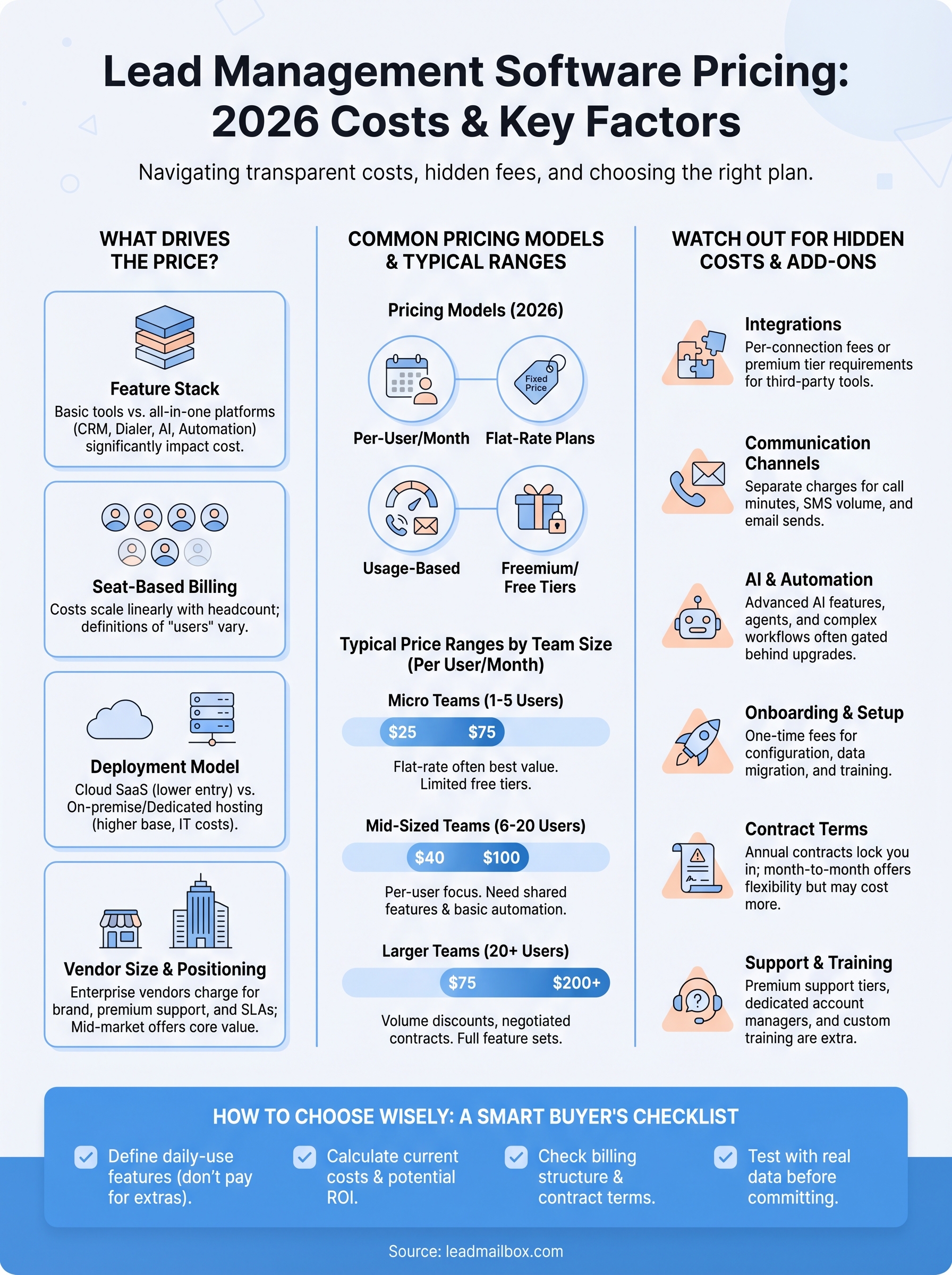
The biggest driver of price differences is what the software actually does. A basic tool that captures leads and lets you add notes costs very little to build and maintain. A platform that combines CRM functionality, a built-in power dialer, SMS and email campaigns, AI-powered response agents, and integrations with hundreds of lead partners costs significantly more to develop, host, and support.
When you're comparing price points, you're often comparing fundamentally different products. A $25/user/month tool and a $150/user/month tool aren't priced differently because of brand markup alone. They're usually doing different amounts of work for your sales team. The question you need to answer is which feature set actually matches what your team does every day.
The safest rule: list the five features your team will use every day, then compare only tools that cover all five. Don't pay for the rest.
Seat-based billing amplifies small differences
Most platforms price per user, per month. That structure looks reasonable for small teams but scales quickly as headcount grows. A $40/user/month platform costs $400/month for a 10-person team and $2,000/month for a 50-person team. The same percentage difference between two vendors compounds significantly at scale.
Some vendors also define "users" differently. One platform might count every login as a full seat. Another might include admin accounts, view-only users, or reporting users in the seat count. Before you accept any per-user quote, ask specifically what counts as a billable user and whether read-only or manager roles carry the same price.
Deployment model and infrastructure costs
On-premise software, cloud-hosted SaaS, and hybrid deployments all carry different underlying cost structures for vendors, and those differences show up in your bill. Cloud SaaS platforms spread infrastructure costs across many customers and typically charge lower entry prices. Vendors who offer on-premise deployment or dedicated hosting environments often charge more because the cost of running your instance isn't shared.
For most small to mid-sized sales teams, cloud SaaS is the standard and the most cost-effective model. It requires no hardware investment on your end, updates automatically, and typically includes uptime guarantees in the subscription. On-premise setups make more sense for regulated industries with strict data residency rules, but they come with setup fees, IT overhead, and usually a higher base price.
Vendor size and market positioning
Larger enterprise vendors charge more, and they're transparent about it. Part of that cost covers genuine enterprise features like SSO, advanced security controls, dedicated account managers, and SLAs. But a meaningful portion reflects brand positioning rather than additional functionality.
Mid-market and SMB-focused vendors often deliver comparable core features at a lower price point because they're not carrying the overhead of enterprise-scale sales teams, premium support tiers, and legacy infrastructure. The challenge is that smaller vendors may lack specific integrations, compliance certifications, or the stability record that enterprise procurement teams require. Knowing which vendor tier you actually need, and being honest about it, prevents you from paying enterprise prices for a use case that a mid-market tool handles just as well.
Understanding these variables won't make the pricing landscape simpler, but it will stop you from being surprised. Every dollar difference you see between platforms maps back to one of these factors, and knowing which ones matter for your team is what keeps your budget decisions logical.
Pricing models you'll see in 2026
Lead management software pricing doesn't follow a single standard, and vendors use several different billing structures depending on who they're selling to. Knowing which model a vendor uses before you request a demo saves you from comparing quotes that aren't structured the same way. Here are the four main models you'll encounter this year.
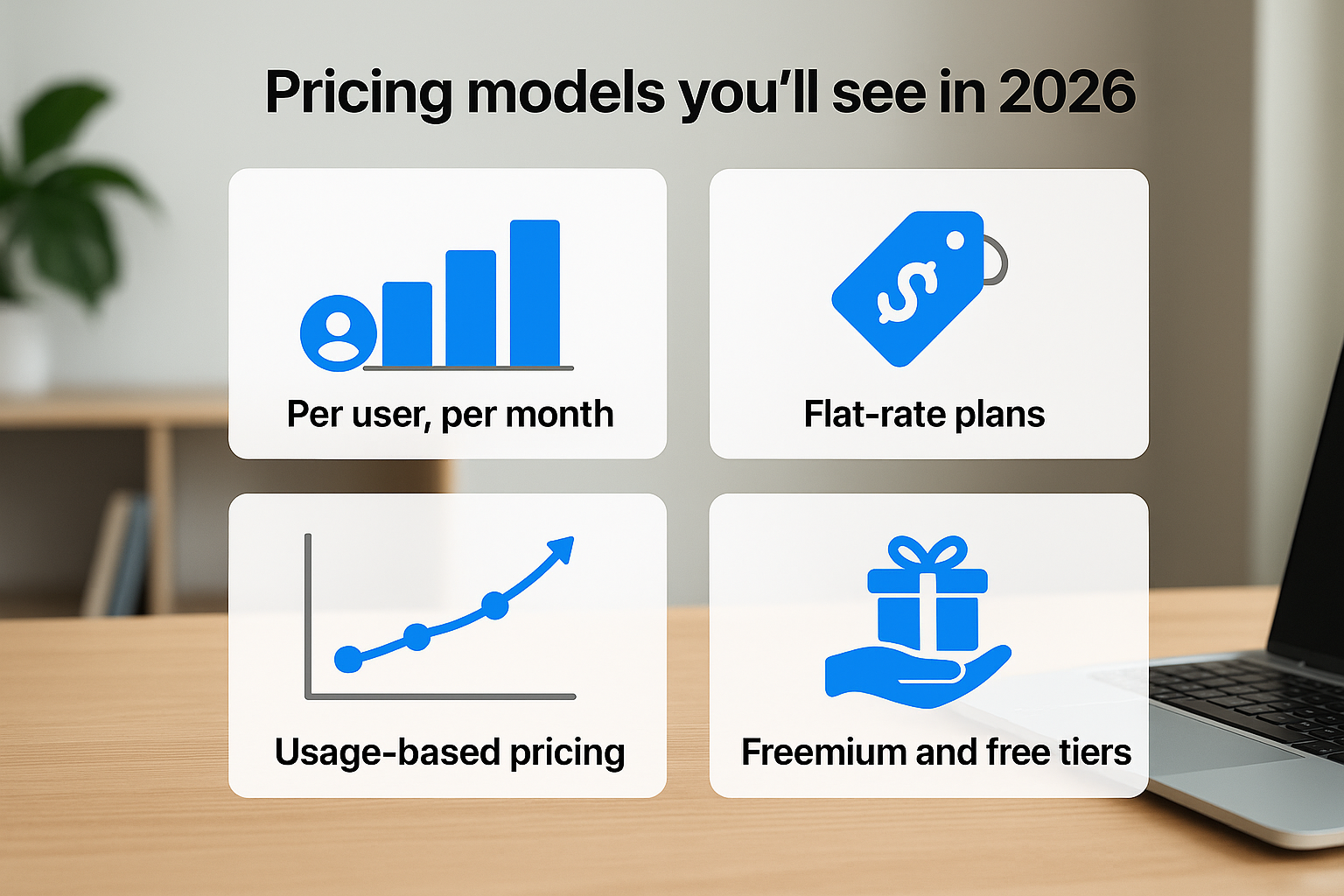
Per-user, per-month billing
Per-user pricing is the most common model in the market, and it's what most SaaS-based lead management platforms default to. You pay a fixed amount for each person on your team who needs access, billed monthly or annually. Annual billing almost always carries a discount, typically between 15% and 25% off the monthly rate.
If you're on a growing team, negotiate a rate lock before signing an annual contract. Vendors rarely advertise this, but many will hold your per-seat price for the contract term if you ask.
The catch with per-user pricing is that costs scale linearly with headcount. Adding five reps doesn't just cost five extra seats. It often triggers an upgrade to the next tier, which raises the per-seat rate for everyone.
Flat-rate plans
Some platforms, particularly those targeting small teams or solopreneurs, charge a single flat monthly fee regardless of how many users you add, up to a set ceiling. This model works well when your team size is stable and you're under the seat cap. If you exceed the limit, vendors typically move you to per-user billing or bump you to a higher flat tier. Flat-rate plans tend to work out cheaper for teams of three to eight users compared to per-seat alternatives.
Usage-based pricing
Usage-based models charge you based on what you actually consume, often tied to call minutes, SMS volume, email sends, or the number of leads processed. You'll see this structure most often with platforms that include built-in telephony or AI communication tools. Base platform access may be cheap or even free, but your monthly bill fluctuates with activity. This model rewards efficient teams and punishes high-volume outreach if you're not tracking consumption carefully.
Freemium and free tiers
Free tiers exist across the market, but they consistently cap the features that matter most: lead limits, user counts, automation rules, or integration access. They're useful for evaluation but rarely functional for a real sales workflow. Before investing time in a free plan, check specifically which features are gated and whether the upgrade path is transparent. Many vendors use free tiers primarily to funnel you toward a paid conversion conversation.
Typical price ranges by team size
Lead management software pricing follows recognizable patterns depending on how many people need access. Team size doesn't just affect your total bill. It often determines which pricing tier you qualify for and which features become available. Knowing where your team falls on this spectrum helps you filter out platforms that aren't built for your scale before you spend time evaluating them.
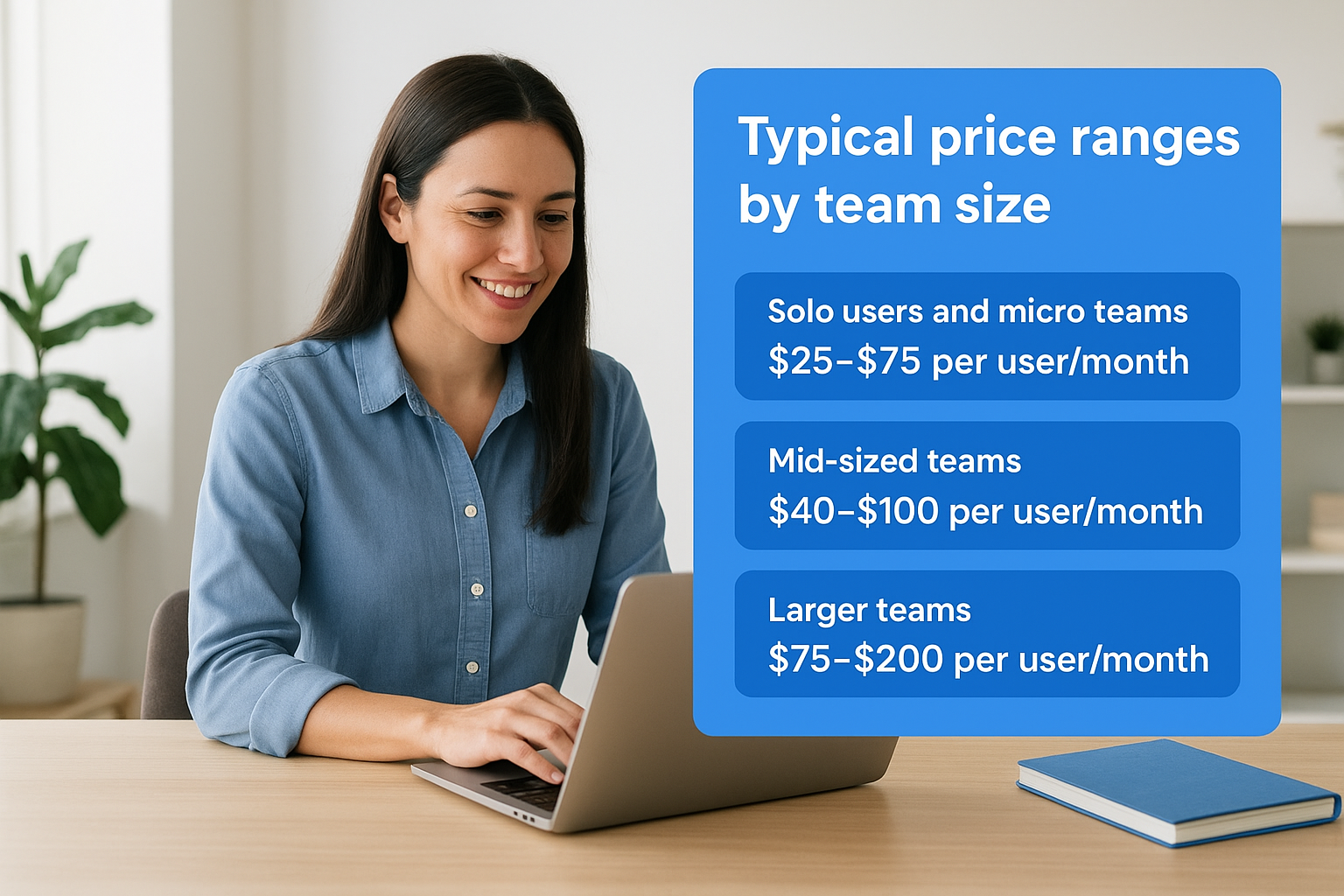
Solo users and micro teams (1 to 5 users)
For individual sales reps or very small teams, the market offers the widest range of options, from free tools to plans around $25 to $75 per user per month. At this scale, flat-rate plans often deliver the best value since you're paying for the ceiling rather than each individual seat. Freemium tools work for initial evaluation, but you'll consistently hit walls around automation limits, lead caps, or integration access. Most micro teams that handle any real outreach volume land on paid plans in the $50 to $200 per month total range.
If you're a solo user or running a two-person operation, prioritize platforms with month-to-month billing so you can exit without penalty as your needs change.
Mid-sized teams (6 to 20 users)
This is where per-user pricing starts to matter most. At 10 users, a $30/user/month platform costs $300/month, while a $70/user/month platform costs $700/month. That $400 gap is easy to dismiss in a demo but adds up to $4,800 per year. Mid-sized teams typically need features like shared lead queues, role-based access, reporting dashboards, and at least basic telephony or email automation. Plans that cover this functionality without heavy add-ons generally fall between $40 and $100 per user per month. Teams in this range should also check whether the vendor's next pricing tier creates a sudden cost jump as you add reps.
Larger teams (20 or more users)
Teams with 20 or more users almost always move into negotiated pricing territory. Published rates still exist, but vendors at this scale routinely offer volume discounts in exchange for annual contracts or multi-year commitments. Expect base platform costs in the range of $75 to $200 per user per month for full-featured platforms that include AI tools, telephony, and CRM-level functionality. Enterprise-grade platforms with dedicated support and security customization can push well above that. At this team size, a few dollars per seat translates into thousands per year, so the evaluation process should be more rigorous and include a full contract review before signing.
What drives the total cost
The sticker price on any plan is rarely what you'll end up paying. Lead management software pricing involves several cost layers that stack on top of your base subscription. Understanding what pushes that number up before you commit to a plan keeps your budget accurate and your expectations realistic.
Integrations and connected tools
Every integration your team requires adds a question mark to your final bill. Some platforms include integrations in the base plan, while others treat them as premium add-ons or charge per connection. If your sales workflow pulls leads from multiple sources, like paid advertising platforms, third-party lead vendors, or existing CRM systems, verify upfront which integrations are included and which trigger an additional fee.
The more sources you aggregate from, the more integration costs can compound. A platform with 100+ native integrations included in the base price delivers significantly more value than one that charges $10 to $30 per connection, even if the listed per-seat rate looks higher at first glance.
Communication channels
Telephony, SMS, and email tools are where usage costs can quietly outpace your base subscription. Platforms that include built-in calling features like click-to-call, power dialers, or inbound number management almost always charge separately for call minutes or phone number provisioning. SMS campaigns carry per-message fees on most platforms, and those fees accumulate fast for high-volume teams.
Before signing any contract, ask for a sample monthly bill from a team your size that uses the communication features you plan to use. Vendors can provide this, and it's the most accurate way to project real costs.
Email volume limits also vary widely. Some plans cap the number of outbound emails per month. Others include unlimited sends but charge for advanced deliverability features, dedicated IP addresses, or personalization tools.
AI features and automation
AI-powered tools, including automated text responses, AI call agents, and email writing assistance, are increasingly included in mid-to-upper tier plans, but they're rarely part of entry-level pricing. Teams that want AI to handle first-touch responses or manage inbound call routing need to check whether those features sit behind an upgrade wall.
Automation rules follow the same pattern. Basic lead routing and task triggers often ship with standard plans, but advanced conditional logic, multi-step sequences, and behavioral triggers tend to appear only in higher tiers. Knowing which automation capabilities your workflow actually requires prevents you from upgrading solely for features you won't use.
Hidden fees and add-ons to watch
The base subscription is only the starting point. Lead management software pricing consistently includes costs that don't appear on the public pricing page, and vendors rarely surface them until you're deep into a sales conversation or already locked into a contract. Knowing where these charges typically hide lets you ask the right questions before you sign anything.

Onboarding and setup fees
Many platforms charge a one-time onboarding fee to configure your account, import your existing data, and walk your team through the system. These fees range from a few hundred dollars on smaller platforms to several thousand on mid-market tools that include dedicated implementation support. Some vendors bundle onboarding into the first month's payment without making it obvious in the quote. Ask specifically whether any setup or implementation fee applies before you finalize pricing, and get the answer in writing.
If a vendor charges an onboarding fee, ask what's included and whether you can skip it if your team handles setup independently. Many will waive or reduce it.
Contract terms and cancellation penalties
Month-to-month billing and annual contracts carry very different financial exposure. Annual contracts typically save you 15 to 25 percent on the monthly rate, but they lock you in. If your team size changes or the platform doesn't perform as expected, exiting early usually triggers a penalty equal to the remaining months on your contract. Some vendors also include auto-renewal clauses that roll you into another annual term unless you cancel within a narrow window, often 30 to 60 days before expiration.
Support tiers and training costs
Standard support is often limited to email tickets or a self-service knowledge base on entry-level plans. Phone support, live chat, and dedicated account management typically sit behind a paid support tier or require an upgrade to a higher plan level. Training resources follow the same logic. Basic documentation ships with every plan, but live onboarding sessions, custom training calls, or ongoing coaching usually carry separate fees. If your team needs hands-on support to get up and running, factor that cost into your comparison before settling on a platform.
Storage and data export limits
Lead and contact record limits appear frequently on lower-tier plans, and exceeding them either blocks new leads or forces an automatic tier upgrade. Data export capabilities also vary. Some platforms charge fees to export your full lead history, which matters significantly if you ever decide to switch tools. Confirm both your storage ceiling and export rights before committing to any plan.
Vendor pricing snapshots for 2026
Comparing lead management software pricing across vendors is easier when you're looking at actual numbers rather than ranges. The table below reflects publicly available 2026 pricing for representative platforms at the individual contributor level. Prices shown are per user, per month, billed monthly unless noted.
| Platform | Entry Plan | Mid Tier | Full Features |
|---|---|---|---|
| HubSpot Sales Hub | $20/user | $100/user | $150/user |
| Salesforce Starter | $25/user | $80/user | $165/user |
| Zoho CRM | $14/user | $40/user | $52/user |
| LeadMailbox | Contact for pricing | Contact for pricing | Contact for pricing |
These figures cover CRM-level features and basic pipeline management, but they don't include telephony, AI tools, or SMS capabilities on most platforms. Those features either sit at the top tier or require add-ons.
What the table doesn't show
A published per-seat rate is only part of the picture. HubSpot and Salesforce both carry significant onboarding costs at mid and upper tiers, and their telephony and AI features are typically add-ons rather than inclusions. Zoho CRM's low entry price covers the basics, but teams that need calling infrastructure and automated outreach will need to add Zoho Voice or a third-party dialer, which adds $10 to $25 per user on top of the base price.
The lowest per-seat price rarely stays the lowest once you add the features your team will actually use every day.
Where LeadMailbox fits
LeadMailbox positions itself as an all-in-one alternative for small to mid-sized sales teams that need lead management, telephony, SMS campaigns, email tools, and AI agents in a single system. Rather than charging separately for each communication channel, the platform bundles these capabilities into its subscription. For teams that would otherwise stack a CRM with a separate dialer, an email tool, and an AI layer, the consolidated cost is often lower than the combined total of point solutions.
The platform uses month-to-month billing as a standard option, which reduces the financial risk that annual contracts from Salesforce and HubSpot typically carry. For teams that are scaling or still testing their sales workflow, that flexibility has real dollar value that doesn't appear in any per-seat comparison table.
How to estimate ROI and budget
Knowing the price of a tool is only useful if you know what return you expect from it. Lead management software pricing makes more sense once you've done the math on your current situation first. Before you request any quotes or compare tiers, run through three straightforward calculations that will tell you how much you can justify spending and what results you should hold the platform accountable for.

Start with your current cost baseline
Your first step is adding up what you're spending right now. List every tool your sales team currently uses: your CRM subscription, any separate dialer or telephony tool, your email platform, SMS tools, and any AI or automation add-ons. Include per-seat costs multiplied by your actual team size. Then add the time cost of manual work that a better platform would automate. If two reps spend four hours per week on lead sorting and follow-up scheduling, that's real labor cost you can quantify.
This baseline number tells you the minimum value a replacement platform needs to deliver. If your current stack costs $1,200 per month and a new consolidated platform costs $900 per month with better features, the cost savings alone justify the switch before you count any revenue impact.
Calculate what better conversion is worth
The revenue side of the equation is where ROI becomes compelling. Start with your current lead-to-close rate and your average deal value. If your team closes 5% of leads at $2,000 per deal, every 100 leads generates $10,000 in revenue. Now estimate conservatively what a 1% improvement in conversion rate would produce. That same 100 leads at 6% closes generates $12,000, a $2,000 gain from one percentage point.
A 1% to 2% conversion rate improvement is a realistic outcome for teams that move from manual follow-up to automated outreach with proper lead routing.
Better lead management tools drive that improvement through faster response times, consistent follow-up sequences, and prioritized lead queues. Attach a dollar figure to even a modest conversion lift, and most platforms in the $50 to $150 per user range pay for themselves within weeks.
Set a budget ceiling before you shop
With your baseline cost and your projected revenue lift in hand, set a hard ceiling on what you'll spend before you enter any sales conversation. A reasonable ceiling is 20% to 30% of your projected monthly revenue gain from better conversion. This keeps your evaluation grounded and prevents vendors from anchoring your expectations to a number that sounds reasonable in a demo but doesn't hold up against your actual numbers.
How to choose the right plan
Choosing the right plan from a crowded market of lead management software pricing options comes down to matching what you actually do every day against what each tier genuinely includes. Most buyers pick wrong by focusing on the lowest number on the page rather than the total cost of the workflow they need to run. Before you select a plan, answer three questions: what features your team will use in the first 30 days, how many billable users you'll actually need, and whether the vendor's upgrade path fits how you expect to grow.
Match features to your actual workflow
Start by writing down the five tasks your team repeats most often in a given week. That list might include lead routing from multiple sources, outbound calling, automated follow-up sequences, or reporting on rep activity. Once you have it, check each plan you're evaluating against that list specifically. If a plan covers four of the five but gates the fifth behind an upgrade, your real cost is the higher tier, not the one that first caught your attention.
Don't evaluate platforms based on their full feature list. Evaluate them based on your short list of daily-use requirements.
Avoid paying for features you'll reach in 12 months if you can start on a lower tier and upgrade cleanly when the time comes. A vendor with a clear, predictable upgrade path is more budget-friendly over time than one that requires a full plan jump the moment you add one capability.
Check the billing structure before committing
The billing model matters as much as the price. Month-to-month plans cost more per seat but carry no exit penalty, which protects you if the platform doesn't perform or your team size changes. Annual contracts reduce your monthly rate but tie you to a number that may not fit your team six months from now.
Confirm what happens when you add users mid-cycle. Some vendors charge you immediately for the full remaining contract period on each new seat. Others prorate the cost to your next billing date. That distinction can mean hundreds of dollars difference on a single hire.
Test before you commit
Most platforms offer a free trial or a demo period. Use that window to test the exact features on your shortlist with real leads, not dummy data. If the vendor won't let you test core features before purchase, treat that as a signal about how they handle the relationship after the contract is signed.
Final take
Lead management software pricing is not as complicated as vendors make it look, but it does require you to do the work before you shop. The per-seat rate on any pricing page is a starting point, not a final number. What you actually pay depends on your team size, the communication channels you need, the integrations your workflow requires, and whether the platform hides its real costs in add-ons and annual contracts. Knowing those variables in advance puts you in control of the conversation instead of reacting to a quote that was built to benefit the vendor.
Your best move is to match features to your daily workflow, set a budget ceiling before you enter a demo, and demand transparency on billing structure before signing anything. A platform that bundles telephony, AI tools, and lead management in one subscription is almost always cheaper than stacking separate tools. If you're ready to see what that looks like in practice, explore LeadMailbox and compare it directly against your current stack.