

12 Lead Management for Small Business Tips That Close Deals
Most small businesses don't lose deals because their product is wrong or their pricing is off. They lose deals because leads fall through the cracks. A prospect fills out a form, and nobody calls back for three days. A hot referral gets buried under a pile of cold contacts. Sound familiar? Lead management for small business isn't just a nice-to-have, it's the difference between a pipeline that produces revenue and one that leaks money every single week.
The challenge is real: you're juggling lead sources, follow-ups, and conversations across email, phone, and text, often with a small team and a tight budget. Enterprise CRMs promise the moon but cost a fortune and take months to set up. Meanwhile, your spreadsheet "system" stopped working about 500 leads ago. What you actually need are practical strategies and the right tools to capture, organize, and convert leads without overcomplicating everything.
That's exactly why we built LeadMailbox, to give small and mid-sized sales teams a single platform for managing leads, running outreach, and closing deals without duct-taping five different tools together. And in this article, we're sharing 12 actionable tips that reflect what we've learned over 20+ years of helping businesses turn leads into customers. Whether you're just getting started with lead management or looking to tighten up a process that's gone sideways, these tips will give you a clear path forward.
1. Centralize every lead in LeadMailbox
When leads live in multiple places, like a Facebook form here, a website contact form there, and a spreadsheet your sales rep is managing solo, things break down fast. Scattered lead data creates duplicates, missed follow-ups, and zero visibility into what's actually happening in your pipeline. The first and most important move in effective lead management for small business is pulling every lead into a single system where your whole team can see and act on them.
What changes when you manage leads in one place
Having one source of truth changes how your team operates. Instead of chasing down who called which lead or checking five tabs to find a contact's history, every interaction is logged in one place and visible to everyone who needs it. Your team stops wasting time on coordination and spends more time on selling.
When your team can see every lead, every note, and every follow-up in one system, accountability becomes automatic and nothing gets forgotten.
Faster follow-ups and fewer dropped leads are the immediate payoff. With shared visibility, your whole team works from the same playbook without daily check-in meetings to figure out who owns what.
How to connect your lead sources and keep them organized
LeadMailbox integrates with hundreds of lead partners, so you can pull in leads from paid sources, referral programs, web forms, and inbound calls without manual data entry. Once connected, leads flow in automatically, get tagged by source, and drop into the right segment of your pipeline immediately.

Keeping those leads organized means using source tags and custom fields from the start. Set up a clear naming system for each source, label leads with the campaign or channel they came from, and use status fields to reflect where each lead sits in your process. Clean data on the way in saves hours of cleanup later.
When LeadMailbox fits best
LeadMailbox is built for small to mid-sized sales teams that handle high lead volume from multiple sources and need a system that keeps everything in one place without a long setup process. If you're currently managing leads across email inboxes, spreadsheets, or disconnected apps, the platform was designed to replace that setup entirely.
It's also a strong fit if your team relies heavily on phone and SMS outreach, since LeadMailbox includes a full telephony suite alongside its lead management tools. You're not adding a separate dialer or texting app on top of everything else. Everything runs from one dashboard, which means less context switching and more actual selling.
2. Define your ideal customer and disqualify fast
Not every lead deserves equal attention from your team. When you pursue everyone at the same pace, you dilute your time and miss the prospects who are actually ready to buy. Defining your ideal customer profile and applying it consistently is one of the most overlooked steps in lead management for small business, but it also delivers one of the fastest improvements to your close rate.
The minimum info you need before you follow up
Before your team picks up the phone, you need a baseline set of data points that tell you whether the lead is worth pursuing. At minimum, capture these three things before any follow-up:
- Industry or use case: Does this prospect actually need what you sell?
- Company or household size: Do they fit the scope you serve?
- How they found you: Source data predicts intent better than most people realize.
Simple qualification questions that work for SMBs
Three questions cover most of what a small team needs: what problem are they solving, what's their timeline, and do they have a budget in place. These questions surface intent fast and give your reps enough information to decide whether to invest more time in a prospect.
Asking the right three questions on the first call saves more time than any follow-up sequence you can build.
Keep your framework simple and repeatable. A basic yes/no/maybe rating based on these answers lets even a new rep qualify a lead in under two minutes.
Common disqualifiers to agree on as a team
Your team needs to agree ahead of time on what rules a lead out. Document your disqualifiers so every rep applies them the same way, not based on personal judgment. Common ones include:
- No budget or budget far below your minimum
- Wrong geography or outside your service area
- Timeline too distant, such as 12+ months out with no urgency signals
- Wrong fit: the problem your product solves is not their actual problem
Locking these down as a shared team standard prevents reps from spending hours on leads that were never going to close.
3. Speed up your first response time
Most small business owners obsess over crafting the perfect opening message when they should focus on something far more basic: getting back to leads before a competitor does. Speed is the single most controllable variable in lead management for small business, and most teams lose deals simply by waiting too long to make first contact.
Why speed to lead matters more than perfect messaging
A lead's interest peaks at the moment they submit a form or make an inquiry. Every hour you wait, that interest fades and the odds of a meaningful conversation drop with it. Your message doesn't need to be polished; it needs to arrive fast. A prompt, simple reply will outperform a carefully worded email sent three hours later almost every time.
The best follow-up message is the one that reaches your prospect while they still remember why they reached out.
A practical response-time standard for small teams
Set a five-minute response goal for all new leads during business hours. This is achievable when leads flow directly into a centralized system and your reps receive instant notifications for new inquiries. Build a clear rule: whoever gets the alert owns the first attempt, and a second rep covers if there's no contact within ten minutes. Write it down, share it with the team, and hold everyone to it consistently.

How to cover nights and weekends without burning out
You don't need your sales team working around the clock to stay competitive. AI agents can handle initial responses outside business hours, acknowledging the inquiry, collecting basic details, and setting expectations for a callback the next morning. Pair that approach with rotating coverage for your highest-intent lead sources, and you close the gap without exhausting the people who actually close your deals.
4. Use a single lead intake checklist every time
Consistency in how you capture lead data is foundational to solid lead management for small business. When every rep uses the same checklist, your data stays clean, your follow-ups stay relevant, and your reporting actually reflects what's happening in your pipeline. Without a shared standard, you end up with half-completed records and no reliable way to compare performance across your team.
What your checklist should include
Your intake checklist doesn't need to be long. It needs to be complete and specific enough that any rep filling it out captures the same information every time. At minimum, include:
- Contact details: name, phone, email, and preferred contact method
- Lead source: where they came from and which campaign or channel drove the inquiry
- Stated need: what problem they described in their own words
- Qualification status: a fit rating based on your agreed disqualifiers
- Next step and owner: who follows up, and by when
How to prevent missing fields and messy notes
The fastest way to fix incomplete records is to make your most critical fields required inside your lead management system. If a field can be skipped, it will be skipped when a rep is moving fast. Mark the fields your team always needs as mandatory, and train reps to complete the checklist during the call, not afterward.
Notes written in the moment are far more accurate than notes reconstructed from memory an hour later.
How to handle duplicate leads from multiple sources
Pulling leads from multiple channels means the same person will occasionally show up more than once. Set a clear rule: always search by phone number and email before creating a new record. LeadMailbox flags potential duplicates automatically, but your team still needs a defined protocol for what happens when a match appears, whether to merge records, discard the duplicate, or flag it for manual review.
5. Score leads with a simple rule set
Not all leads are equal, and treating them like they are wastes your team's time on prospects who were never going to buy. Lead scoring gives you a way to rank leads by how likely they are to convert, so your reps spend their energy on the people who are actually worth pursuing. A basic rule set is all most small businesses need to get started.
Fit signals vs intent signals and how to use both
Two types of signals drive a good scoring model. Fit signals tell you whether a prospect matches your ideal customer profile: industry, company size, geography, and budget range. Intent signals tell you how ready they are to act: did they request a demo, open multiple emails, or call in directly? Fit without intent means someone who could buy but isn't ready. Intent without fit means someone who wants to move but isn't the right customer.
Use both signal types together, because a high-fit, high-intent lead should jump to the top of your list immediately.
A starter scoring model you can implement in a day
Keep your first model simple. Assign point values to a handful of criteria and set a threshold that separates hot leads from everyone else:

| Signal | Points |
|---|---|
| Matches ideal customer profile | +10 |
| Requested a demo or callback | +15 |
| Opened 3+ emails | +5 |
| Budget confirmed | +10 |
| Timeline under 30 days | +10 |
Set a clear cutoff, such as 30 points or more to qualify as a priority lead, and build your follow-up sequence around that threshold.
When to switch from rules to AI-assisted scoring
Manual rules work well until your lead volume grows past what you can realistically maintain by hand. Once you're managing hundreds of leads per week, AI-assisted scoring inside your lead management for small business platform picks up patterns your static rules miss and adjusts automatically as your data improves.
6. Route leads to the right person automatically
Getting a lead into your system is only half the battle. If it lands in a shared inbox without a clear owner, it sits there until someone notices, or it never gets followed up at all. Automatic routing removes that ambiguity by assigning every incoming lead to a specific rep the moment it arrives, which is one of the most effective upgrades you can make to your lead management for small business process.
The routing rules that reduce lead leakage
Routing rules work best when they match how your business actually operates. Set rules based on lead source, geography, or product type so each lead reaches the rep who already has the right context to follow up. Without defined rules, leads default to whoever checks the shared queue first, which creates uneven workloads and missed follow-ups that quietly drain your pipeline.
Round-robin vs specialty routing and when to use each
Round-robin distributes leads evenly across your team, which works well when your reps share similar skills and your leads don't require specific expertise. Specialty routing sends leads to the rep best suited for that inquiry type, such as routing inbound calls from a specific campaign to the rep who ran it.
Use specialty routing when the wrong rep following up on a lead does more harm than a delayed response does.
If your team is small and generalist, start with round-robin and layer in specialty rules as your team grows or your offerings expand.
How to handle overflow and unclaimed leads
Every routing setup needs a fallback. Define a backup assignee or manager escalation for any lead that goes unclaimed within a set window, such as 15 minutes during business hours. Review unclaimed lead patterns weekly to catch whether a rep is overloaded, a routing rule is broken, or a specific source is sending contacts outside your coverage hours.
7. Build a pipeline with clear stage definitions
A pipeline without clear stage definitions is just a list of names with no direction. When every rep defines "in progress" differently, you lose the ability to forecast, spot problems, or hand off leads cleanly. Good lead management for small business depends on a pipeline structure that everyone on your team understands and applies the same way.
The only stages most small businesses need
Most small teams overcomplicate their pipelines by adding too many stages, which creates confusion about where a lead actually belongs. Keep it to five core stages: new, contacted, qualified, proposal sent, and closed (won or lost).
That structure gives you enough detail to track real movement without creating gray zones where leads quietly stall. Fewer stages with clear definitions will always outperform a complex pipeline that nobody applies consistently.
Entry and exit criteria for each stage
Every stage needs a specific condition that moves a lead in and a specific condition that moves it out. Without those rules, reps make judgment calls that lead to inconsistent data and unreliable forecasting.

A stage means nothing unless your whole team agrees on exactly what it takes to enter and exit it.
| Stage | Entry criteria | Exit criteria |
|---|---|---|
| New | Lead record created | First contact attempt made |
| Contacted | Reached prospect | Qualification questions asked |
| Qualified | Meets fit and intent criteria | Proposal or next step scheduled |
| Proposal Sent | Proposal delivered | Decision received |
| Closed | Decision made | Won or lost noted with reason |
What to do when a lead goes cold
A lead goes cold when no activity or response has occurred within your defined window, such as seven days after last contact. Flag these leads automatically in your system and drop them into a re-engagement sequence rather than letting them pile up in your active pipeline.
After two re-engagement attempts with no reply, mark the lead inactive and remove it from your live stages. Accurate pipeline data depends on keeping only real, active opportunities in view.
8. Standardize follow-ups across calls, SMS, and email
Random follow-up habits produce random results. When each rep decides on their own when to call, when to text, and when to email, your outreach looks inconsistent and your data tells you nothing useful. Good lead management for small business requires a defined sequence that every rep runs the same way, every time.
When to call vs text vs email
Each channel serves a different purpose in your follow-up sequence. Phone calls are best for first contact and conversations that require real-time back-and-forth. Text messages work well for fast confirmations, reminders, and re-engagement when a prospect has gone quiet. Email is best for sending documents, proposals, or longer context that a lead needs to read at their own pace. Match the channel to the moment rather than defaulting to whatever is most comfortable for your rep.
A 7-day follow-up cadence that feels human
A simple sequence covers most scenarios without overwhelming your prospects. On day one, call and leave a voicemail if there's no answer, then follow up with a text. On day two, send a short email. On day four, make a second call attempt. On day seven, send a final message that gives the prospect a clear, low-pressure option to respond or opt out.
A structured cadence keeps your follow-ups consistent across the team and removes the guesswork that causes reps to give up too early.
Opt-in, compliance, and consent basics for SMS
Before you send a single text, make sure you have documented consent from each lead. SMS outreach in the US is governed by the Telephone Consumer Protection Act (TCPA), which requires prior written consent before sending marketing messages. Capture that consent on your intake form and store it in your lead record. Keep opt-out requests simple, honor them immediately, and never send messages to leads who have unsubscribed.
9. Use call tools to increase daily conversations
Phone conversations close deals faster than any other channel, yet most small sales teams waste significant time on manual dialing, note-taking, and deciding who to call next. The right call tools built into your lead management for small business platform remove those friction points and let your reps focus on actual conversations rather than the busywork around them.
Click-to-call vs power dialer and when each wins
Click-to-call lets a rep dial a single lead directly from their browser with one click, which works well for high-value prospects where you want to review notes before dialing. A power dialer automates the sequence, calling through a list automatically and connecting the rep only when someone picks up. Use click-to-call for priority leads that need a thoughtful approach and switch to the power dialer when you need to move through a large batch of cold or warm contacts quickly.
Your power dialer turns a 30-call day into an 80-call day without adding a single rep to your team.
Voicemail, call notes, and next-step discipline
Pre-recorded voicemail drops save your reps from repeating the same message dozens of times a day. Drop a consistent message with one click and move to the next call immediately. After every live conversation, your rep should log two things only: a brief call note and a scheduled next step. Keeping notes short and action-focused prevents the habit of writing summaries nobody reads.
How to use inbound numbers to track lead sources
Assign a unique inbound number to each lead source or campaign so every incoming call ties back to the channel that generated it. This gives you accurate cost-per-conversation data by source, which tells you where to put your ad spend and where to pull it back.
10. Write scripts that sound natural and qualify leads
A script isn't a speech. Its job is to give your reps a reliable starting point, not a word-for-word monologue that sounds robotic by the second sentence. Good scripts built into your lead management for small business process keep your team consistent without removing the human element that makes prospects actually want to talk.
A short opener that earns permission to ask questions
Your opener needs to do one thing: get the prospect to stay on the line. Lead with your name, your company, and a direct reason for the call in two sentences or fewer. Then ask a simple question that invites them to respond, such as "Did I catch you at an okay time?" That question shifts the dynamic from interruption to conversation before you've asked anything meaningful.
An opener that earns a yes to one small question sets the tone for everything that follows.
Questions that uncover budget, need, and timing
Once the prospect is engaged, your goal is to uncover whether they're a real fit without interrogating them. Ask open-ended questions that let them describe the problem in their own words, then follow up to clarify budget range and timeline. Three questions cover most of what you need: what prompted them to reach out, what solving this problem is worth to them, and when they need a solution in place.
How to handle common objections without arguing
Objections are requests for more information, not rejections. Train your reps to acknowledge the concern first, then ask a question that opens it up rather than pushing back directly. For example, if a prospect says the price is too high, respond with "That's fair, what would make this feel like the right investment?" Reframing objections as questions keeps the conversation moving without creating friction that shuts the door entirely.
11. Let AI handle routine replies and summaries
Your sales reps should spend their time on conversations that move deals forward, not writing the same acknowledgment email for the fifth time today. AI agents built into your lead management for small business platform can handle the repetitive communication tasks that eat up hours each week, freeing your team to focus on prospects who actually need a human touch.
The best tasks to hand off to AI agents
Initial inquiry responses are the most obvious win. When a lead submits a form outside business hours, an AI agent can reply within seconds, confirm receipt, collect a few qualifying details, and set expectations for a follow-up call. AI also handles call summaries and follow-up email drafts well, turning a rep's quick call notes into a structured recap that gets sent automatically after each conversation.
Handing off routine replies to AI doesn't reduce the human element of your sales process. It protects it by making sure your reps show up to the right conversations instead of burning out on busywork.
Guardrails that keep AI on-brand and accurate
AI agents perform best when you give them tight, specific instructions rather than broad prompts. Write clear templates that define the tone, the information the agent can share, and the topics it should never address. Set strict limits around pricing, guarantees, and anything legal so the AI never goes off-script in ways that create problems later. Review AI-generated replies regularly in the first few weeks to catch patterns that need correction before they become habits.
How to set escalation rules to a human
Not every conversation belongs with an AI agent. Define a clear trigger list that routes a conversation to a live rep immediately, such as when a prospect expresses frustration, asks a complex product question, or requests a call. Your escalation rules should also include a time-based trigger: if a prospect exchanges more than a set number of messages with the AI without a resolution, a human steps in automatically.
12. Track the right metrics and fix bottlenecks weekly
Without consistent measurement, your lead management for small business process runs on guesswork. You can have the best routing rules and follow-up cadences in place, but if you're not checking what the numbers say each week, problems compound quietly until they become real revenue losses. Tracking the right metrics keeps your team accountable and tells you exactly where to focus.
The small business lead dashboard that actually helps
Your dashboard should show five core numbers: new leads by source, contact rate, qualification rate, pipeline velocity, and close rate. These metrics tell you whether leads are coming in from the right places, whether your team is reaching them fast enough, and whether qualified prospects are actually converting.
A dashboard with too many metrics tells you nothing. Five focused numbers tell you everything that matters.
How to spot leakage between stages
Look at drop-off rates between pipeline stages every week. If 80% of leads reach "contacted" but only 30% reach "qualified," your qualification step has a problem. Compare those numbers across individual reps to see whether the issue is a process gap or a skills gap. Both are fixable, but they require different responses.
Track time in stage alongside volume. A lead sitting in "proposal sent" for 14 days signals a stalled deal that needs direct intervention, not another automated email.
What to test next when conversions stall
When your close rate drops, start with the stage where leads stop moving, not the end of your funnel. Change one variable at a time, such as your follow-up timing, your opener script, or your qualification threshold. Testing multiple changes at once makes it impossible to know which fix worked, which means you will repeat the same mistakes in the next quarter.
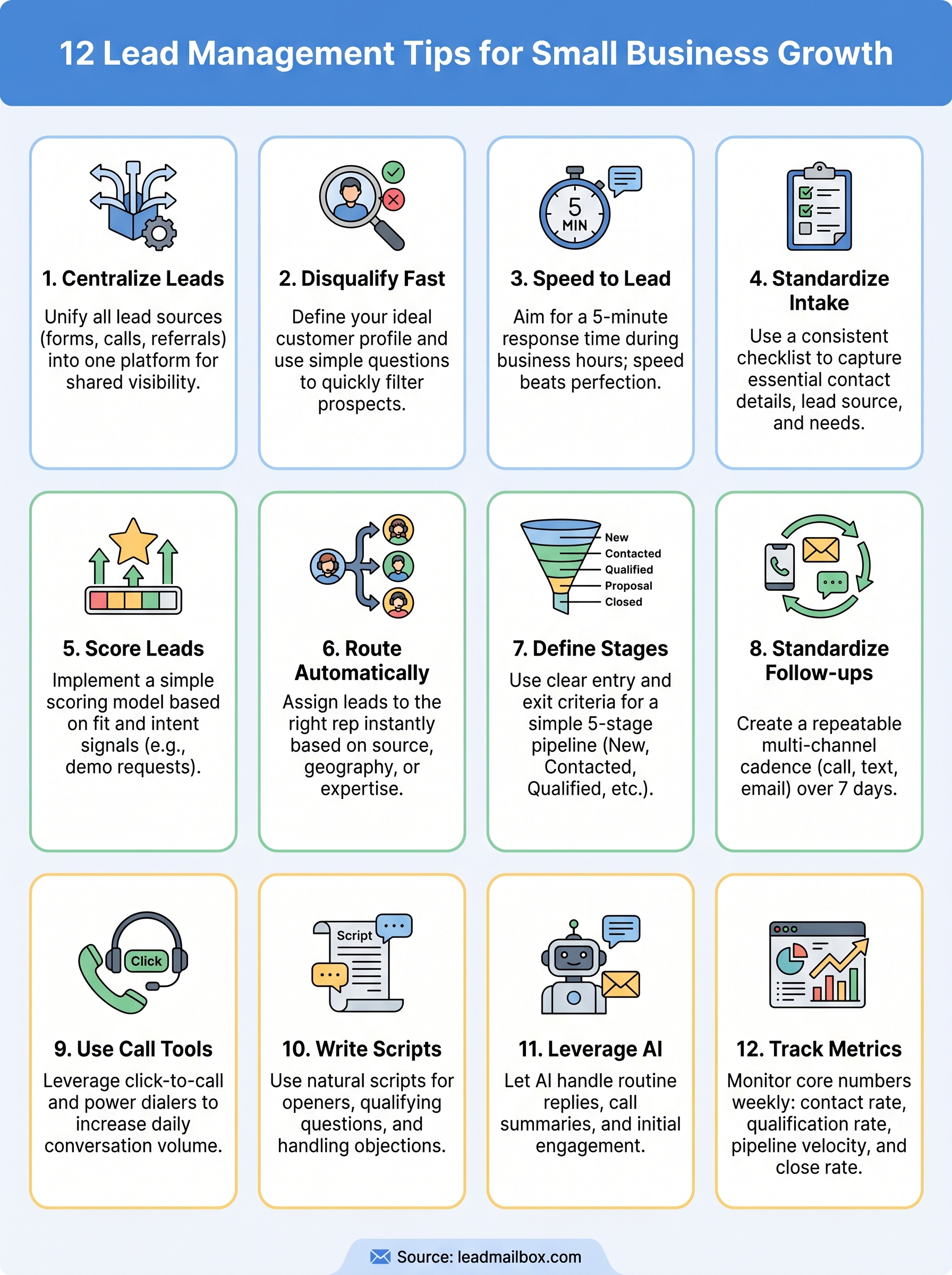
A simple next step
You now have 12 concrete strategies to build a lead management process that actually closes deals. The goal was never to overwhelm you with theory; it was to give you a practical framework your team can implement this week. Start with one or two tips that address your biggest current gap, whether that's response time, pipeline visibility, or follow-up consistency, and build from there.
Lead management for small business doesn't require a massive budget or a dedicated ops team. It requires the right system, clear rules, and a team that applies them consistently. Every tip in this article works better when your leads, calls, SMS, and email outreach live in the same platform instead of scattered across disconnected tools.
If you're ready to put these strategies into practice with a system built for exactly this kind of work, start managing your leads with LeadMailbox and see how much tighter your pipeline can run.