

Email Campaign: How To Build An Email Campaign Step By Step
Most email campaigns fail before they even reach the inbox. Not because the product is wrong or the offer is weak, but because the campaign itself was thrown together without a real plan. A scattered subject line, a generic message, a list that hasn't been touched in months, these are the things that quietly kill results. Knowing how to build an email campaign the right way is what separates the businesses that actually close deals from the ones stuck wondering why nobody's clicking.
The good news: building an effective email campaign isn't complicated. It does, however, require a clear process, from defining your goal and segmenting your audience to writing copy that earns attention and scheduling sends at the right time. Each step matters, and skipping one usually means weaker performance across the board. Whether you're sending your first campaign or your fiftieth, a structured approach beats guesswork every time.
At LeadMailbox, email campaigns are built right into our lead management platform alongside SMS, calling tools, and AI agents, so your outreach stays connected to your pipeline instead of living in a separate tool. We've helped sales teams run targeted campaigns since 2004, and this guide pulls from what actually works. Below, you'll find a step-by-step breakdown of how to plan, build, and launch an email campaign that gets opened, read, and acted on.
What an email campaign is and what you need
An email campaign is a series of targeted emails sent to a specific group of people with a defined purpose, whether that's generating leads, nurturing prospects, promoting an offer, or re-engaging contacts who've gone quiet. It's not a one-off message. A campaign has structure: a goal, an audience, a sequence, and a way to measure what worked. Understanding this distinction matters because scattered emails sent to a bloated, untargeted list without a strategy don't constitute a campaign. They just add to the noise.
The moment you attach a goal, an audience, and a measurable outcome to your emails, you stop blasting and start campaigning.
The core parts of every email campaign
Every effective campaign, regardless of industry or offer, shares the same fundamental components. Knowing these upfront gives you a checklist to build against rather than something to improvise later. When you understand how to build an email campaign from the structure level, each decision you make has a reason behind it.
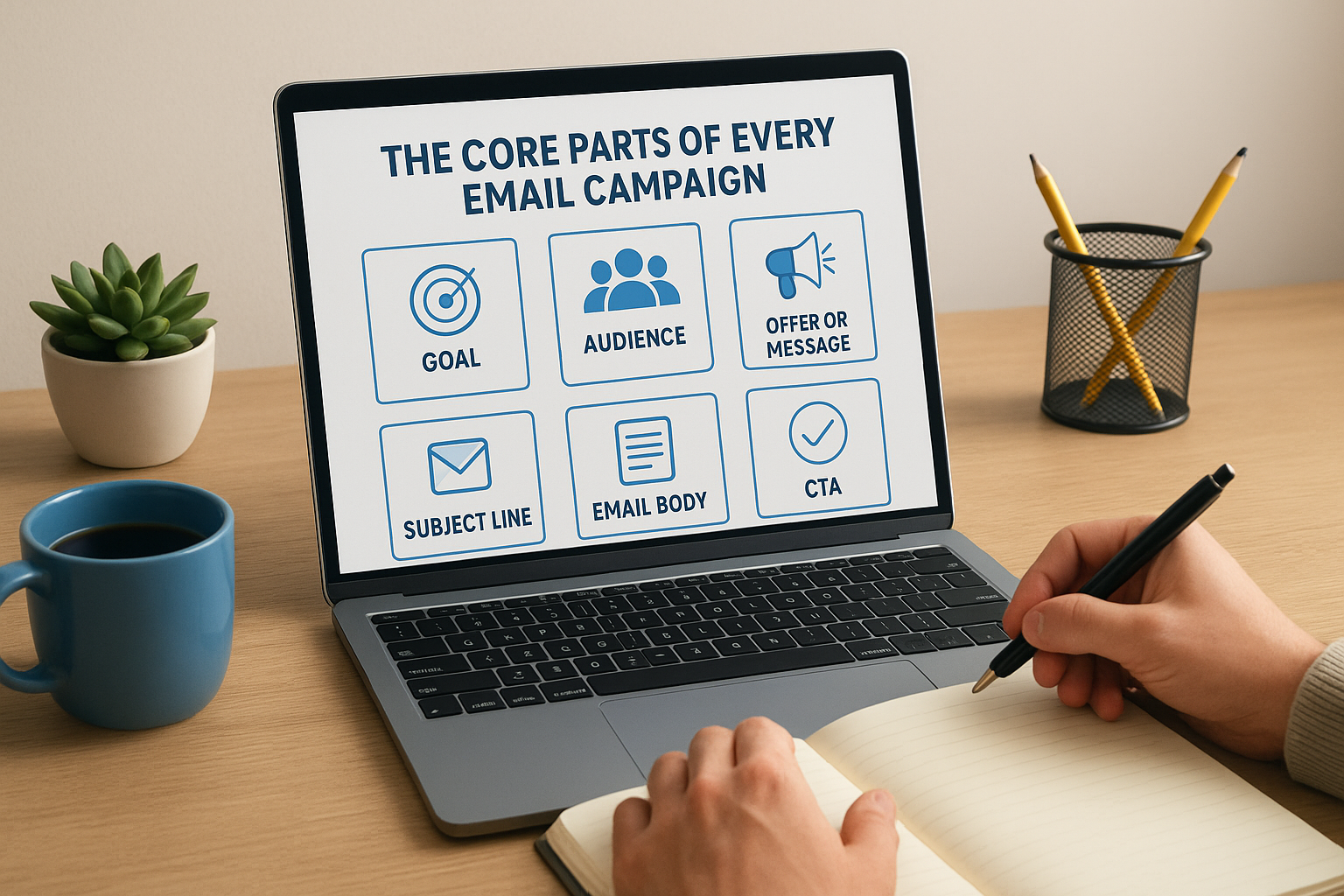
Here's what every campaign includes:
| Component | What it is | Why it matters |
|---|---|---|
| Goal | The specific outcome you want | Drives every other decision |
| Audience | The list of contacts you're targeting | Determines relevance and messaging |
| Offer or message | What you're asking them to do or consider | The core reason for the email |
| Subject line | The first thing recipients see | Controls whether the email gets opened |
| Email body | The content that delivers your message | Builds context and moves readers toward action |
| CTA | The one thing you want them to do next | Converts interest into action |
| Metrics | Open rate, click rate, conversions | Tells you what to fix and what to repeat |
Each component connects to the next. A weak subject line means nobody reads the body. A strong body with a buried or confusing CTA still loses the conversion. Building each layer intentionally is what separates campaigns that drive revenue from ones that just fill inboxes.
What you need before you start
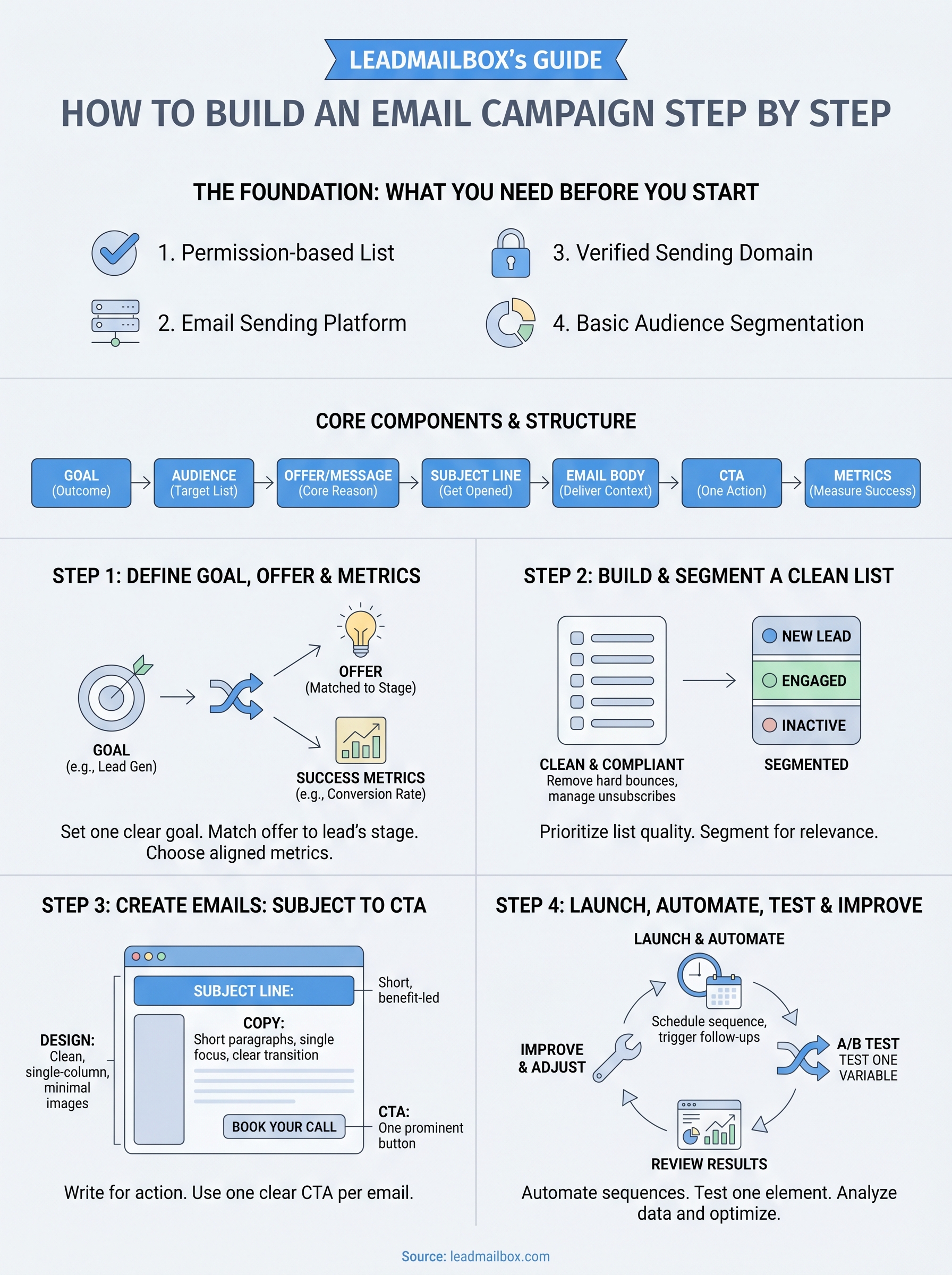
Before you send a single email, you need four things in place: a contact list, an email platform, a compliant sending setup, and a basic understanding of your audience. Skipping any of these creates problems that no amount of good copywriting will fix.
Here's a practical starting checklist:
- A permission-based list: Every contact on your list should have opted in or have a legitimate prior relationship with your business. Sending to purchased or scraped lists damages your sender reputation and risks legal exposure under CAN-SPAM rules.
- An email sending platform: You need a tool that handles deliverability, unsubscribes, and tracking. Sending bulk campaigns from a personal inbox will get you flagged quickly.
- A verified sending domain: Set up SPF, DKIM, and DMARC records on your domain to authenticate your emails. Without these, your messages land in spam folders instead of inboxes.
- Basic audience segmentation: Even splitting your list by lead source or interest level improves relevance and response rates immediately.
- A clear offer or message: Know what you're asking contacts to do before you write a single word. Vague campaigns produce vague results.
Your platform choice also shapes what's possible. An integrated system that connects your email campaigns directly to your lead pipeline, like what LeadMailbox provides, means you can trigger emails based on lead activity, track responses alongside calls and texts, and follow up without switching tools. Disconnected tools create gaps where leads fall through, especially when your team is managing high volumes.
Once these fundamentals are in place, you're ready to start building the campaign itself.
Step 1. Define your goal, offer, and success metrics
Before you write a single subject line, you need to know exactly what you want this campaign to do. A common mistake is treating email campaigns as general-purpose broadcasts, which produces general-purpose results. When you're learning how to build an email campaign, the goal isn't just to send emails. It's to drive a specific action from a specific group of people, and that starts with a decision you make before anything else.
Set one clear goal per campaign
Each campaign should have one primary goal, not three or four. Trying to nurture a lead, close a sale, and collect a testimonial in the same sequence dilutes your message and confuses your reader. Pick the outcome that matters most right now and build the entire campaign around it.
Common campaign goals include:
- Lead generation: Get a prospect to fill out a form, book a call, or request a demo
- Lead nurturing: Move a prospect further along by educating them or building trust
- Re-engagement: Pull back contacts who haven't opened or clicked in 60 to 90 days
- Promotion: Drive purchases or signups around a specific offer or deadline
The clearer your goal, the easier every downstream decision becomes, from the subject line to the call-to-action.
Match your offer to where the lead stands
Your offer is what you're giving the reader in exchange for their attention or action. A cold lead who's never heard of you needs a different offer than a warm prospect who's already visited your pricing page. Mismatching the offer to the audience's stage kills conversions even when the email itself is well-written.
Cold lists respond better to low-commitment value: a useful resource, a relevant insight, or a quick tip they can apply immediately. Warm prospects who have already engaged with your previous emails are ready for a more direct ask, like a demo request or a limited-time offer. Read where your contact stands before you decide what to put in front of them.
Choose metrics that connect to your goal
Tracking the right numbers keeps you focused on outcomes rather than vanity stats. Open rates tell you if your subject line worked. Click-through rates tell you if your body copy and CTA did their job. Conversions tell you if the whole campaign delivered.
| Goal | Primary metric | Secondary metric |
|---|---|---|
| Lead generation | Conversion rate | Click-through rate |
| Lead nurturing | Click-through rate | Open rate |
| Re-engagement | Open rate | Unsubscribe rate |
| Promotion | Revenue or signups | Conversion rate |
Set your target benchmarks before you send, not after. Measuring against a predetermined expectation gives you something actionable to improve, rather than just a report of what happened.
Step 2. Build and segment a clean, compliant list
Your list is the foundation of any email campaign, and list quality matters more than list size. A database of 500 engaged, opted-in contacts will consistently outperform a list of 10,000 cold, unverified addresses. When working through how to build an email campaign that actually converts, this is the step most people rush and later regret.
A clean, segmented list is not a nice-to-have. It is the difference between a campaign that performs and one that quietly destroys your sender reputation.
Keep your list clean and compliant
Compliance is not optional, and neither is regular list maintenance. Under CAN-SPAM, you need explicit permission to send marketing emails, a clear unsubscribe option in every message, and accurate sender information in every send. Violating these rules creates legal exposure and tanks your deliverability over time.
To keep your list in good shape:
- Remove hard bounces immediately after each campaign. A high bounce rate signals poor list quality to inbox providers.
- Suppress unsubscribes automatically so you never message someone who opted out.
- Run a re-permission campaign on any list that has not been contacted in more than 12 months before sending anything promotional.
- Validate email addresses during your lead intake process before they ever enter your sending list.
Segment your list before you send anything
Segmentation means dividing your contacts into smaller groups based on shared characteristics so you can send more relevant messages to each one. A lead who just submitted a form needs different messaging than someone who has opened your last five emails but has not yet converted. Sending the same email to both wastes the opportunity with each group.
Practical ways to segment your list:
| Segment type | Example | Why it helps |
|---|---|---|
| Lead source | Paid ad vs. referral | Tailor message to how they found you |
| Engagement level | Active in last 30 days vs. inactive | Match content to contact temperature |
| Pipeline stage | New lead vs. demo requested | Match offer to readiness |
| Role or industry | Business owner vs. sales manager | Speak to their specific situation |
Start with two or three segments if you are new to this process. You do not need a dozen buckets on your first campaign. Pick the split that creates the most meaningful difference in what you would say to each group, then build from there once you have data showing what works.
Step 3. Create the emails: subject line, copy, design, CTA
This is where most of the visible work happens, and it is also where most campaigns lose their edge. Knowing how to build an email campaign technically is only useful if the emails themselves give people a reason to open, read, and act. Every element of your email, from the first line of text a recipient sees to the button they click at the end, needs to serve a specific purpose.
Write a subject line that earns the open
Your subject line decides whether your email gets read or deleted. Keep it under 50 characters so it displays fully on mobile, and lead with the benefit or the tension, not a label. Avoid words like "free," "urgent," or excessive punctuation, which trigger spam filters and train readers to ignore you.
Strong subject line formulas:
| Type | Example |
|---|---|
| Benefit-led | "Cut your follow-up time in half" |
| Question | "Still following up manually?" |
| Direct offer | "One call slot left this week" |
| Curiosity gap | "What most sales teams skip on day one" |
Your subject line is a promise. The email body needs to deliver on it, or your next open rate will be lower.
Write copy that moves the reader forward
Short paragraphs and a single focus outperform long, multi-topic emails every time. Open with one sentence that confirms why you are reaching out and why it matters to the reader. Follow with two to three sentences that connect the offer to a specific problem they are dealing with. Close with a direct transition into the CTA. Below is a simple structure you can adapt:
Subject: [Benefit or question tied to their situation]

Hi [First Name],

[One sentence: relevant context or shared problem.]

[Two to three sentences: what you're offering and why it helps them specifically.]

[One sentence CTA lead-in: what happens when they click.]

[CTA button or link text]

[Your name]
Design the layout and lock in your CTA
Clean, single-column layouts load reliably across devices and keep the reader focused. Avoid overloading the email with images, which can slow load time and trigger spam filters. Use one CTA per email, placed prominently near the bottom, with action-oriented text like "Book your call" or "Get the guide" rather than vague language like "Click here." Test your email on mobile before sending, since more than half of all emails are opened on a phone.

Step 4. Launch, automate, A B test, and improve results
Getting your emails written is the halfway point. Sending them at the right time, in the right sequence, and to the right audience is what turns a draft into a campaign that produces measurable results. This step covers the decisions that determine how your campaign performs once you press send, and how you use what you learn to make every future send stronger.
Schedule and automate your send sequence
Timing and sequence consistency matter more than most people expect. Sending one email and waiting to see what happens is not a campaign. A proper sequence delivers the right message at the right interval, based on how your contacts behave. Most email platforms let you build trigger-based automation that sends follow-ups when a contact opens but does not click, or moves them to a different track when they convert.
A simple three-email lead nurture sequence looks like this:
Email 1 (Day 0):  Introduce the offer or resource
Email 2 (Day 3):  Follow up with a specific benefit or case detail
Email 3 (Day 7):  Direct ask with a clear CTA and deadline or scarcity
Tuesday through Thursday, between 8 AM and 11 AM, tends to produce stronger open rates for B2B audiences. Test this against your own list rather than assuming the general rule applies.
Run A/B tests on the right variables
A/B testing means sending two versions of the same email with one variable changed to see which performs better. The key word is one. Testing multiple variables at once makes it impossible to know what actually drove the difference in your results.
Test one element at a time, so your data tells you something useful instead of leaving you guessing.
Start with the variables that carry the most weight:
| Variable | What to test | Why it matters |
|---|---|---|
| Subject line | Benefit-led vs. question-led | Directly affects open rate |
| CTA text | "Book a call" vs. "Get started" | Affects click-through rate |
| Send time | Morning vs. afternoon | Affects open rate by audience |
| Email length | Short vs. detailed | Affects engagement and conversion |
Review results and adjust before the next campaign
Once your campaign runs, pull the data before you move on. Open rate below 20 percent means your subject lines need work. Click rate below 2 percent points to a body copy or CTA problem. Understanding how to build an email campaign that improves over time means treating every send as a source of feedback, not just a task to complete.
Apply fixes based on what the numbers show:
- Low open rate: Rewrite subject lines, test a different send time
- Low click rate: Simplify the CTA, tighten the body copy, remove distractions
- High unsubscribe rate: Review your list segments and offer relevance
- Low conversion rate: Check that your landing page matches the email's promise
Ready to send
You now have a complete picture of how to build an email campaign from the ground up. Start with a clear goal and the right audience. Build a clean, segmented list. Write emails where every element, from the subject line to the CTA, earns its place. Then send, test, and improve based on what the data tells you. None of these steps require a large team or an expensive stack. They require a clear process and the discipline to follow it.
Most sales teams lose leads not because their offer is weak, but because their follow-up is disconnected from their pipeline. LeadMailbox solves that by keeping your email campaigns, calls, SMS, and lead data in one place so nothing falls through the gaps. If your current setup is costing you conversions, see what LeadMailbox can do for your sales team and start running campaigns that actually close.