

9 Customer Relationship Management Software: Small Business
Picking the right customer relationship management software for small business isn't just a tech decision, it's a growth decision. The tool you choose determines how your team tracks leads, follows up with prospects, and ultimately closes deals. Get it wrong, and you're stuck with bloated features you'll never use or, worse, a system that slows your sales process down.
Small businesses don't operate like enterprises. You need software that's affordable, easy to learn, and built to handle real sales workflows, not just store contact info. That means looking beyond brand names and focusing on what actually helps you manage leads and convert them into revenue. At LeadMailbox, we've spent over 20 years building exactly that kind of platform: a unified lead management and sales enablement system with built-in telephony, AI agents, and campaign tools. So we know what matters when evaluating CRM tools from a small business perspective.
This guide breaks down nine CRM platforms worth considering. We'll cover pricing, standout features, and what type of business each one fits best, so you can skip the guesswork and pick the tool that actually matches how your team sells. Whether you need a full-featured dialer suite or a simple contact manager, you'll find a solid option on this list.
1. LeadMailbox
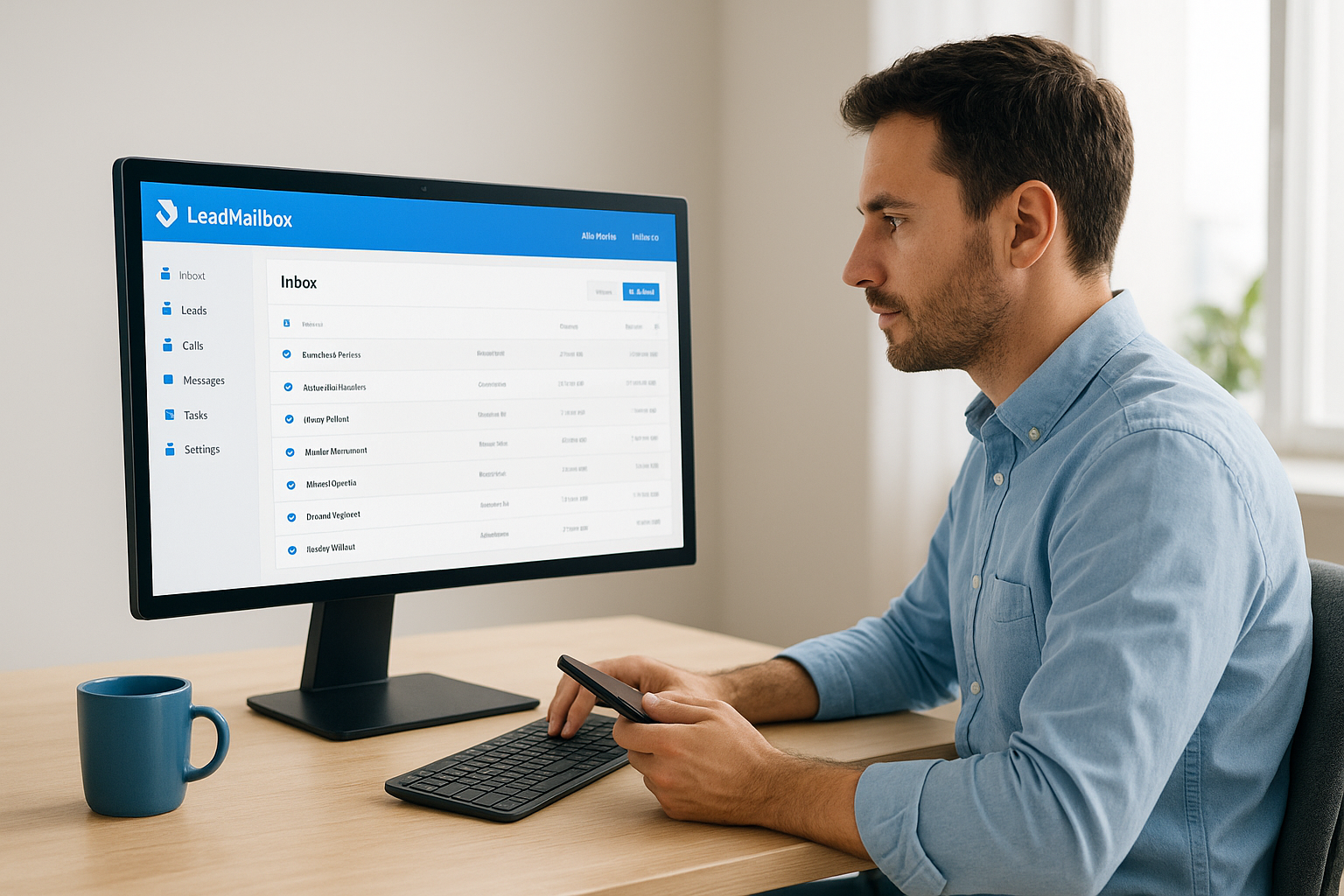
LeadMailbox has operated as a lead management and sales enablement platform since 2004, giving it over two decades of experience solving what small and mid-sized sales teams actually need. Unlike most CRMs that focus on contact storage, LeadMailbox combines CRM functionality with built-in communication tools, including telephony, SMS, email campaigns, and AI agents, all in one system.
What it is and how it works
LeadMailbox aggregates leads from multiple sources into a single inbox, so your team isn't jumping between spreadsheets or separate apps to find new contacts. From there, you can call, text, or email directly within the platform. The system supports automated workflows that move leads through your pipeline based on actions you define, reducing the manual work your reps spend on repetitive follow-up tasks each day.
Best for
This platform fits sales-heavy small businesses that generate a high volume of inbound leads and need to act on them fast. If your team relies on phone calls as a primary sales channel, LeadMailbox is built for that exact workflow. It also works well for businesses that buy leads from external partners and need a centralized place to manage, track, and follow up with those contacts without switching between tools.
Standout features
LeadMailbox includes a full telephony suite with click-to-call, a power dialer, insta-call, and inbound number management, which most small business CRMs don't offer natively. The platform also includes AI agents that can respond to incoming text messages, handle inbound calls, and draft emails, meaning your leads get a response even when your team is unavailable or off the clock.
If you're evaluating customer relationship management software for small business and your sales process is phone-first, LeadMailbox's built-in dialer alone eliminates the need for a separate calling tool.
Where it can fall short
LeadMailbox is built for active lead conversion, so if you need deep project management features or robust reporting dashboards right out of the box, you may find it more limited than platforms like Salesforce. It's also not the strongest fit for B2B enterprise sales teams that need complex deal stages with multiple stakeholders tracked across large accounts simultaneously.
Pricing and plan structure
LeadMailbox runs on a month-to-month subscription model, which means no long-term contracts locking you in before you know if the tool fits your team. Pricing stays accessible for small businesses without stripping out core features to hit a lower price point. You can check current plan details directly on the LeadMailbox website, since options can vary based on team size and the specific tools you need.
Integrations and lead sources
The platform integrates with hundreds of lead partners, making it practical for businesses that source leads from multiple vendors. You can also connect to other tools already in your stack. The depth of lead source integrations is one of the stronger selling points for businesses running multi-channel lead generation campaigns and needing everything to flow into one place.
Setup and onboarding notes
Setup is straightforward for most users because the platform is purpose-built for lead management, so you won't spend time configuring features that don't apply to your sales process. Most small sales teams can get up and running within a few days without needing a dedicated IT resource or a lengthy implementation project to get value from day one.
2. HubSpot CRM
HubSpot CRM is one of the most recognized customer relationship management software for small business options on the market. It started as a marketing tool and expanded into a full CRM, giving small businesses a single platform to manage contacts, deals, and basic marketing outreach.

What it is and how it works
HubSpot CRM works by organizing your contacts, companies, and deals inside a visual pipeline you can customize to match your sales stages. Every interaction, including emails, calls, and notes, logs automatically against the right contact. Your team sees the full activity history for each lead without manually entering data after every touchpoint.
Best for
HubSpot fits small businesses that want a free starting point and plan to grow into more advanced marketing and sales features over time. It works especially well for teams that prioritize inbound marketing alongside their sales process, since the platform bridges those two functions more naturally than most standalone CRMs.
Standout features
HubSpot's free tier includes contact management, deal pipelines, email tracking, and meeting scheduling, which is a strong set of tools at no cost. The platform also has a built-in forms and landing page builder that connects directly to your CRM, so leads from web campaigns flow in automatically without needing extra integrations.
If your team is just getting started and needs a no-cost entry point with room to scale, HubSpot's free CRM gives you functional sales tools without an upfront commitment.
Where it can fall short
The free plan covers the basics, but core automation features and advanced reporting sit behind paid tiers that can get expensive quickly, especially as your contact list grows. Small teams on tight budgets often hit a wall where the features they actually need require a significant jump in monthly spend.
Pricing and plan structure
HubSpot offers a free CRM tier with limited functionality, plus paid Sales Hub plans starting at the Starter level. Costs increase substantially at the Professional tier, which is where most meaningful automation and customization unlock. Pricing scales with seat count and contact volume.
Integrations and ecosystem
HubSpot connects to a broad range of third-party tools through its app marketplace, including Gmail, Outlook, Slack, and Zoom. The ecosystem is one of its strongest advantages for teams already using a mix of tools.
Setup and onboarding notes
Most small teams can set up HubSpot's free CRM in a single afternoon. The interface is clean and well-documented, and HubSpot provides guided onboarding resources through its knowledge base and Academy to help new users get moving without outside help.
3. Zoho CRM
Zoho CRM is a well-established platform that gives small businesses a feature-rich system at a price point that won't drain the budget. Zoho has built a broad suite of business software, and the CRM sits at the center of that ecosystem, connecting sales, marketing, and customer support under one roof.
What it is and how it works
The platform organizes your leads, contacts, deals, and accounts inside a customizable pipeline. Zoho tracks activity across email, phone, social media, and live chat, and logs everything against the right record automatically. You can build workflow automation rules that trigger actions based on lead behavior, deal stage changes, or time-based conditions, which cuts down the repetitive manual work your sales reps handle every day.
Best for
Teams that need a high volume of features without paying enterprise prices will find Zoho a strong match. It works particularly well if you already use other Zoho products, such as Zoho Books or Zoho Desk, since the integrations between those tools are tight and require minimal configuration work to get them talking to each other.
Standout features
Zoho includes Zia, its built-in AI assistant, which can score leads, predict deal outcomes, and surface the best time to contact a prospect. The platform also offers a Canvas design studio that lets you rework the CRM interface without writing any code, which is useful when you want the layout to match how your team actually sells.
If you're evaluating customer relationship management software for small business and want AI-assisted lead scoring without paying for a high-tier plan, Zoho CRM is worth a close look.
Where it can fall short
Zoho's depth can work against you if your team is new to CRM tools. The sheer number of settings and modules creates a learning curve that smaller teams without a dedicated admin may struggle with. Some users also report that customer support response times vary, which gets frustrating when you're stuck on a configuration issue mid-setup.
Pricing and plan structure
A free plan covering up to three users makes Zoho accessible for very small teams starting out. Paid tiers scale through Standard, Professional, Enterprise, and Ultimate plans, with each level unlocking more automation, analytics, and AI capabilities as you move up.
Integrations and add-ons
Zoho connects to Google Workspace, Microsoft 365, Mailchimp, and Slack, along with hundreds of other tools through its marketplace. Businesses building a broader stack using Zoho's own products benefit from deep native integrations that plug in without extra development work.
Setup and onboarding notes
Expect a longer setup process here than with simpler CRMs, because the platform offers a large number of configuration options from day one. Zoho provides guided setup wizards and documentation to help you through it, but plan to spend several days configuring your pipeline, fields, and automation rules before your team hits a comfortable stride inside the system.
4. Pipedrive
Pipedrive is a sales-focused CRM built specifically around pipeline management. Unlike platforms that bolt on sales features after the fact, Pipedrive starts with the deal view front and center, making it a natural fit for teams that think in terms of stages and conversion rates rather than contact databases.

What it is and how it works
Pipedrive organizes your entire sales process around a visual drag-and-drop pipeline where each deal moves through custom stages your team defines. Every action your reps take, whether that's a call, email, or note, logs directly to the deal record, giving you a clean activity history without any manual data entry overhead.
Best for
Pipedrive works best for small sales teams with a defined, repeatable sales process. If your team closes deals through a consistent set of steps and you want a tool that maps directly to those steps, Pipedrive fits that model well. It also suits businesses evaluating customer relationship management software for small business that want simplicity without sacrificing sales-specific functionality.
Standout features
Pipedrive's AI-powered Sales Assistant surfaces deal recommendations and activity reminders based on your pipeline data. The platform also includes a solid email integration layer that links your inbox directly to deals, so your team tracks every conversation without switching between apps.
If your primary concern is keeping deals moving through stages and nothing falling through the cracks, Pipedrive's pipeline-first design gives your reps a clear view of exactly what needs to happen next.
Where it can fall short
Pipedrive lacks a native marketing automation suite, so if you need campaign tools or advanced lead nurturing built into the same platform, you'll have to connect a third-party tool. Reporting also stays fairly basic on lower-tier plans, which limits visibility for managers who want deeper analytics without upgrading.
Pricing and plan structure
Plans start at the Essential tier and scale through Advanced, Professional, Power, and Enterprise levels. Each tier unlocks more automation capacity and reporting depth, and Pipedrive offers a 14-day free trial so your team can test the workflow before committing.
Integrations and add-ons
Pipedrive connects to Google Workspace, Microsoft 365, Slack, and Zoom, along with a broad marketplace of third-party tools covering everything from document signing to lead generation.
Setup and onboarding notes
Most teams get their first pipeline configured within a day. The interface is clean and the guided setup walks you through creating deal stages and importing existing contacts, so you're not starting from a blank slate.
5. Freshsales
Freshsales is a CRM built by Freshworks that targets small and mid-sized sales teams looking for an intuitive, AI-powered platform without a steep learning curve. It sits inside the broader Freshworks product suite, which covers customer support, marketing, and IT service management, giving it a solid ecosystem to work within if you already use those tools.
What it is and how it works
Freshsales organizes your contacts, accounts, and deals inside a visual pipeline you can configure to match your sales stages. The platform logs calls, emails, and activity automatically against the right contact record, so your reps spend less time on data entry. Built-in phone and email tools let your team reach out directly from the CRM without switching between apps throughout the day.
Best for
Freshsales fits small to mid-sized teams that want a clean interface with solid AI features built in from day one. It works well for businesses evaluating customer relationship management software for small business that need phone and email communication inside the CRM without paying for separate subscriptions to cover those channels independently.
Standout features
Freshsales includes Freddy AI, the platform's built-in intelligence layer, which scores leads, predicts deal outcomes, and recommends next steps based on your pipeline activity. The platform also offers a built-in phone system with call recording and logs tied directly to contact records, removing the need for a standalone telephony tool.
If AI-driven lead scoring and a built-in phone system at an accessible price point matter to your team, Freshsales delivers both without requiring enterprise-tier spending.
Where it can fall short
Freshsales can feel limited on reporting depth at lower pricing tiers, which means managers who want detailed analytics often need to upgrade sooner than expected. The platform also carries a smaller third-party app marketplace compared to HubSpot or Zoho, so verify compatibility before committing if your stack relies on niche integrations.
Pricing and plan structure
Freshsales offers a free plan for up to three users, plus paid Growth, Pro, and Enterprise tiers. Each level adds more automation rules, AI capabilities, and reporting depth as you move up, and pricing stays competitive at the mid-market level without forcing you into long-term annual commitments on entry plans.
Integrations and add-ons
Freshsales connects to Google Workspace, Microsoft 365, Slack, and Mailchimp, along with the rest of the Freshworks suite. If your team also uses Freshdesk for customer support, both platforms share contact data natively, so your sales and support reps always work from the same customer record without extra configuration.
Setup and onboarding notes
Most small teams get a working pipeline configured within one to two days using Freshsales. The setup wizard walks you through importing contacts, building deal stages, and connecting your email inbox, so you're not starting from scratch. Freshworks also provides documentation and live chat support to help your team clear any configuration questions without delays.
6. Less Annoying CRM
Less Annoying CRM does exactly what its name suggests: it strips away the complexity that makes most platforms frustrating to adopt. Built exclusively for small businesses, it delivers the core contact and pipeline management tools your team actually needs without burying them under enterprise-level settings.
What it is and how it works
Less Annoying CRM stores your contacts, notes, tasks, and pipeline data in a single straightforward workspace. Every contact record shows you the full history of interactions, upcoming tasks, and deal status at a glance. The platform keeps your entire workflow in one simple view so your reps spend time selling rather than navigating through menus and configuration screens.
Best for
This platform fits very small teams and solo operators who want a functional CRM without spending days on setup or paying for features they will never touch. If you're evaluating customer relationship management software for small business and your main requirement is simplicity over advanced automation, Less Annoying CRM delivers that without compromise.
Standout features
The platform provides unlimited contacts and pipelines on a single flat-rate plan, which removes the pricing anxiety that comes with contact-based billing on other platforms. Your team also gets a daily agenda email every morning that summarizes tasks and follow-ups for the day, keeping reps on track without logging in to check their queue.
If your team keeps missing follow-ups because your current CRM buries tasks inside multiple menus, Less Annoying CRM's daily agenda email alone can recover a measurable number of dropped leads.
Where it can fall short
Less Annoying CRM offers minimal automation capabilities compared to platforms like Zoho or Freshsales. Teams that need multi-step workflow automation, AI-powered lead scoring, or built-in telephony will hit the ceiling here quickly. It also carries limited reporting features, so managers who want data-driven pipeline visibility may find the analytics too basic.
Pricing and plan structure
The platform charges a flat rate of $15 per user per month with no tiered plans to navigate. Every user gets access to all features at that single price, and a 30-day free trial lets your team test the full product before committing.
Integrations and extensions
Less Annoying CRM connects to Google Calendar and Mailchimp and supports data import via CSV files. The integration list stays intentionally short to match the platform's focused scope.
Setup and onboarding notes
Most teams complete setup in under an hour. The interface is minimal by design, and Less Annoying CRM provides phone and email support to any user who needs help getting started, which is a practical advantage for small teams without a dedicated IT resource.
7. monday CRM
monday CRM runs on top of the monday.com work operating system, giving it a visual, flexible structure that teams already familiar with project management tools will recognize immediately. It handles contact tracking, deal pipelines, and sales activity logging inside a highly customizable board-based interface that you can reshape to match your exact workflow.

What it is and how it works
The platform organizes your leads, contacts, and deals across customizable boards where each row represents a record and each column tracks a specific data point. You can build pipeline views, activity logs, and dashboards without writing any code, and the drag-and-drop interface makes it easy to restructure your workflow as your sales process evolves.
Best for
This platform suits small business teams that blend sales with project work and want a single tool to manage both without switching between apps. If your team is evaluating customer relationship management software for small business and finds that most CRMs feel too rigid for how you operate, monday CRM's flexibility makes it easier to configure the system around your actual process rather than adjusting your process to fit the tool.
Standout features
monday CRM includes AI-powered email generation and activity summaries that help reps draft outreach and review deal history faster. The platform also offers no-code automation recipes that trigger actions based on deal status changes, deadlines, or manual inputs, so your team spends less time on routine follow-up work.
If your sales team also handles project delivery or client onboarding, monday CRM's ability to bridge both workflows inside one platform removes a significant amount of coordination friction.
Where it can fall short
Native phone calling features are absent, so teams that rely heavily on outbound calling still need a separate telephony solution. Reporting also carries some limitations at lower tiers, which means managers tracking detailed pipeline analytics often need to upgrade sooner than the entry-level pricing suggests.
Pricing and plan structure
monday CRM offers a free plan for up to two seats, with paid Basic, Standard, Pro, and Enterprise tiers scaling above that. Each level adds more automation capacity and reporting features, and pricing adjusts based on seat count.
Integrations and automations
The platform connects to Gmail, Outlook, Slack, Zoom, and Salesforce, among hundreds of other tools through its app marketplace. Built-in no-code automation templates handle repetitive triggers across integrated apps without requiring developer support.
Setup and onboarding notes
Most teams configure their first board and pipeline within a day using monday CRM's guided templates. The platform provides video walkthroughs and a dedicated help center to cover common setup questions, and the visual interface makes it easier for non-technical users to get productive quickly.
8. Salesforce Starter Suite
Salesforce Starter Suite brings the world's largest CRM platform down to a price point that small businesses can actually work with. It's Salesforce's entry-level product, designed for teams that want the credibility and infrastructure of the Salesforce ecosystem without committing to the full enterprise configuration that large organizations require.
What it is and how it works
Your team manages leads, contacts, accounts, and opportunities inside a unified workspace where every interaction logs automatically against the correct record. The platform combines contact management, deal tracking, and basic customer service tools in one package, and includes task management and email integration so reps maintain a complete view of each prospect without switching between separate tools throughout the day.
Best for
Starter Suite fits small businesses that plan to grow and want a CRM that scales without requiring a platform switch later. If you're evaluating customer relationship management software for small business and know your team will eventually need more advanced Salesforce capabilities, starting here gives you a direct upgrade path within the same ecosystem.
Standout features
The platform includes pre-built reports and dashboards that give managers immediate pipeline visibility without custom development work. Your team also gets basic customer service case management bundled alongside sales tools, which helps small teams that handle both sales and support without the resources to run separate systems.
If your business plans to grow into Salesforce's broader ecosystem, starting with Starter Suite builds platform familiarity before you need to navigate its more advanced tiers.
Where it can fall short
Starter Suite removes many advanced automation and customization options that make Salesforce powerful at higher tiers. Teams that want complex workflow rules or custom object structures will hit those limits quickly and face a significant price jump to unlock them.
Pricing and plan structure
Salesforce Starter Suite is priced at $25 per user per month, billed annually. There is no monthly billing option at this tier, so you commit to a full year before confirming the platform truly matches how your team sells.
Integrations and marketplace apps
Salesforce's AppExchange marketplace provides access to thousands of third-party integrations covering telephony, document signing, and marketing automation. Most major business tools offer a native Salesforce connector, which keeps integration setup manageable even without a dedicated IT resource.
Setup and onboarding notes
Setup here takes more time than simpler CRMs because the Salesforce environment carries more configuration surfaces even at the starter level. Salesforce provides guided learning trails through its Trailhead platform to help small teams get productive without hiring outside consultants to complete the initial implementation.
9. Microsoft Dynamics 365 Sales
Microsoft Dynamics 365 Sales is an enterprise-grade CRM platform that Microsoft has adapted for smaller teams through modular pricing and cloud-based deployment. It connects directly to the broader Microsoft 365 ecosystem, making it a natural consideration for businesses already running on Teams, Outlook, and Excel.
What it is and how it works
Dynamics 365 Sales organizes your leads, contacts, accounts, and opportunities inside a pipeline that integrates tightly with Outlook and Teams. Every email your reps send or receive inside Outlook logs automatically to the correct contact record, and your team can access deal data directly from their inbox without switching to a separate CRM tab throughout the day.
Best for
This platform fits small businesses deeply embedded in the Microsoft stack that want their CRM to work as a natural extension of tools they already use daily. If you're evaluating customer relationship management software for small business and your team lives inside Outlook and Teams, Dynamics 365 Sales removes most of the friction that comes with adopting a standalone CRM from a different vendor.
Standout features
Dynamics 365 Sales includes Copilot, Microsoft's AI layer, which summarizes meeting notes, drafts follow-up emails, and surfaces deal risks based on pipeline activity. The platform also provides relationship health scores that track engagement patterns and flag contacts that need attention before deals go cold.
If your team already pays for Microsoft 365, the native integration between Dynamics 365 Sales and your existing tools can reduce the time your reps spend switching between apps each day.
Where it can fall short
The platform carries a steeper learning curve than most small business CRMs, and the configuration options can overwhelm teams without a dedicated admin. Smaller businesses without existing Microsoft infrastructure often find less value here because the core advantages depend on deep integration with other Microsoft products.
Pricing and plan structure
The Sales Professional plan starts at $65 per user per month, and the Sales Enterprise plan sits higher than that. Both tiers require annual commitments, so confirm the platform fits your workflow before signing.
Integrations in the Microsoft ecosystem
Dynamics 365 Sales connects natively to Teams, Outlook, SharePoint, and Power BI, giving you a unified data environment across sales, communication, and reporting tools without extra configuration.
Setup and onboarding notes
Setup takes more time than simpler platforms at this tier. Microsoft provides guided learning resources through Microsoft Learn to help small teams navigate initial configuration without requiring outside consultants.
Wrap-up
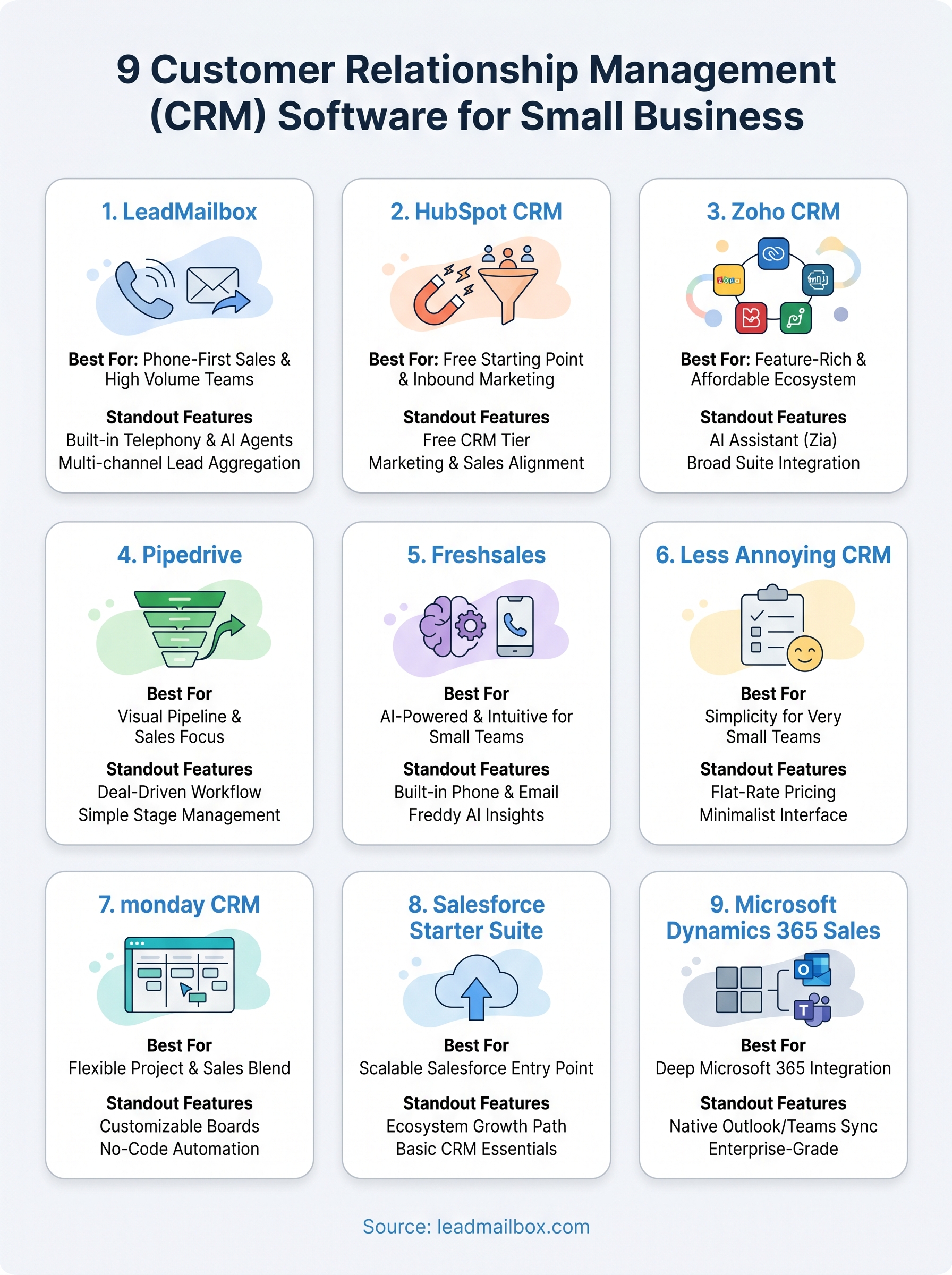
Every platform on this list solves a different version of the same problem: managing leads and converting them into revenue. The right customer relationship management software for small business depends on how your team actually sells. If you prioritize simplicity, Less Annoying CRM or Pipedrive will serve you well. If you need enterprise infrastructure and deep Microsoft integration, Dynamics 365 Sales makes sense.
But if your team runs a phone-first, high-volume sales operation and needs built-in telephony, AI agents, and lead aggregation from multiple sources all in one place, most of the platforms on this list will leave gaps that cost you time and money. LeadMailbox was built specifically for that workflow, with over 20 years of refinement behind it and a month-to-month model that keeps the risk low. If that matches how your business sells, explore what LeadMailbox can do for your team and see it in action.