

Customer Relationship Management for Small Business: A Guide
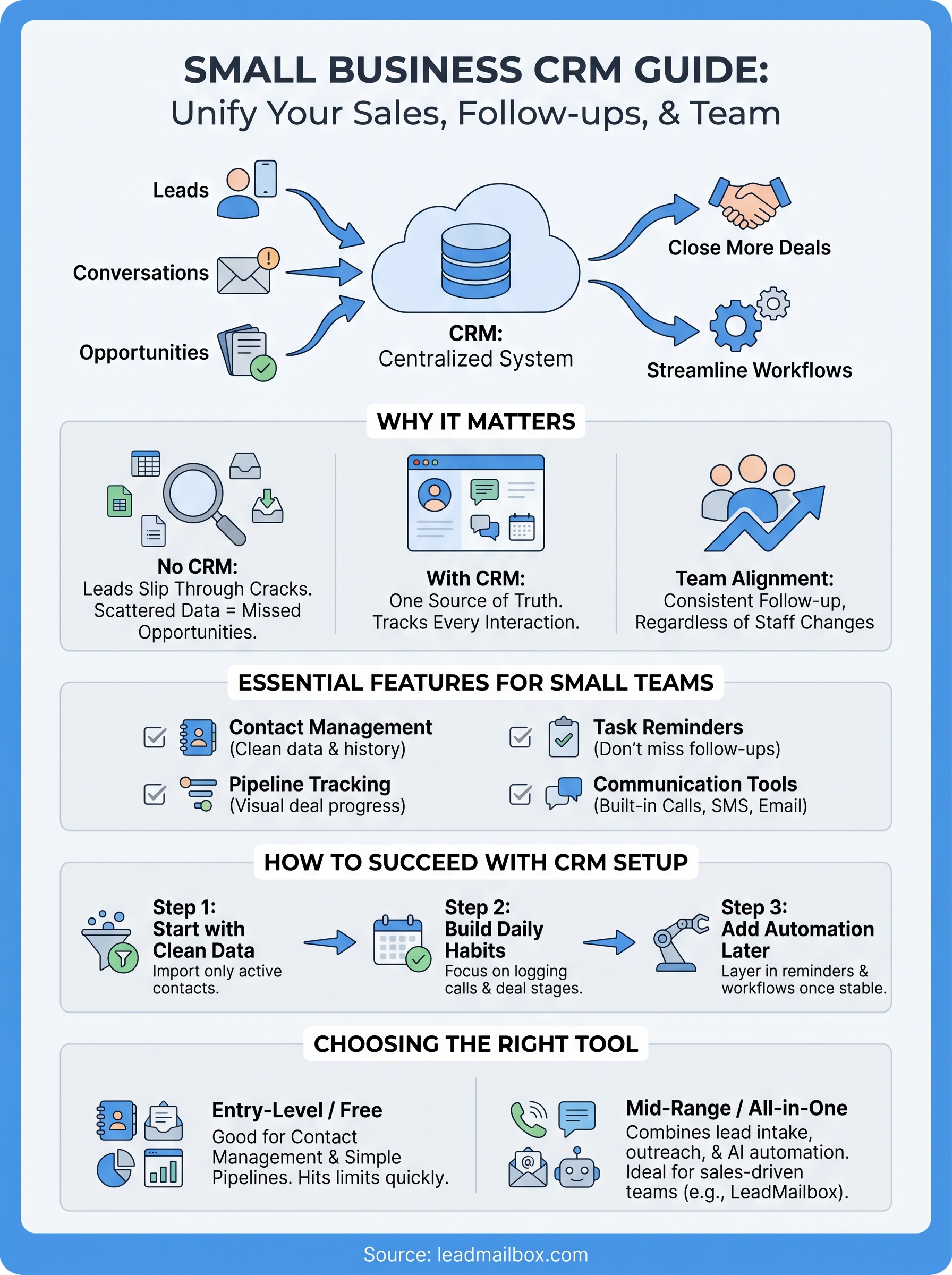
Most small businesses don't lose customers because of a bad product. They lose them because leads slip through the cracks, follow-ups get missed, and no one can remember who said what three weeks ago. That's exactly the problem customer relationship management for small business solves, and it doesn't require an enterprise budget or a dedicated IT team to get started. A solid CRM gives you one place to track every conversation, every deal, and every opportunity so nothing gets forgotten.
The tricky part is choosing the right tool. There are hundreds of CRM platforms out there, and most of them were built for large organizations with complex workflows and deep pockets. Small teams need something leaner, a system that handles lead tracking, outreach, and relationship management without piling on unnecessary complexity. That's the philosophy behind platforms like LeadMailbox, which bundles lead management, communication tools, and AI-powered automation into a single affordable package built specifically for sales-driven small businesses.
This guide breaks down what CRM actually means in a small business context, what features matter most, and how to compare the top options available right now. Whether you're shopping for your first CRM or replacing one that isn't pulling its weight, you'll walk away with a clear picture of what to look for, and what to avoid.
Why CRM matters for small businesses
Running a small business means wearing many hats. Sales, follow-ups, customer service, and admin work often fall on the same two or three people, and without a system tying everything together, things break down fast. Customer relationship management for small business isn't just about storing contacts. It's about making sure every opportunity gets the attention it deserves, so your team can close more deals without working longer hours.
The real cost of managing leads manually
Most small business owners start out tracking leads in spreadsheets or email inboxes. That approach works for a while, but it falls apart quickly once lead volume picks up or a team member leaves. When your lead data is scattered across tools, you spend time hunting for information instead of selling. A significant portion of any sales rep's week goes to admin tasks rather than actual selling, and that number climbs fast without a centralized system keeping everything in order.
The time your team spends searching for contact information or remembering where a deal stands is time they're not spending closing business.
Centralizing that data changes everything. Every call, every email, and every note lives in one place, attached to the right contact. When someone on your team is out sick or moves on, the next person picks up exactly where things left off without losing a beat.
Why small businesses benefit more than they expect
Large companies have entire departments dedicated to managing customer data. Your team doesn't have that luxury, which makes a good CRM more valuable for small businesses than it is for enterprise organizations. With the right tool, a team of five can operate with the same level of organization and follow-through as a team of fifty.
Small businesses also tend to rely heavily on repeat customers and word-of-mouth referrals, which means relationship quality directly affects your bottom line. A CRM helps you track where each customer stands, when they last heard from you, and what they actually care about. That context turns a generic follow-up into a conversation that means something to the person receiving it, and that difference shows up in your close rate.
How CRM works and the features that matter
At its core, a CRM is a database with a workflow layer on top of it. Every contact, lead, and customer gets a record, and that record captures every interaction your team has had with them. When someone logs a call, sends an email, or updates a deal stage, that activity attaches to the right record automatically. The result is a live view of your entire pipeline that anyone on your team can access at any time, without digging through inboxes or spreadsheets.
The features small teams actually need
Not every feature a CRM vendor advertises is worth paying for. For customer relationship management for small business, the features that drive real results tend to be the same handful: contact management, pipeline tracking, task reminders, and communication tools. Contact management keeps your lead data clean and searchable. Pipeline tracking lets you see exactly where each deal stands and which ones need attention today, so nothing gets stuck or forgotten.

The best CRM for your team isn't the one with the most features. It's the one your team will actually open every morning.
Task reminders and follow-up automation close the gap between knowing you should reach out and actually doing it. Communication tools like built-in calling, SMS, and email mean your team doesn't have to jump between apps to contact a lead. Platforms like LeadMailbox take this further by including AI agents that can respond to texts and handle inbound calls, so leads get a response even when your team is occupied with other work.
How to choose the right CRM for your team
Picking a CRM isn't about finding the most popular option. It's about finding the one that fits how your team actually works right now. The wrong choice doesn't just waste money. It creates friction that causes your team to stop using the tool entirely, which puts you back to square one.
Know your team's actual workflow
Before you compare pricing pages, map out what your sales process looks like today. How do leads come in? Where do deals stall? What communication channels does your team rely on? When you understand your workflow clearly, you can evaluate whether a CRM will support it or fight against it. A platform built for enterprise sales cycles rarely fits a lean team running high-volume outbound calls and SMS follow-ups.

The best indicator of a CRM's value isn't its feature list. It's whether your team uses it consistently after the first 30 days.
For customer relationship management for small business, the right tool typically handles lead intake, pipeline visibility, and outreach in one place rather than requiring you to stitch together separate apps.
Match the tool to your budget and scale
Most CRMs charge per seat, so your costs grow as your team grows. Before committing, calculate what you'll actually pay at your current team size and at double it. Some platforms look affordable upfront but become expensive quickly once you add users or unlock features your team genuinely needs.
Also consider what's included out of the box. Communication features like built-in calling, SMS, and email can replace several standalone tools, which often makes a slightly higher CRM price the more cost-effective choice overall.
How to set up a CRM system that people use
Buying a CRM is the easy part. Getting your team to actually use it every day is where most small businesses stumble. The setup phase determines whether your CRM becomes a core part of how your team sells or another tab that nobody opens. Start with the smallest possible version of success before you add complexity, because a system your team ignores on day one is a system they'll ignore permanently.
Start with clean data and clear ownership
Before you import anything, decide who owns the CRM data and what a complete contact record looks like. Import only the leads and contacts that are currently active. Bringing in years of stale data creates noise that discourages people from trusting the system. When your team opens the CRM on day one, every record should look accurate and immediately usable, not like a cleanup project waiting for someone to tackle it.
A CRM filled with bad data is worse than no CRM at all, because it teaches your team not to rely on it.
Build habits before adding features
Start with two or three core actions: logging calls and updating deal stages. Once those feel natural, layer in automation, task reminders, and reporting. For customer relationship management for small business, the goal in the first 30 days is consistency, not sophistication. Hold a brief weekly check-in where your team reviews the pipeline together and sets follow-up tasks before the next meeting:
- Flag deals that haven't moved in a week
- Log any outstanding calls or emails
- Assign the next step to a specific person
Top CRM tools for small business by budget and need
Not every CRM costs the same, and the price tag alone rarely tells you what you're actually getting for your money. Matching a tool to your budget and your team's specific needs saves you from paying for features you'll never touch or missing critical ones you can't work without. For customer relationship management for small business, the right choice usually comes down to whether you need a standalone contact tool or a complete sales platform with built-in communication.
Free and entry-level options
If your team is small and your sales process is straightforward, a free or low-cost CRM can handle the basics without stretching your budget. These tools typically cover contact management, deal tracking, and basic reporting, but they tend to hit limits fast once your lead volume grows or your team needs automation.
| Tool | Starting Price | Best For |
|---|---|---|
| HubSpot CRM | Free | Contact management, small pipelines |
| Zoho CRM | ~$14/user/month | Affordable automation, growing teams |
| Freshsales | Free tier available | Outbound sales, simple pipelines |
The free tier of a CRM often works well early on, but watch for the point where your team hits limits and faces a steep upgrade cost.
Mid-range platforms built for sales teams
Pipedrive focuses on pipeline management and works well for teams running structured outbound sales. LeadMailbox sits in this tier but goes further by combining lead management, a built-in telephony suite, SMS and email campaigns, and AI agents in one platform. That combination cuts the cost of running separate tools for calling, messaging, and lead tracking, which makes it a strong fit for sales-driven small businesses managing high-volume lead intake from multiple sources.
What to do next
You now have a clear picture of what customer relationship management for small business actually involves, which features move the needle, and how to evaluate tools against your team's real workflow. The next step is straightforward: pick one platform and start small. Don't wait until your process is perfect or your data is spotless. Set up your pipeline, import your active leads, and get your team logging calls and updating deal stages for 30 days before adding anything else.
If you need a platform that handles lead management, built-in calling, SMS, email campaigns, and AI-powered automation in one place without the enterprise price tag, it's worth taking a closer look at what LeadMailbox offers. The platform was built specifically for sales-driven small businesses that need to convert leads without juggling five separate tools. See what LeadMailbox can do for your sales team and decide if it fits what you're building.