

9 Customer Relationship Management Best Practices For 2026
Most businesses invest in a CRM. Fewer actually use it well. The gap between having a system and getting results from it comes down to customer relationship management best practices, the habits, workflows, and strategies that turn a database of contacts into real revenue growth. Without them, even the best software becomes an expensive address book.
The stakes are higher heading into 2026. Buyers expect faster responses, more personalized outreach, and seamless communication across channels. Sales teams that still rely on scattered spreadsheets or disconnected tools are losing deals to competitors who aren't. Structured lead management and consistent follow-up aren't optional anymore, they're the baseline for staying competitive in any sales-driven industry.
At LeadMailbox, we've spent over 20 years helping sales teams organize leads from multiple sources, automate outreach, and close more deals through a single platform. That experience has given us a front-row seat to what separates high-performing CRM strategies from the rest. This article breaks down nine practices that actually move the needle, practical, proven, and built for how sales teams work right now.
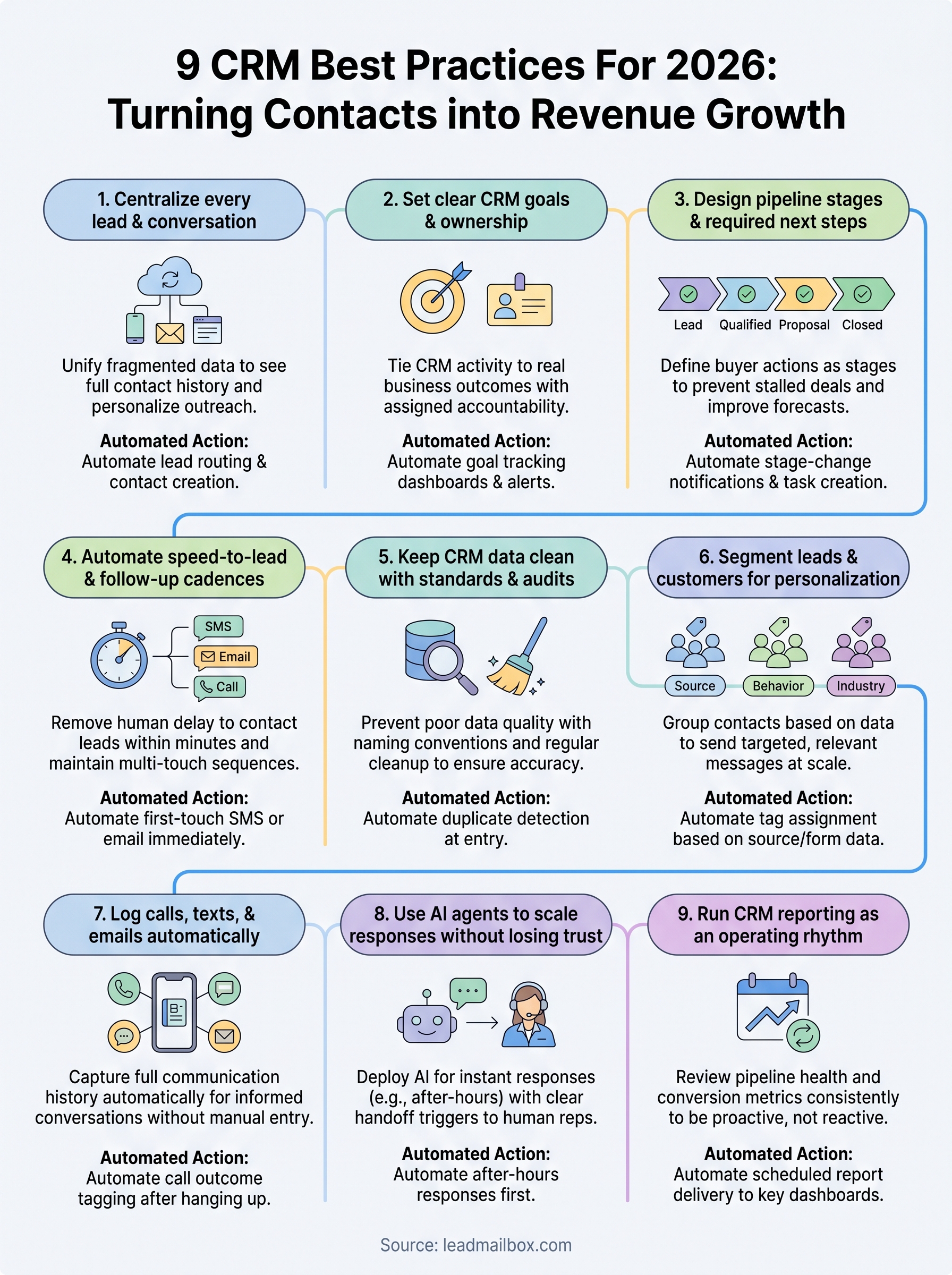
1. Centralize every lead and conversation
If your leads live in one place, your emails in another, and your call notes in a third, you're running blind. Fragmented data forces reps to hunt for context instead of selling, and leads fall through the cracks because no one has a complete picture. Centralizing everything into one system is the foundation every other customer relationship management best practice builds on.
Why it matters in 2026
Buyers interact across multiple channels before they buy. They fill out a form, get a follow-up text, and then call in the next day. If your team can't see that full history in one place, they start every conversation cold. Complete contact timelines help reps personalize outreach, and personalized follow-up converts at a significantly higher rate than generic messaging.
The more channels you use to reach buyers, the more critical it is to have one record where all of that activity is visible.
How to implement it step by step
Start by auditing every lead source your business currently uses, then map each one directly to your CRM. Connect your phone system and email so all activity logs automatically without manual entry.
- List all lead sources (forms, ad platforms, referral partners, inbound calls) and connect each to your CRM
- Link your phone system so call logs sync in real time
- Connect email so every sent and received message appears on the contact record
What to automate first
Once your sources are connected, automatic lead routing is the first thing to configure. New leads should land in the right rep's queue the moment they arrive, with no manual assignment needed.
After routing, automate contact record creation from inbound calls and form submissions. Every lead that enters your system should have a record created immediately, with source and timestamp already filled in.
Metrics to watch
Track these three numbers weekly to confirm centralization is working across your team. If any are consistently off, manual workarounds are almost always the cause.
- Lead source coverage rate: percentage of leads entering CRM automatically vs. manually added
- Record completeness score: how many records have full contact info and a logged first interaction
- Data entry lag: time between a lead's first contact and their CRM entry
Pitfalls to avoid
The most common mistake is connecting the tool but not enforcing its use. Manual workarounds creep back in when reps find it easier to track things in their personal inbox or a private spreadsheet. Set a clear rule that any activity not logged in the CRM didn't happen, and build system adoption into every new rep's onboarding from day one.
2. Set clear CRM goals and ownership
A CRM without defined goals is just a place to store names. Clear objectives and assigned ownership give your team a reason to use the system consistently and a measurable way to know whether your customer relationship management best practices are actually working.
Why it matters in 2026
Sales environments move faster now, and accountability gaps become costly when deals slip because no one knew who was responsible. Tying your CRM activity to real business outcomes like conversion rates or revenue targets gives your team something concrete to optimize.
When everyone on your team knows exactly what they're accountable for, CRM adoption follows naturally.
How to implement it step by step
Start by connecting your CRM goals directly to the sales metrics your team already tracks, then assign a named owner to each one.
- Define 2-3 measurable CRM outcomes (response time, conversion rate, close rate)
- Assign one named owner per goal, not a team or department
- Review progress in your weekly sales meeting
What to automate first
Automate goal tracking dashboards so owners see their numbers without pulling reports manually. Configure automated alerts that fire when a key metric drops below a set threshold, so problems surface before they compound.
Metrics to watch
Track these two numbers to confirm goal ownership is functioning across your team.
- Goal completion rate: percentage of defined CRM targets hit each month
- Owner response rate: how quickly each owner addresses flagged metric drops
Pitfalls to avoid
Avoid assigning goals to groups rather than individuals. Shared ownership almost always means no ownership in practice, and accountability disappears when results slip.
Pick one person, give them clear authority over that metric, and hold them to it every week. If your CRM goals aren't tied to a single name, treat that as your first fix.
3. Design pipeline stages and required next steps
A pipeline without defined stages is just a list of names. When your team can't tell the difference between a lead who just opted in and one who's ready to close, they waste time on the wrong conversations and skip the right ones. Clear pipeline stages and required next steps give every rep a shared map of how deals move forward.

Why it matters in 2026
Buyers move faster and expect reps to keep up. Without structured stages, deals stall because no one knows what required action advances them. Stage clarity directly reduces deal slippage and makes your forecast numbers far more reliable.
Defining a required next step at every stage removes guesswork and keeps your pipeline moving.
How to implement it step by step
Map your actual sales process, then build stages that reflect how deals actually move rather than how you wish they would.
- Name each stage after the buyer action that triggered it, not your internal status label
- Define the required next step before a rep can advance a lead
- Remove any stage your team consistently skips
What to automate first
Automate stage-change notifications so the right rep gets alerted the moment a lead advances. Configure automatic task creation tied to each stage transition so the required next step appears in their queue without manual setup. These are reliable customer relationship management best practices for keeping deals from stalling.
Metrics to watch
Track these numbers weekly to spot where your pipeline breaks down.
- Stage conversion rate: percentage of leads advancing from each stage to the next
- Average time in stage: how long deals sit before moving
Pitfalls to avoid
Avoid building too many stages. More than seven typically creates confusion and slows team adoption. Keep your pipeline lean and actionable, with each stage marking a clear milestone your rep can identify and act on right away.
4. Automate speed-to-lead and follow-up cadences
Speed wins leads. Research consistently shows that contacting a lead within the first five minutes dramatically increases your odds of conversion compared to waiting even an hour. Automating speed-to-lead and follow-up cadences removes human delay from the equation and keeps your pipeline moving without relying on reps to manually trigger every touchpoint.
Why it matters in 2026
Buyers now compare multiple vendors at once, and the first rep to respond often controls the conversation. Slow follow-up is one of the most preventable reasons deals go cold, and it happens most often when teams depend on manual processes to trigger outreach.
The rep who responds first doesn't just win the meeting, they set the standard the buyer uses to measure everyone else.
How to implement it step by step
Map your current follow-up gaps before you automate anything, then build cadences around what actually works in your market.
- Set a speed-to-lead target of five minutes or less for all inbound leads
- Build a multi-touch sequence combining SMS, email, and calls across the first seven days
- Define clear stop conditions so the cadence pauses the moment a lead responds
What to automate first
Automate your first-touch SMS or email the moment a lead enters your CRM. This single step is one of the most impactful customer relationship management best practices you can implement right now, and it requires no rep involvement once configured.
Metrics to watch
- Average speed-to-lead: time from lead creation to first contact attempt
- Cadence completion rate: percentage of leads who receive every scheduled touchpoint
Pitfalls to avoid
Avoid building cadences so aggressive that prospects feel overwhelmed. Space your touchpoints with clear intent and always include a straightforward opt-out path to protect both trust and compliance.
5. Keep CRM data clean with standards and audits
Dirty data costs sales teams more than they realize. Duplicate records, outdated contact info, and inconsistent field entries make every report unreliable and every outreach less targeted. Without data standards and regular audits, your CRM slowly becomes a liability instead of an asset.
Why it matters in 2026
Poor data quality compounds over time. A bad phone number today means a missed follow-up tomorrow, and enough missed follow-ups add up to real lost revenue. Buyers expect you to know who they are when you reach out, and stale or incorrect data makes that impossible.
Clean data is the foundation every other customer relationship management best practice depends on.
How to implement it step by step
Build your standards before you start cleaning, so the rules stick long after the first audit is done.
- Create a field naming convention your whole team follows from day one
- Run a deduplication scan monthly to merge or remove duplicate records
- Set a required field list so records can't be saved with critical info missing
What to automate first
Automate duplicate detection at the point of entry so your CRM flags conflicts before they're created rather than after. This single step prevents the most common source of data clutter without adding work to your team's daily routine.
Metrics to watch
- Duplicate rate: percentage of records flagged as duplicates each month
- Field completion rate: how many records meet your required field standard
Pitfalls to avoid
Avoid running a one-time cleanup and treating it as finished. Data degrades continuously, so schedule quarterly audits and assign a named owner to run them every time without exception.
6. Segment leads and customers for personalization
Sending the same message to every contact in your CRM is one of the fastest ways to kill engagement. Buyers respond to outreach that reflects their specific situation, not a generic blast. Segmentation is how you make that happen at scale without writing individual messages for every lead.
Why it matters in 2026
Personalization is now a baseline expectation, not a differentiator. When your outreach matches a buyer's industry, behavior, or lead source, your response rates climb. Generic messaging, by contrast, gets ignored or unsubscribed at a rate that damages your long-term deliverability.
Segmentation turns one large list into smaller, higher-converting audiences your team can actually speak to.
How to implement it step by step
Start with the data you already have in your CRM before building new fields or tags.
- Group leads by source (paid ad, referral, inbound call, partner)
- Add a behavioral tag when a contact opens an email, clicks a link, or requests a callback
- Create separate sequences for each segment so messaging matches context
What to automate first
Automate tag assignment based on lead source and form submission data. This applies one of the most scalable customer relationship management best practices without requiring your team to manually categorize every contact.
Metrics to watch
- Segment open rate: email open rate broken down by segment
- Conversion rate by segment: which groups convert at the highest rate
Pitfalls to avoid
Avoid creating too many micro-segments early on. Start with three to five clear groups, measure results, and add complexity only once your core segments are performing consistently.
7. Log calls, texts, and emails automatically
Manual activity logging is where CRM accuracy quietly breaks down. When reps have to remember to log every call and paste in every email thread, they don't, and your contact records end up half-empty. Automatic logging solves this by capturing every interaction the moment it happens, so your data reflects reality instead of what a rep had time to document.
Why it matters in 2026
Your team needs full communication history to have informed conversations with leads. Without it, reps repeat questions, miss context, and lose trust with buyers who expect you to remember what was already discussed. These gaps are entirely preventable, and closing them is one of the most underrated customer relationship management best practices available.
Automatic logging turns every call, text, and email into a searchable, actionable record without adding work to your team's day.
How to implement it step by step
Connect your communication tools directly to your CRM before you expect consistent logging from your team.
- Link your phone system so calls log with duration, direction, and outcome
- Connect your SMS platform so every inbound and outbound text syncs to the contact record
- Integrate your email client so sent and received messages appear automatically
What to automate first
Automate call outcome tagging so reps select a result, like answered, voicemail, or callback requested, immediately after hanging up, with the log already created.
Metrics to watch
- Activity log rate: percentage of contacts with at least one logged interaction
- Unlogged call rate: calls completed outside the CRM system
Pitfalls to avoid
Avoid letting reps use personal phones or email accounts for lead communication. If the activity doesn't run through your connected tools, it won't log, and your records will have gaps no audit can fix.
8. Use AI agents to scale responses without losing trust
AI agents let your team handle more conversations without adding headcount, but only if you deploy them in ways that protect the buyer experience. The wrong setup creates robotic exchanges that damage trust faster than a slow response ever would.

Why it matters in 2026
Buyers now expect instant responses at any hour, and your human team can't cover every window. AI agents fill that gap without round-the-clock staffing, which makes them one of the most practical customer relationship management best practices you can implement today.
The goal isn't to replace your reps with AI. It's to make sure no lead ever waits without a response.
How to implement it step by step
Deploy AI agents where speed matters most and human nuance is less critical.
- Configure AI to handle first-touch SMS responses when a lead submits a form
- Set AI to answer inbound calls after hours with a clear, natural script
- Define handoff triggers so a human rep takes over when a lead signals buying intent
What to automate first
Automate your after-hours response first. This single deployment closes the most common gap in lead coverage and improves response time metrics without changing your team's daily workflow.
Metrics to watch
- AI response rate: percentage of leads receiving an AI-triggered first response
- Handoff conversion rate: how often AI-initiated conversations convert to human-led meetings
Pitfalls to avoid
Avoid deploying AI agents without clear escalation rules. If a buyer asks a complex question and the AI keeps responding, you lose the deal and the trust. Set firm trigger points that transfer the conversation to a rep automatically.
9. Run CRM reporting as an operating rhythm
Most sales teams pull CRM reports when something goes wrong. By then, the damage is already done. Consistent reporting as a fixed operating rhythm keeps your team proactive rather than reactive, and it turns your CRM from a storage tool into a real decision-making engine.
Why it matters in 2026
Running reports on a fixed schedule gives your team early warning signals before small problems compound into large ones. Sales cycles are shorter and buyer expectations are higher, so lagging indicators reviewed only monthly are often too late to act on.
Reporting is only useful if it happens consistently enough to catch problems while you can still fix them.
How to implement it step by step
Build your reporting rhythm around your existing meeting schedule so it sticks without requiring new habits from scratch.
- Review pipeline health metrics every week in your sales meeting
- Run a monthly conversion rate report by lead source and rep
- Schedule a quarterly review to assess goal progress and adjust targets
What to automate first
Automate scheduled report delivery so key dashboards land in your team's inbox before each meeting. This removes the step most teams skip and is one of the simplest customer relationship management best practices you can put into place right away.
Metrics to watch
Focus on two numbers to start, then add more once your review rhythm is consistent.
- Pipeline velocity: average time from lead creation to close
- Win rate by source: which lead sources convert at the highest rate
Pitfalls to avoid
Avoid tracking too many metrics at once. Pick four to six numbers your team can actually act on, and resist adding new reports until your core rhythm holds steady across at least two full quarters.
Where to start this week
Nine practices is a lot to absorb at once, but you don't need to implement all of them this week. Pick the one gap that's costing you the most right now and close it first. If leads are slipping before anyone follows up, start with speed-to-lead automation. If your data is unreliable, run a deduplication scan before anything else and build from there.
The underlying principle across all nine of these customer relationship management best practices is the same: structure eliminates guesswork, and consistency compounds over time. Start with one fix, measure it for two weeks, then move to the next.
Looking for a platform that handles lead aggregation, automated follow-up, AI agents, and reporting in one place? LeadMailbox is built exactly for that. You get your entire sales operation under one roof without stitching together separate tools, and without paying enterprise prices to do it.