

6 Customer Relationship Management Benefits for Sales Teams
Most sales teams juggle spreadsheets, sticky notes, and a half-dozen apps just to keep track of their leads. It works, until it doesn't. Deals slip through the cracks, follow-ups get missed, and revenue stalls. That's where the customer relationship management benefits start to matter. A solid CRM doesn't just store contact info; it gives your team a structured system to close more deals with less friction.
At LeadMailbox, we've spent over 20 years helping sales teams organize leads from multiple sources, run outreach campaigns, and manage every customer interaction from a single platform. We've seen firsthand what happens when teams move from scattered processes to a unified system, and the results speak clearly in their numbers.
Below, we break down six specific ways CRM software strengthens sales teams. Whether you're evaluating your first CRM or reconsidering your current setup, these benefits should give you a concrete framework for understanding what the right tool can do for your pipeline and your bottom line.
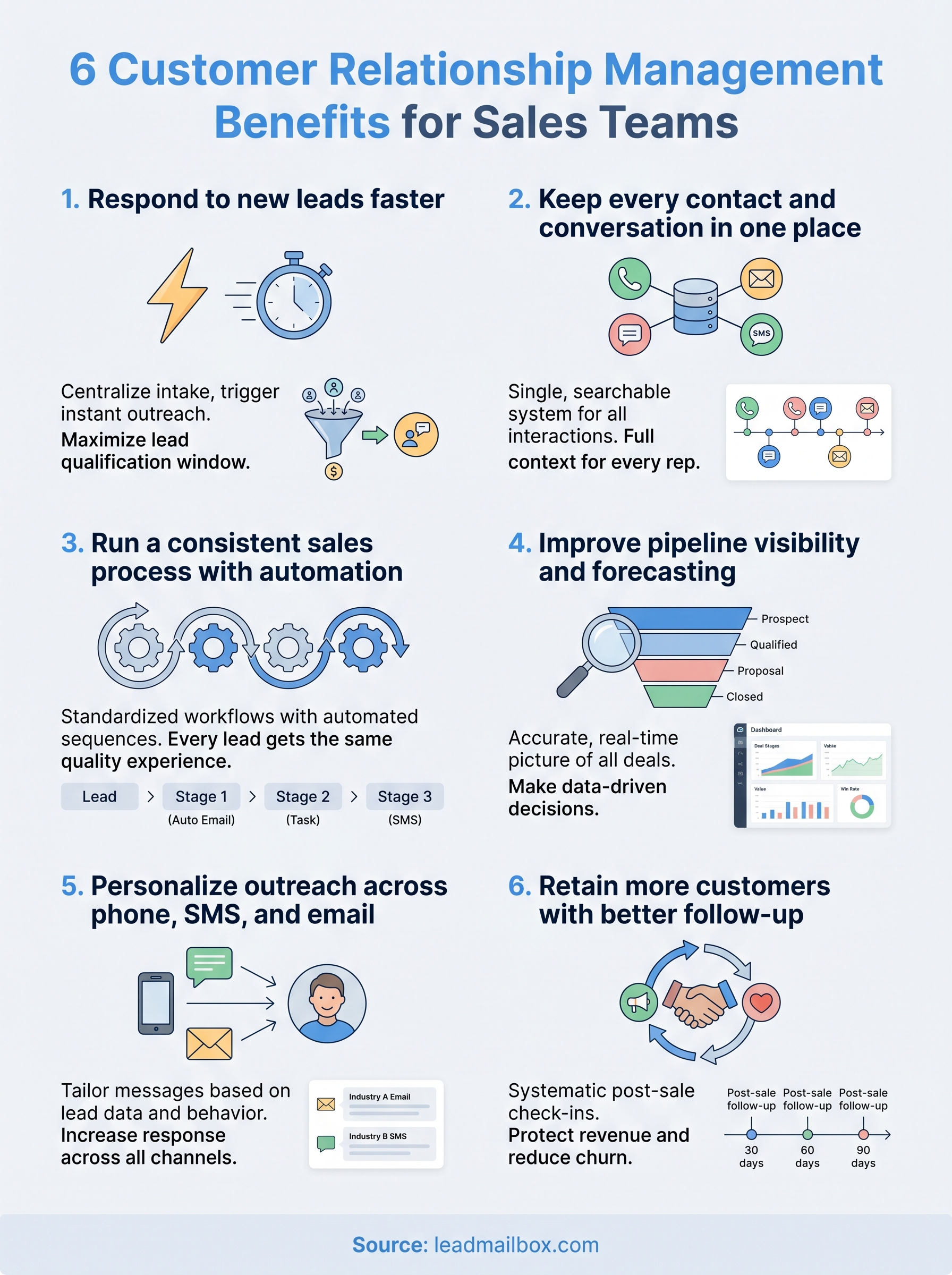
1. Respond to new leads faster
Speed is one of the biggest levers in sales. Studies consistently show that contacting a lead within the first hour makes you far more likely to qualify them than reaching out later. Most sales teams lose that window because they juggle multiple lead sources with no automated system to push new contacts into immediate action. A CRM solves this by centralizing lead intake and triggering outreach the moment a new contact arrives.

Why this benefit matters for sales teams
When a lead fills out a form or calls your number, their interest peaks at that exact moment. Every minute you wait drops your odds of making a real connection. The longer the delay, the colder the lead gets, and your competitors are often reaching out to the same prospects from the same lead sources at nearly the same time.
The first sales rep to make genuine contact has a measurable advantage in converting that lead into a conversation.
CRM features that enable it
A good CRM pulls leads from multiple sources automatically into one dashboard, so your team sees new contacts the moment they arrive. Features like insta-call, click-to-call, and automated SMS triggers let you act on a lead in seconds rather than minutes. AI agents can respond on your behalf while your reps are tied up on other calls, so no lead sits idle.
How to implement it in your workflow
Start by connecting all your lead sources to your CRM so every new contact lands in one centralized queue. Then configure an automated notification or instant-dial rule that fires the moment a lead arrives. Train your team to treat new lead alerts as top priority and respond within a defined window, ideally under five minutes.
KPIs to track
Monitoring the right numbers shows you whether speed improvements are actually converting into results. Watch these metrics closely:
- Lead response time: Average minutes between lead arrival and first contact attempt
- Contact rate: Percentage of new leads reached on the first try
- Speed-to-first-conversation: Time from lead creation to a live two-way exchange
2. Keep every contact and conversation in one place
Scattered data kills deals. When call notes live in one app, emails in another, and lead details in a spreadsheet, your team wastes time hunting for context instead of selling. One of the clearest customer relationship management benefits is that it pulls every contact record and conversation thread into a single, searchable system your whole team can access.
Why this benefit matters for sales teams
When a rep picks up the phone, they need to know the last touchpoint instantly. Without a unified record, they go in blind, which erodes trust and damages the conversation before it even gets started. Your prospects notice when you don't remember them, and that gap costs you deals.
A complete contact history lets your reps pick up exactly where the last conversation left off, every single time.
CRM features that enable it
A CRM logs every call, SMS, and email automatically against the right contact record. Shared timelines and activity feeds mean the entire team sees what's happened with each lead, even if a rep changes or is unavailable.
How to implement it in your workflow
Require your team to log every interaction inside the CRM, not in personal notes or separate tools. Set a clear standard for how contact records get updated after each call, message, or meeting.
KPIs to track
- Data completeness rate: Percentage of records with full interaction history
- Rep adoption rate: How consistently your team logs activities in the CRM
3. Run a consistent sales process with automation
Every rep on your team should follow the same proven steps when working a lead, but without automation, that rarely happens. Manual processes drift over time, and inconsistency quietly costs you conversions. Automation keeps your sales workflow standardized so every lead gets the same quality experience regardless of who handles it.
Why this benefit matters for sales teams
Inconsistent follow-up is one of the top reasons deals fall apart. One rep sends three follow-up emails; another sends one. These gaps add up across your pipeline and make it hard to diagnose what's actually working. A CRM with automation removes that variability by enforcing the same sequence of actions every time.
A repeatable process gives you a baseline to measure, improve, and scale without relying on individual habits.
CRM features that enable it
Workflow automation tools let you build step-by-step sequences triggered by lead status, activity, or time elapsed. Features like automated email drips, task assignments, and follow-up reminders fire without any manual input, keeping every lead moving forward on schedule.
How to implement it in your workflow
Map out your current sales stages and identify where leads typically stall or get dropped. Then build automation rules that fill those gaps, such as a follow-up SMS after a missed call or a task reminder after no contact in 48 hours.
KPIs to track
- Follow-up completion rate: Percentage of leads that receive every scheduled touchpoint
- Stage conversion rate: How many leads advance from one pipeline stage to the next
4. Improve pipeline visibility and forecasting
Without a clear view of your pipeline, you're making decisions based on gut feelings instead of real data. One of the most underrated customer relationship management benefits is that it gives you an accurate, real-time picture of where every deal stands, which makes forecasting far more reliable and your planning more focused.

Why this benefit matters for sales teams
Guessing at your close rate or projected revenue leads to poor hiring decisions, missed quotas, and misallocated resources. When you can see exactly how many deals sit in each stage, you can make smart calls about where to focus energy and when to accelerate efforts before the month closes.
Accurate pipeline data shifts your sales strategy from reactive to intentional.
CRM features that enable it
A CRM gives you visual pipeline boards that display every deal by stage, value, and close probability. Reporting dashboards and deal analytics let you spot bottlenecks before they stall your numbers and give leadership a reliable snapshot for planning conversations.
How to implement it in your workflow
Start by defining clear pipeline stages that reflect your actual sales process, not a generic template. Then require your reps to update deal status after every interaction so your data stays current and your forecast reflects real activity rather than outdated assumptions.
KPIs to track
- Pipeline coverage ratio: Total pipeline value versus your revenue target
- Win rate by stage: Where deals drop off most often
- Forecast accuracy: How close your projections land to actual closed revenue
5. Personalize outreach across phone, SMS, and email
Generic outreach gets ignored. When you send the same message to every lead regardless of where they came from or how they've interacted with you, response rates drop and your brand feels transactional. One of the clearest customer relationship management benefits is that a CRM gives you the data and tools to reach each lead the right way, through the right channel, at the right time.
Why this benefit matters for sales teams
Prospects respond better when outreach feels relevant to them specifically. Personalized messages drive higher engagement across every channel, and your team can only personalize effectively when they have full context on each contact before reaching out.
The more your outreach reflects what a lead actually needs, the more likely they are to respond and move forward.
CRM features that enable it
A CRM stores lead source, communication history, and behavioral data so your reps can tailor every call script, SMS, and email. Multi-channel campaign tools let you build sequences that mix phone, text, and email based on how each lead has already responded.
How to implement it in your workflow
Segment your leads by source, industry, or engagement behavior and build channel-specific templates for each group. Use your CRM data to identify whether a prospect responds better to SMS or email before defaulting to a single approach.
KPIs to track
- Response rate by channel: Which outreach method drives the most replies per segment
- Engagement rate per sequence: How different lead groups respond to tailored multi-channel messaging
6. Retain more customers with better follow-up
Winning a customer is only half the job. Keeping them requires consistent, timely follow-up that most sales teams fail to deliver once the deal closes. A CRM makes that follow-up systematic rather than accidental.
Why this benefit matters for sales teams
Retention is cheaper than acquisition. Losing an existing customer to a competitor because you went silent after closing is one of the most avoidable revenue drains a sales team can face. Among the practical customer relationship management benefits, structured post-sale follow-up directly protects the revenue you've already worked to earn.
Customers who feel ignored after signing are far more likely to churn than those who receive consistent, relevant contact.
CRM features that enable it
A CRM lets you build automated follow-up sequences that trigger after deal closure, sending check-ins, renewal reminders, or satisfaction messages without manual effort. Contact activity logs also surface when a customer has gone quiet, giving your team a clear signal to re-engage before the relationship cools.
How to implement it in your workflow
Create a post-sale workflow in your CRM that kicks off automatically once a deal moves to closed-won. Include scheduled touchpoints at 30, 60, and 90 days with channel-specific templates tailored to each customer segment.
KPIs to track
- Customer retention rate: Percentage of customers who renew or stay active
- Churn rate: How many customers disengage after the initial close
Wrap-up
The six customer relationship management benefits covered here share a common thread: they all replace guesswork and manual effort with systems that actually scale. Faster lead response, unified contact data, consistent automation, pipeline clarity, personalized outreach, and structured follow-up each address a real gap that costs sales teams revenue every single day. Together, they give your team a repeatable framework for converting more leads without adding headcount or complexity.
The platform you choose matters. You need a CRM that handles lead aggregation, multi-channel outreach, and automation in one place rather than across five disconnected tools. That's exactly what LeadMailbox is built to do. With features like power dialing, AI-powered SMS agents, and email campaign tools all under one subscription, your team spends less time managing software and more time closing deals. If you're ready to put these benefits to work, explore what LeadMailbox can do for your sales team.