

10 Best CRM Software for Small Business (Features & Prices)
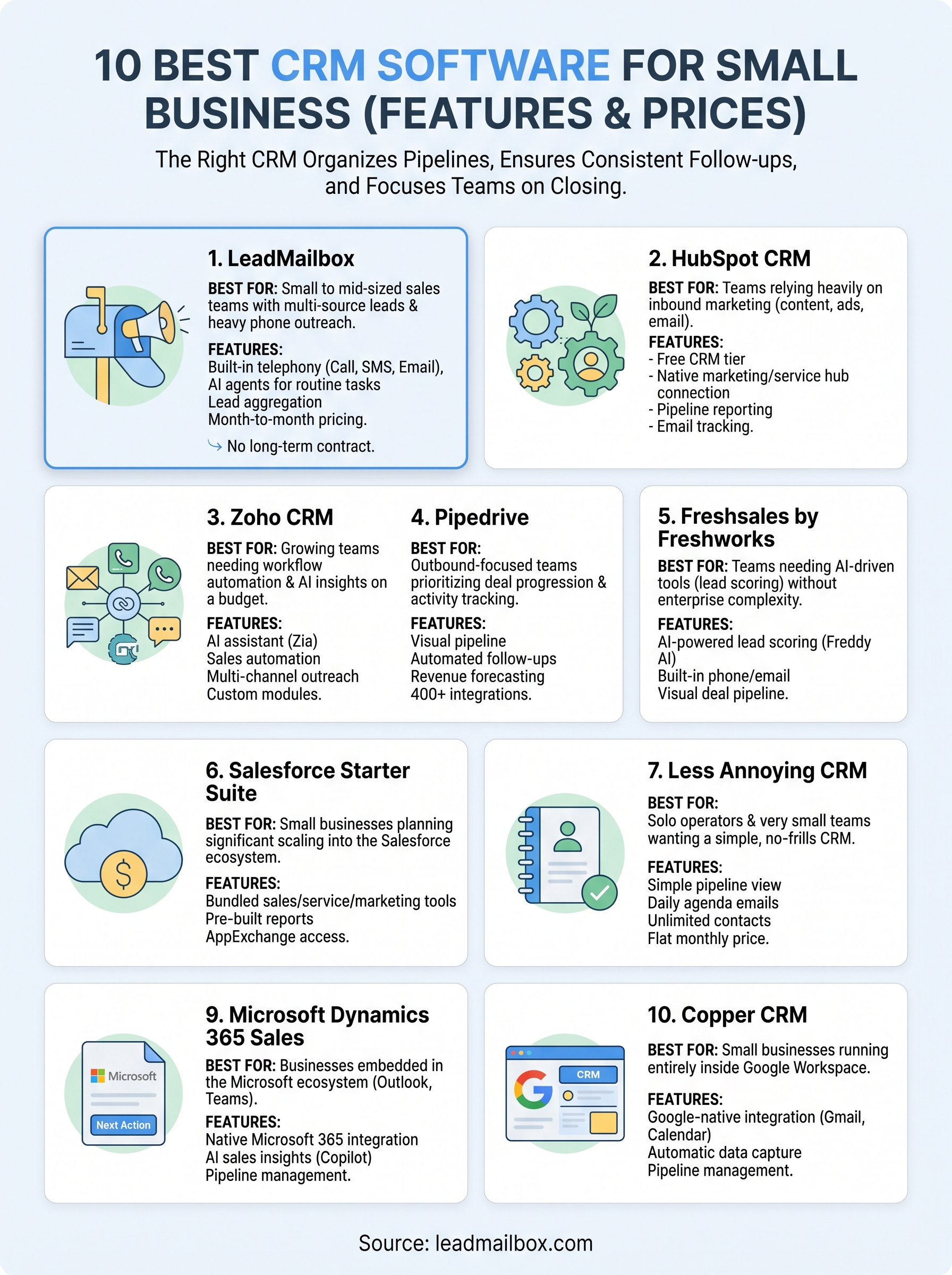
Picking the best CRM software for small business isn't just a tech decision, it's a revenue decision. The right platform keeps your pipeline organized, your follow-ups consistent, and your team focused on closing instead of clicking around. The wrong one? It drains your budget and collects digital dust within weeks.
Most small businesses don't need a bloated enterprise system. They need something that actually fits how they sell, whether that's managing inbound leads, running outreach campaigns, or keeping track of conversations across phone, email, and text. At LeadMailbox, we've spent over 20 years building exactly that kind of tool, so we know what separates a CRM that works from one that just looks good on a features page.
We put together this list of 10 CRM platforms worth considering in 2026, with a breakdown of features, pricing, and who each one is best for. Whether you're a solo founder or managing a growing sales team, this guide will help you make a confident choice without wading through dozens of tabs and free-trial signups.
1. LeadMailbox
LeadMailbox has been in the lead management space since 2004, giving it over two decades of real-world refinement. This is not a startup product with a polished landing page and shaky infrastructure. It is a battle-tested platform built specifically for sales teams that need to move fast on leads without juggling five different tools.

What it is
The platform combines CRM functionality with built-in communication tools, including telephony, SMS, and email. Rather than treating those features as add-ons, LeadMailbox unifies them in a single workspace so your team can manage contacts, run outreach campaigns, and track deals without switching between applications. AI agents handle routine tasks like responding to texts, answering inbound calls, and drafting emails, cutting down on manual work across the board.
Best for
This platform works best for small to mid-sized sales teams that generate leads from multiple sources and need one system to organize and convert them. If your business depends on phone-based outreach, inbound lead routing, or high-volume follow-up, LeadMailbox fits that workflow directly. It suits businesses that want to avoid enterprise CRM complexity and cost while still getting serious communication infrastructure.
If you're looking for the best CRM software for small business with telephony built in rather than bolted on, LeadMailbox is worth putting at the top of your list.
Standout features
LeadMailbox covers a toolset that most CRMs require you to purchase separately, which matters when you're trying to keep your stack lean and your budget under control. The built-in communication tools alone replace several point solutions that most small sales teams are currently paying for individually.
- Click-to-call, power dialer, and insta-call for fast phone-based outreach
- Inbound number management for handling incoming calls without a separate phone system
- SMS and email campaigns with personalization support
- AI agents that text, call, and email on your behalf
- Lead aggregation from hundreds of integrated lead partners
- Month-to-month subscription with no long-term contract
Pricing and plan notes
Pricing runs on a month-to-month subscription model, so you're not locked into an annual contract the moment you sign up. This matters for small businesses managing tight budgets or testing whether a new tool fits their process. The all-in-one setup also reduces what you'd otherwise spend combining separate telephony, email, and dialer tools, making the total cost of ownership lower than it might appear at first glance.
2. HubSpot CRM
HubSpot is one of the most recognized names in the CRM space, and its free entry point makes it a common first step for small businesses building out their sales process. The platform has grown into a broad ecosystem covering marketing, sales, and customer service, all connected through a central CRM layer.
What it is
The core product is a cloud-based CRM that handles contact management, deal tracking, and pipeline visibility. It connects natively with HubSpot's marketing and service hubs, giving you visibility across the full customer journey without needing third-party integrations for basic handoffs between teams.
Best for
When evaluating the best crm software for small business, HubSpot stands out for teams that rely heavily on inbound marketing. If your leads come from content, paid ads, or email campaigns and you want those channels feeding directly into your CRM without extra setup, HubSpot handles that natively.
HubSpot's free tier is genuinely useful for early-stage businesses, but growth quickly pushes you into paid plans with steep price jumps.
Standout features
- Free CRM with contact and deal management included
- Email tracking and meeting scheduling built into the platform
- Native connection to HubSpot's marketing and service hubs
- Pipeline reporting and activity dashboards
- Live chat and chatbot tools available on the free plan
Pricing and plan notes
The free plan covers basic CRM needs well, but sales automation and advanced reporting require a paid upgrade. Starter plans begin around $15 per user per month, and Professional tiers jump significantly, often reaching several hundred dollars monthly as your team scales.
3. Zoho CRM
Finding the best crm software for small business on a tight budget is where Zoho CRM earns its reputation. The platform delivers real depth across sales automation, analytics, and multi-channel communication at a price that most small teams can actually afford.
What it is
Zoho CRM is a cloud-based sales platform managing the full cycle from lead capture to deal close. It connects with Zoho Mail, Zoho Desk, and dozens of other Zoho products.
Your sales and support data flows between those products without custom integrations, which matters when your team has limited technical bandwidth.
Best for
This platform works well for growing teams that need workflow automation without paying enterprise-level prices. It suits businesses that want AI-driven insights and multi-channel outreach in a single system, especially if they're already using other Zoho tools.
If cost is a constraint but your sales process demands real automation, Zoho CRM gives you more per dollar than most alternatives in this range.
Standout features
Zoho packs tools into its tiers that rivals typically reserve for premium plans. The AI assistant Zia handles sales predictions and email sentiment analysis, while custom module support lets your team adapt the platform without writing code.
- AI assistant (Zia) for predictions, anomaly detection, and sentiment analysis
- Workflow automation across leads, contacts, and deals
- Multi-channel outreach via email, phone, social, and live chat
- Custom modules and fields without coding
- Built-in analytics and forecasting dashboards
Pricing and plan notes
Paid plans start at $14 per user per month billed annually, with a free plan available for up to three users. The Professional tier at $23 per user per month covers most automation needs a small team will encounter.
4. Pipedrive
Pipedrive takes a sales-first approach to CRM design, building everything around the idea that your team should spend time selling, not maintaining software. The platform prioritizes pipeline visibility above everything else, which makes it a practical choice for small teams that live and die by their deal stages.

What it is
Pipedrive is a visual, pipeline-driven CRM built specifically for sales professionals. Instead of loading the platform with marketing features your team won't use, it keeps the focus on deal progression and activity tracking. You get a clear view of where every lead sits in your sales process at any given moment, with automated reminders to keep follow-ups from falling through.
Best for
Pipedrive fits outbound-focused sales teams that manage multiple deals simultaneously and need a simple way to track each one. If your team handles a steady flow of prospects and you want a platform that prioritizes deal management over everything else, Pipedrive delivers that without much configuration. It is one of the cleaner options when evaluating the best crm software for small business for pure pipeline management.
Pipedrive works best when your team already knows how to sell and just needs a system that stays out of the way.
Standout features
- Visual drag-and-drop pipeline for managing deal stages
- Activity reminders and automated follow-up scheduling
- Email integration with open and click tracking
- Revenue forecasting and goal tracking dashboards
- 400+ integrations with third-party tools
Pricing and plan notes
Plans start at $14 per user per month billed annually on the Essential tier. The Professional plan runs $49 per user per month and unlocks AI features, contract management, and deeper reporting tools your team will likely want once the pipeline grows.
5. Freshsales by Freshworks
Freshsales is a sales CRM built by Freshworks, designed for teams that want AI-driven tools without enterprise-level complexity. The platform packs pipeline management, built-in communication, and lead scoring into a single interface that most small sales teams can set up and start using the same day.
What it is
Built as a cloud-based CRM, Freshsales combines contact management, deal tracking, and built-in phone and email tools in one workspace. The platform's AI assistant, Freddy, analyzes contact behavior and engagement signals to score leads automatically.
Your team sees exactly which prospects deserve attention first, so you spend less time guessing and more time on conversations that are likely to convert.
Best for
Freshsales fits teams searching for the best crm software for small business that includes real AI assistance without a steep price tag. If your process relies on quick lead qualification and consistent follow-up, the built-in scoring and workflow automation handle the repetitive parts so your reps can focus on closing.
Freshsales gives smaller teams access to AI lead scoring that most platforms lock behind enterprise pricing.
Standout features
- AI-powered lead scoring (Freddy AI) based on behavior and engagement signals
- Built-in phone and email tools with full activity tracking
- Visual deal pipeline with drag-and-drop stage management
- Workflow automation for follow-ups and routine tasks
- Mobile app for managing deals outside the office
Pricing and plan notes
Freshsales offers a free plan supporting up to three users, which works for very early-stage teams getting started. Paid tiers begin at $9 per user per month on the Growth plan billed annually, with the Pro plan at $39 per user per month adding advanced AI features and deeper reporting capabilities.
6. Salesforce Starter Suite
Salesforce is the most widely recognized name in CRM, and the Starter Suite is its answer to small businesses that want access to that ecosystem without committing to an enterprise contract. It packages core CRM capabilities into a simpler, lower-cost entry point that gets your team running on the same platform as larger organizations.
What it is
Salesforce Starter Suite is a bundled CRM package that includes sales, service, and marketing tools in a single plan. It runs on the same underlying Salesforce platform used by enterprise teams, which means your data and workflows sit inside a proven, scalable infrastructure from day one. The tradeoff is that even the simplified version carries more complexity than most lightweight CRMs on this list.
Best for
This option suits small businesses that plan to scale significantly and want to grow into the Salesforce ecosystem rather than migrate away from a simpler tool later. If your industry or future partners run on Salesforce, starting here means your team builds familiarity with a platform that will still fit when your operations expand. It is a solid pick when evaluating the best crm software for small business with long-term growth in mind.
Salesforce Starter Suite is most valuable when your five-year plan includes significant team growth or enterprise client relationships.
Standout features
- Contact, account, and opportunity management in a unified workspace
- Built-in email tools with activity tracking
- Pre-built reports and dashboards for pipeline visibility
- Access to the broader Salesforce AppExchange integration library
Pricing and plan notes
The Starter Suite runs $25 per user per month billed annually, with a cap of 10 users on that tier. Moving beyond those limits pushes you into Pro Suite or higher, where pricing increases noticeably.
7. Less Annoying CRM
Less Annoying CRM lives up to its name by stripping out complexity that most small businesses never use anyway. It is built specifically for small teams that want a functional, no-frills CRM without the learning curve or feature overload that comes with larger platforms.
What it is
Built specifically for small businesses, Less Annoying CRM is a simple, web-based contact and pipeline manager. The platform prioritizes ease of use over feature volume at every turn.
You get contact management, pipeline tracking, and a daily agenda view that surfaces exactly what your team needs to act on each day, without configuration headaches or a complicated setup process standing in the way.
Best for
This platform fits solo operators and very small sales teams that need basic pipeline management without paying for features they will never touch. If your process is straightforward and you want a tool your whole team can learn in an afternoon, Less Annoying CRM delivers that without compromise.
Less Annoying CRM proves that you do not need a complex system to run an effective sales process.
It stands out as one of the most accessible options when searching for the best crm software for small business on a minimal budget, especially when simplicity and low cost are the top priorities.
Standout features
- Simple pipeline view with drag-and-drop stage management
- Daily agenda emails showing tasks and follow-up reminders
- Unlimited contacts and pipelines on every plan
- Mobile-friendly interface with no separate app required
Pricing and plan notes
Less Annoying CRM charges a flat $15 per user per month with no annual contract required. There are no tiered plans to navigate, which makes budgeting straightforward for small teams.
8. OnePageCRM
OnePageCRM organizes your entire sales process around one principle: every contact needs a next action attached to it. This keeps your team focused on what to do today rather than reviewing static lead lists that sit untouched for weeks.
What it is
Built around an action-based selling methodology, OnePageCRM replaces the traditional contact database with a dynamic action stream that prioritizes leads based on the next step your team needs to take. The interface stays deliberately simple, pushing your reps toward consistent follow-through on every deal in the pipeline rather than spending time navigating a cluttered dashboard.
Best for
This platform works well for small sales teams that struggle with follow-up consistency. If your biggest challenge is leads going cold because no one took the next step, OnePageCRM addresses that problem directly. It is a practical option when evaluating the best crm software for small business that keeps your team accountable without overcomplicating the process.
OnePageCRM's action-stream model is most valuable for teams that lose deals to inconsistent follow-up rather than poor prospecting.
Standout features
OnePageCRM keeps its feature set focused rather than broad, giving your team tools that directly support the action-based workflow without unnecessary clutter getting in the way.
- Next Action system that assigns a clear task to every contact
- Pipeline management with deal tracking and forecasting
- Built-in email integration with activity logging
- Mobile app for managing follow-ups on the go
- Integrations with Mailchimp, Zapier, and QuickBooks
Pricing and plan notes
OnePageCRM offers a 21-day free trial with no credit card required. Paid plans start at $9.95 per user per month billed annually, with the Business plan at $19.95 per user per month adding advanced reporting and bulk email capabilities.
9. Microsoft Dynamics 365 Sales
Microsoft Dynamics 365 Sales is a CRM platform built directly into the Microsoft ecosystem, making it a natural fit for teams already running on Teams, Outlook, or Excel. It brings enterprise-grade sales intelligence to organizations that want serious depth without switching away from the tools they rely on daily.

What it is
Dynamics 365 Sales is a cloud-based CRM that handles contacts, opportunities, and forecasting across the full sales cycle. It connects natively with Microsoft 365 apps like Outlook, Teams, and SharePoint, so your team logs activity without leaving familiar tools. The platform also layers in AI-powered insights through Microsoft Copilot, giving reps context on deal health and next steps automatically.
Best for
This platform suits small businesses already embedded in the Microsoft ecosystem that want their CRM to work seamlessly with the software they use daily. If you're comparing the best crm software for small business and your team lives in Outlook and Teams, Dynamics 365 removes the friction of connecting separate tools.
Dynamics 365 delivers the most value when your team already relies on Microsoft 365, since native integration removes a significant setup burden.
Standout features
Dynamics 365 keeps its feature set tightly connected to the Microsoft tools your team uses every day, reducing time spent switching between applications. The AI capabilities through Copilot separate it from most CRMs at a comparable price point.
- Native Microsoft 365 integration across Outlook, Teams, and SharePoint
- AI-driven sales insights via Microsoft Copilot
- Pipeline management with opportunity tracking and forecasting
- Customizable dashboards and role-based reporting
Pricing and plan notes
The Sales Professional plan starts at $65 per user per month, with the Premium tier at $95 per user per month adding full Copilot AI capabilities and deeper sales intelligence tools for teams that need more than basic pipeline tracking.
10. Copper CRM
Copper CRM takes a different approach from most platforms on this list by building its entire experience around Google Workspace. If your team runs on Gmail and Google Calendar, Copper sits directly inside those tools rather than asking you to open a separate application every time you need to log a contact or update a deal.
What it is
Copper is a Google-native CRM that lives inside Gmail and syncs automatically with your Google Workspace data. Contact details, email threads, and calendar events pull into Copper without manual entry, which removes one of the most common reasons sales teams fall behind on CRM hygiene. The platform handles pipeline management, contact tracking, and basic reporting from within the tools your team already uses daily.
Best for
Copper fits small businesses that run their entire operation inside Google Workspace and want a CRM that connects without friction. If you're evaluating the best crm software for small business and your team resists tools that sit outside Gmail, Copper solves that problem directly.
Copper delivers the most value when your team's workflow is already built around Google Workspace and switching applications is a real adoption barrier.
Standout features
- Automatic data capture from Gmail, Calendar, and Google Drive
- Pipeline management with drag-and-drop deal stages
- Native Google Workspace integration with no manual sync required
- Task automation and follow-up reminders built into the inbox view
Pricing and plan notes
Copper's Starter plan begins at $9 per user per month billed annually. The Professional plan runs $69 per user per month and adds workflow automation and deeper reporting features that growing teams will need as their pipeline expands.
Next steps
You now have a clear view of ten platforms that each solve the CRM problem in a different way. The best crm software for small business comes down to how your team actually sells. If you rely on phone outreach and need built-in communication tools, that narrows your list fast. If you live inside Google Workspace or Microsoft 365, your decision practically makes itself.
Most teams overpay for features they never use or buy a lightweight tool that stops fitting their process six months in. Getting the match right from the start saves you a painful migration later. Before committing to any platform, map your actual sales workflow against what each tool handles natively.
If your business depends on lead management, outbound calling, and multi-channel follow-up without stitching together separate tools, LeadMailbox is worth a closer look. It handles all of that in one place, on a month-to-month plan with no long-term contract required.