

15 Best Contact Management Software for 2026 (Compared)
Every sales team eventually hits the same wall: leads scattered across spreadsheets, inboxes, and sticky notes, with no clear system tying it all together. When that happens, deals slip through the cracks and follow-ups get missed. Finding the best contact management software can fix that problem, but picking the right one from dozens of options is its own challenge.
The right tool should do more than store names and phone numbers. It should help you track every interaction, organize contacts by source or stage, and make it easy for your team to act on opportunities quickly. Some tools lean heavily into CRM territory, while others stay lightweight and focused. What matters most is how well the software fits the way your team actually works.
At LeadMailbox, we've spent over 20 years helping sales teams aggregate, manage, and convert leads from multiple sources, so we know exactly what to look for in contact management tools. We put together this comparison of 15 standout options for 2026, breaking down their features, pricing, and ideal use cases so you can make a confident choice without the guesswork.
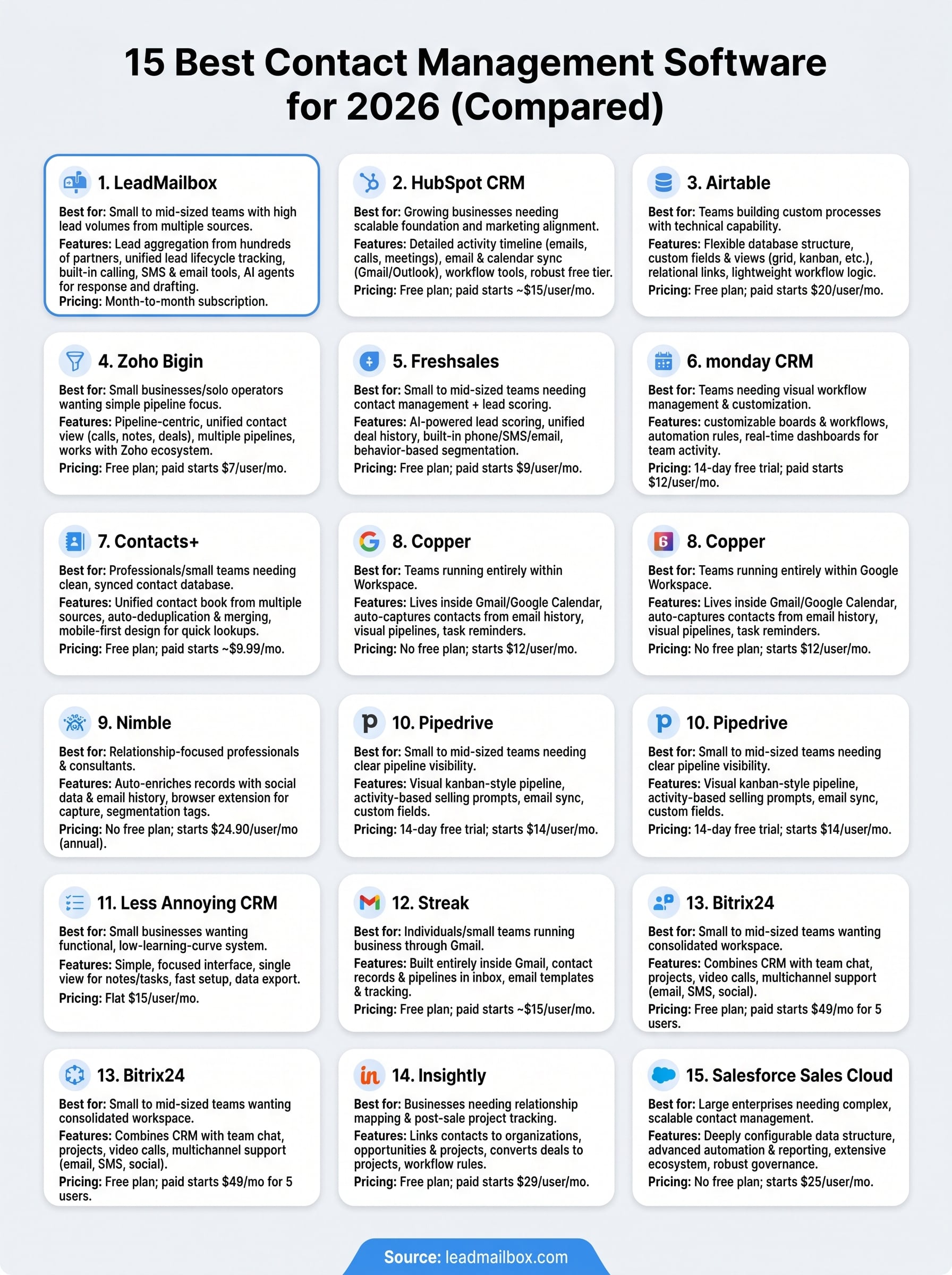
1. LeadMailbox
LeadMailbox has been a dedicated lead management and sales enablement platform since 2004, making it one of the longest-standing systems in this space. Unlike tools built purely for contact storage, it connects contact management directly to outreach and conversion, giving sales teams a unified system for the full lead lifecycle rather than a fragmented stack.
Best for
Small to mid-sized sales teams that manage high volumes of leads from multiple sources will get the most out of LeadMailbox. If your team relies on phone-based sales and needs both organization and outreach tools in one place, this platform was built specifically for that kind of workflow.
Standout contact management features
The platform lets you aggregate contacts from hundreds of lead partners and organize them by source, status, and stage without manual imports. Your team gets a clear view of every contact's full history, making it straightforward to prioritize follow-ups and avoid duplicate outreach across a busy pipeline.
LeadMailbox connects lead aggregation, contact tracking, and multichannel outreach in one system, so you skip the cost and friction of assembling separate tools.
Calling, SMS, and email tools
For teams looking at the best contact management software that includes outreach built in, LeadMailbox stands out with a complete telephony suite covering click-to-call, a power dialer, insta-call, and inbound number management. You can also run personalized SMS and email campaigns directly from the platform, keeping every communication tied to the right contact record.

AI agents and automation
LeadMailbox's AI agents can respond to incoming text messages, handle inbound calls, and draft emails on your behalf. This lets your reps focus on high-value conversations while the system manages routine touchpoints automatically, cutting response lag without adding headcount.
Integrations and lead sources
With connections to hundreds of lead partners, LeadMailbox pulls contacts from your existing lead generation channels without manual data entry or reformatting. It also supports other tools in your stack, giving you flexibility to integrate rather than rebuild your entire operation around a new platform.
Pricing
LeadMailbox operates on a month-to-month subscription model, so you avoid long-term contracts and can adjust your plan as your team grows. Pricing is structured to stay accessible for small and mid-sized teams, making it a strong alternative to more expensive enterprise contact management systems. Reach out to LeadMailbox directly for current pricing and plan details.
2. HubSpot CRM
HubSpot CRM is one of the most widely used platforms in this space, and it earns that position through a combination of polished design and a free tier that gives you real capability without requiring a credit card upfront.
Best for
HubSpot fits best for growing businesses that want a scalable contact management foundation they can expand over time. It works especially well for teams that need to align marketing and sales data in one shared system.
Standout contact management features
The platform gives every contact a detailed activity timeline that automatically logs emails, calls, and meetings in one place. You can segment your contact list using a wide range of filters, making it straightforward to find the right people without manually digging through your database.
HubSpot's free CRM tier supports unlimited users and unlimited contacts, which is rare for a platform this capable.
Email and calendar sync
HubSpot connects directly to Gmail and Outlook, logging emails against contact records automatically so your team never has to enter data by hand. Calendar sync keeps meeting history visible across the team, giving managers full context on rep activity without chasing down updates.
Automation and reporting
The platform's workflow tools let you trigger follow-up tasks, rotate leads between reps, and advance deals based on contact behavior. Built-in reporting gives your team a clear view of pipeline health and outreach activity, which makes it one of the more capable options when you're evaluating the best contact management software with reporting included.
Pricing
HubSpot offers a free plan covering core contact management for unlimited users. Paid plans start at around $15 per user per month for the Starter tier, but costs climb quickly once you add additional hubs or unlock advanced automation.
3. Airtable
Airtable sits in a different category from most platforms on this list. It's a flexible database tool that many teams repurpose for contact management, giving you significant control over how your data is structured and displayed without locking you into a preset CRM format.
Best for
Airtable works best for teams that want to build a contact system around their specific process rather than adapt to a pre-built structure. If you have someone technical enough to configure it, the flexibility pays off for niche or non-standard workflows.
Standout contact management features
You can store contact records as rows in a database, then attach files, link related records, and add custom fields to capture exactly what your team needs. Each contact can connect to deals, companies, or projects through relational links, giving your data more depth than a flat contact list.
Custom views and workflows
Airtable lets you switch between grid, kanban, calendar, and gallery views depending on how you want to work your list on any given day. You can also build automations that trigger emails or update records based on field changes, adding lightweight workflow logic without needing a dedicated CRM platform.
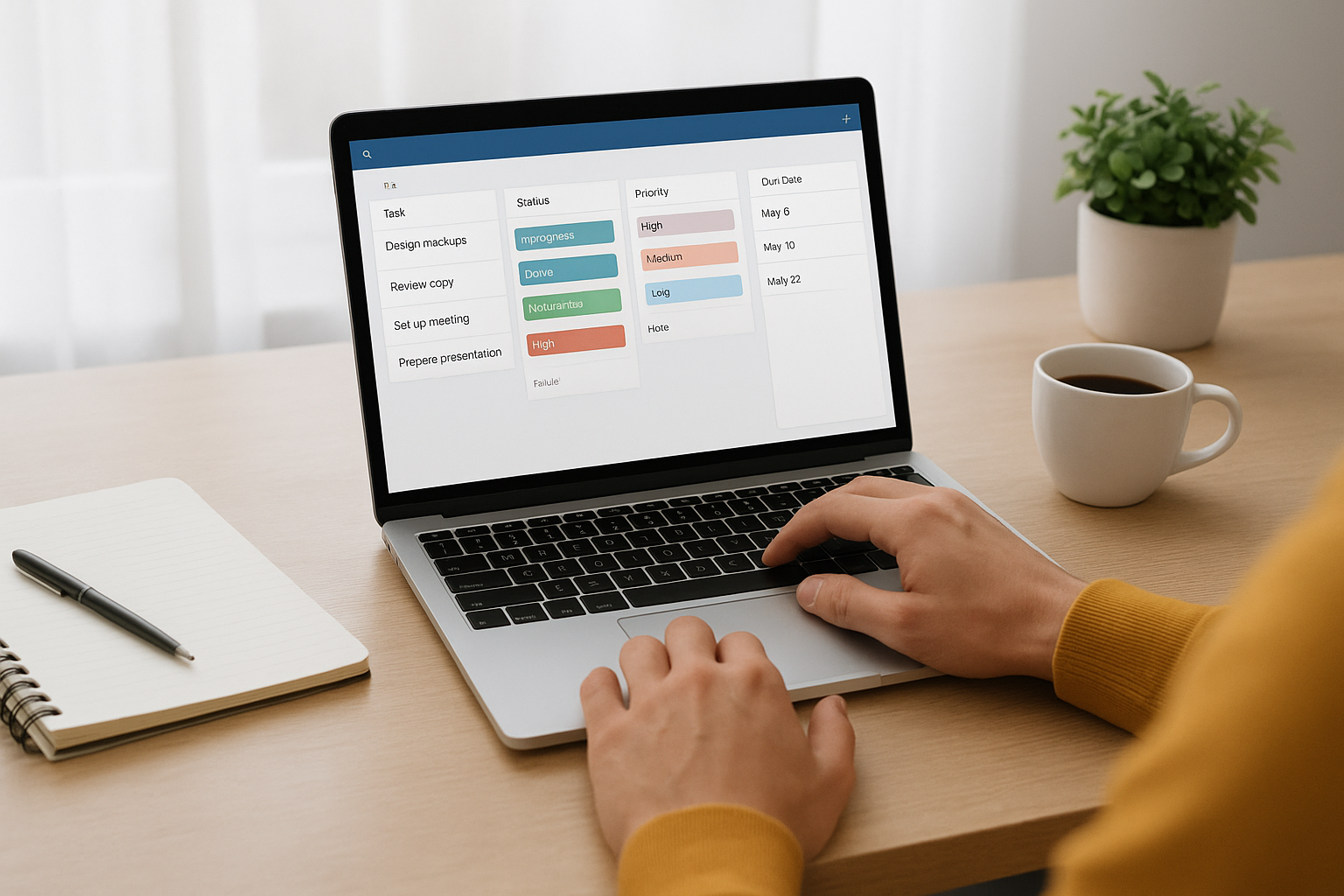
Airtable gives you structural freedom that most dedicated contact tools don't, but that freedom requires meaningful setup time upfront.
Limits to know before you choose it
When evaluating the best contact management software for outreach-heavy teams, Airtable shows clear gaps. There's no built-in calling, no native email sync, and no lead source integrations out of the box, so high-volume sales teams will likely need to patch in third-party tools to cover those functions.
Pricing
Airtable offers a free plan for up to five editors with limited records. Paid plans start at $20 per user per month on the Team plan, with higher tiers unlocking more records and automation runs.
4. Zoho Bigin
Zoho Bigin is a pipeline-focused CRM designed for small businesses that find full-scale platforms too complex or expensive. It keeps the focus on contacts, pipelines, and follow-up activity without loading your team down with features they will rarely touch.
Best for
Bigin works best for small businesses and solo operators moving away from spreadsheets who want a structured contact management system without a heavy setup process. Most teams get fully operational on the same day they sign up, which removes a common barrier to adoption for resource-strapped organizations.
Standout contact management features
Each contact record stores calls, emails, notes, and linked deals in one view, so your team always knows exactly where a relationship stands. You can also add custom fields to capture details specific to your sales process without cluttering the interface or confusing newer reps.
Bigin is purpose-built for small teams rather than a trimmed-down version of a larger platform, which makes it feel intentional rather than limited.
Pipeline and activity tracking
Bigin supports multiple pipelines within a single account, which helps if your business runs more than one type of deal or service at the same time. Follow-up tasks stay visible directly on each contact record, so active opportunities do not get buried inside a crowded dashboard.
Integrations and add-ons
Bigin connects natively with other Zoho products like Zoho Mail, Zoho Books, and Zoho Desk, making it a practical fit if your team already operates within that ecosystem. It also supports Google Workspace and Microsoft 365 for teams that need calendar and email sync without switching platforms entirely.
Pricing
Bigin offers a free plan for a single user, which gives you a low-risk way to test the platform before committing. Paid plans start at $7 per user per month on the Express tier, making it one of the more budget-friendly picks when you are evaluating the best contact management software for a small team.
5. Freshsales
Freshsales is a CRM and contact management platform from Freshworks designed to help sales teams organize contacts and move deals forward faster through built-in intelligence tools. It gives you more than basic contact storage without burying your team in features they will rarely use.
Best for
Freshsales works best for small to mid-sized sales teams that want contact management combined with lead scoring in one place. If your team handles a steady flow of inbound leads and needs help deciding who to call first, this platform is built for exactly that use case.
Standout contact management features
Each contact record in Freshsales gives your team a unified view of deal history, email threads, calls, and notes. You can segment contacts into custom lists based on behavior, source, or deal stage, so your reps always know which portion of the pipeline to work next.
Lead scoring and prioritization
Freshsales uses AI-powered lead scoring to rank contacts based on engagement signals and conversion likelihood. This helps your team stop guessing and focus on the highest-priority contacts, making it a strong pick when evaluating the best contact management software for active outbound teams.
Freshsales scores leads automatically, so your reps spend time on real conversations instead of manually sorting through a contact list.
Built-in communication tools
The platform includes native phone, SMS, and email tools tied directly to contact records, so your team can call, message, and email without switching between different apps.
All interactions log automatically to the contact timeline, giving managers full visibility into rep activity and ensuring no follow-up gets missed across a busy pipeline.
Pricing
Freshsales offers a free plan for unlimited users with core contact management included. Paid plans start at $9 per user per month on the Growth tier, with AI features and deeper automation available on higher plans.
6. monday CRM
monday CRM is a visual work platform that extends into contact management through highly customizable boards and workflows. It gives teams the flexibility to build their own sales process rather than fitting into a rigid pre-built structure, which sets it apart from most traditional CRM tools.
Best for
monday CRM fits teams that need strong visual workflow management alongside contact tracking. It works especially well for sales and operations teams that already use monday.com's broader project tools and want their contact data living in the same workspace.
Standout contact management features
The platform stores contacts, deals, and activities in fully customizable boards where you control what columns appear and how data is grouped. You can add custom fields for any data point your team tracks, from lead source to contract value, and filter or sort contacts without touching a line of code.
monday CRM's board-based structure makes it easy to view your entire contact pipeline at a glance and shift priorities without rebuilding your setup.
Workflow customization and automation
monday CRM lets you build automation rules that trigger actions when a contact reaches a certain stage, a deal value changes, or an activity deadline passes. These automations reduce the manual work your team carries between calls, keeping records updated without relying on reps to log every step themselves.
Reporting and visibility for teams
Managers get real-time dashboards that pull data from across your boards into a single view. You can track team activity, pipeline progress, and deal counts without waiting for a manual report, which makes it a strong pick when evaluating the best contact management software for growing teams.
Pricing
monday CRM does not offer a free plan, but it does provide a 14-day free trial. Paid plans start at $12 per user per month on the Basic tier, with automation and deeper reporting features available on higher tiers.
7. Contacts+
Contacts+ takes a different approach from most tools on this list. Where other platforms focus on pipeline management and sales workflows, Contacts+ focuses on keeping your contact database clean, synced, and accurate across every device and platform you use.
Best for
Contacts+ works best for professionals and small teams that primarily need a well-organized, de-duplicated contact list rather than a full sales pipeline. It suits freelancers, consultants, and business owners who manage relationships across multiple apps and devices and spend too much time untangling duplicate or outdated records.
Standout contact management features
The platform gives you a unified contact book that pulls records from your phone, email, and social accounts into one organized view. You can tag, note, and group contacts by relationship type or project, making it easy to find the right person at the right time without scrolling through a cluttered list.
Contacts+ is built around contact hygiene first, which makes it one of the cleaner tools when your main problem is messy, scattered contact data.
Syncing, merging, and de-duplication
Contacts+ automatically detects and merges duplicate entries across your connected accounts, so you stop seeing the same person listed multiple times with conflicting phone numbers or email addresses. The sync engine keeps your contact data consistent across devices, meaning an update on your phone appears everywhere without manual intervention.
Mobile and everyday usability
The mobile app is the core experience for most Contacts+ users, designed for quick lookups, notes after a call, and fast tagging on the go. If you're evaluating the best contact management software for personal productivity rather than a full sales team, the mobile-first design makes daily use genuinely low-friction.
Pricing
Contacts+ offers a free plan with basic sync and up to 1,000 contacts. Paid plans start at around $9.99 per month, unlocking higher contact limits, advanced de-duplication, and additional sync sources.
8. Copper
Copper is a CRM built specifically for Google Workspace, which makes it one of the more focused options on this list. Rather than asking your team to learn a separate interface, Copper works inside Gmail and Google Calendar so your workflow stays where it already lives.
Best for
Copper works best for teams that run their business entirely inside Google Workspace. If Gmail is your primary communication tool and you want the best contact management software that requires minimal context-switching, Copper is a natural fit for that environment.
Standout contact management features
Copper automatically captures contacts from your Gmail inbox and populates their records with details pulled from your email history, so your team rarely has to build a record from scratch. Each contact profile stores linked deals, activities, tasks, and files in one consolidated view, giving your reps full context before any conversation starts.
Copper eliminates manual data entry for Google Workspace users by building contact records directly from your existing email activity.
Gmail and Google Workspace fit
The Copper Chrome extension lets you view and edit contact records without leaving your inbox, removing the friction of switching between tabs during a busy outreach day. It also syncs with Google Calendar to log meetings automatically against the right contact records, keeping your activity history accurate without extra steps.
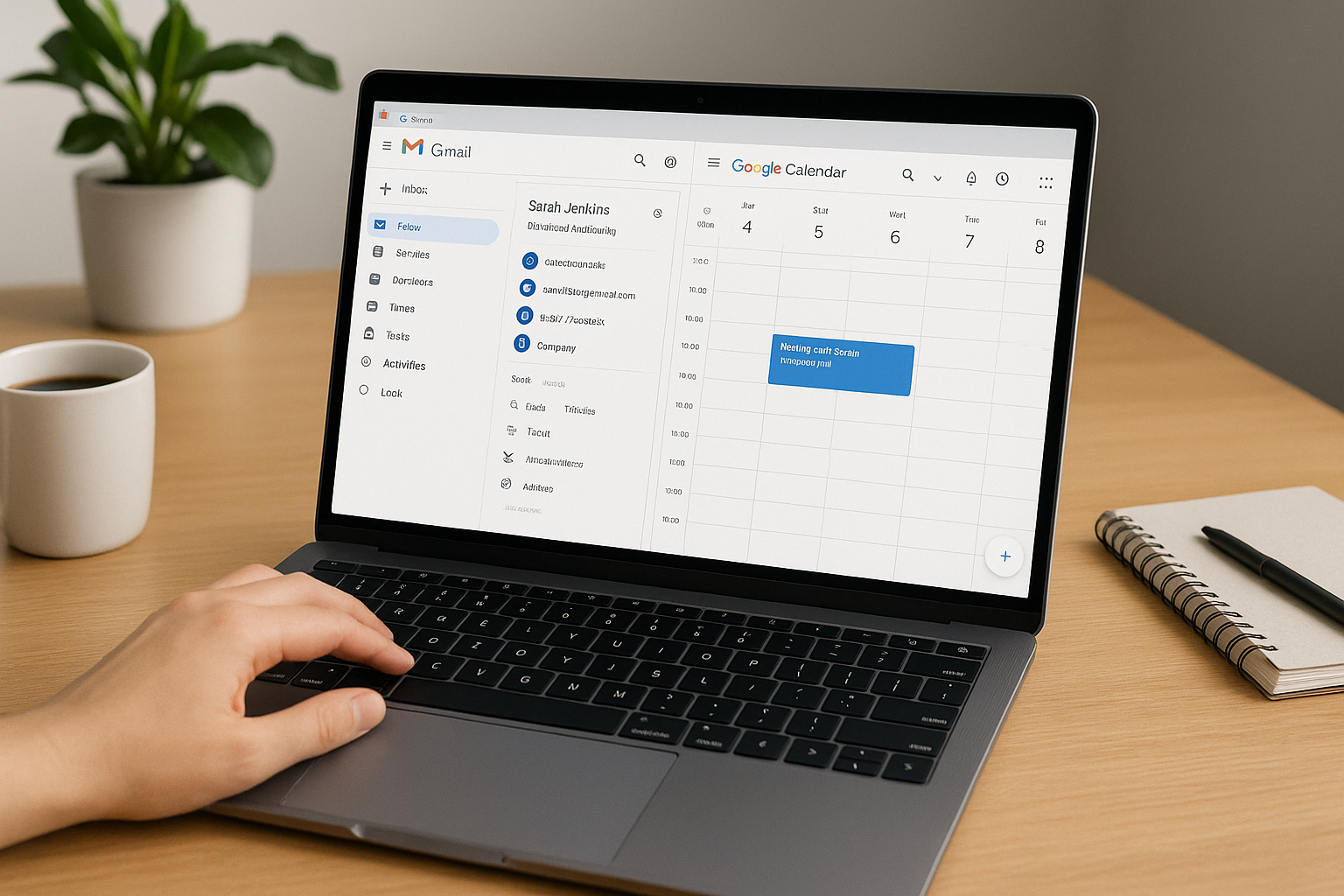
Pipelines, tasks, and follow-ups
Copper gives you visual pipelines where you can drag and drop deals between stages and assign follow-up tasks directly from a contact record. Automated task reminders keep your team on top of next steps without relying on memory or a separate task management tool running alongside your CRM.
Pricing
Copper does not offer a free plan. Paid plans start at $12 per user per month, with higher tiers unlocking more automation, reporting depth, and higher contact record limits.
9. Nimble
Nimble positions itself as a relationship-focused contact management platform that pulls social data and email history into unified contact profiles. Instead of asking your team to manually research contacts before outreach, it does that background work automatically so your reps show up to every conversation with full context already in hand.
Best for
Nimble works best for sales professionals and consultants who treat relationship-building as the core of their sales process. If your team frequently reaches out to contacts they have met at events, connected with on social platforms, or encountered through shared networks, Nimble gives you the tools to maintain and act on those relationships without losing track over time.
Standout contact management features
Each Nimble contact record pulls in publicly available social information, email history, and interaction data to give you a richer picture of who you are talking to. You can also add tags, notes, and custom segments to organize your contact list by relationship type, deal stage, or follow-up priority without building a complex tagging system from scratch.
Social enrichment and relationship context
Nimble automatically enriches contact records with LinkedIn, Twitter, and other social profile data, so you can reference shared connections or recent posts before a call or email. This added context makes Nimble one of the more distinctive picks when evaluating the best contact management software for professionals who prioritize relationship depth over high-volume outreach.
Nimble pulls social context directly into contact records, which removes the manual research step that typically slows down personalized outreach.
Browser extension workflow
The Nimble browser extension lets you capture contacts and view enriched profiles from any webpage or social platform without opening the main app. Your team can log notes and create follow-up tasks on the spot, keeping records current without breaking their existing workflow.
Pricing
Nimble does not offer a free plan. The platform charges $24.90 per user per month on annual billing, with a higher rate for month-to-month subscriptions.
10. Pipedrive
Pipedrive is a sales-focused CRM that puts pipeline visibility at the center of everything it does. It gives sales teams a straightforward way to manage contacts, track deals, and stay on top of follow-up activity without needing weeks of onboarding to get value from the platform.
Best for
Pipedrive works best for small to mid-sized sales teams that want a clean pipeline view without complex configuration. If your reps spend most of their day working deals through stages and need a system that keeps their next actions clearly visible, Pipedrive is built with exactly that workflow in mind.
Standout contact management features
Each contact record in Pipedrive links directly to active deals, completed activities, and scheduled follow-ups, giving your team full relationship context in one view. You can also build custom fields and filters to segment your contact list by any data point that matters to your specific sales process.
Pipeline clarity and activity tracking
Pipedrive's visual kanban-style pipeline makes it easy to see where every deal stands at a glance and move contacts through stages with a simple drag-and-drop action. The platform prompts your team to log the next activity on every open deal, reducing the chance of a contact going cold because a follow-up slipped through the cracks.
Pipedrive enforces an activity-based selling approach that keeps your team focused on concrete next steps rather than passive deal monitoring.
Email sync and follow-up workflows
Pipedrive syncs with Gmail and Outlook, logging sent and received emails against the right contact record automatically. When evaluating the best contact management software for outbound teams, this automatic email capture removes a significant manual logging burden from your reps each day.
Pricing
Pipedrive does not offer a free plan, but it does include a 14-day free trial. Paid plans start at $14 per user per month on the Essential tier, with higher plans unlocking automation, reporting, and advanced customization features.
11. Less Annoying CRM
Less Annoying CRM does exactly what its name suggests. It strips away the complexity that slows down small teams and delivers a focused, straightforward platform built around the core tasks most businesses actually need: storing contacts, tracking follow-ups, and keeping deals moving forward.
Best for
Less Annoying CRM fits small businesses and solo operators that want a functional contact management system without a steep learning curve or a bloated feature list. If your team has been burned by overly complex tools before, this platform is worth a close look.
Standout contact management features
Every contact record stores notes, tasks, and pipeline information in a single clean view so your reps can see everything relevant without navigating between tabs. You can also add custom fields to capture data points specific to your process without disrupting the overall simplicity of the interface.
Simplicity and setup time
Most teams get up and running on Less Annoying CRM within a single afternoon, which removes the onboarding friction that kills adoption on more complicated platforms. The interface is designed to be approachable for non-technical users, so you do not need dedicated training time or an internal admin to keep the system functional.
Less Annoying CRM's flat pricing and fast setup make it one of the most accessible picks when evaluating the best contact management software for a small team on a tight timeline.
Collaboration and data portability
The platform lets your whole team share a single contact database with role-based visibility, so everyone works from the same source of truth. You can also export your data at any time in standard formats, which protects you if your needs eventually outgrow the platform.
Pricing
Less Annoying CRM charges a flat $15 per user per month with no tiered plans or hidden feature gates. Every user gets full access to all features at that single rate.
12. Streak
Streak is a CRM and contact management tool built entirely inside Gmail, which makes it one of the most distinct options on this list. Rather than asking your team to work in a separate application, Streak keeps your contact data, pipelines, and communication history living directly inside your inbox so your reps never have to leave Google to stay organized.
Best for
Streak works best for individuals and small teams that run most of their business through Gmail and want CRM functionality without switching to a standalone platform. It suits freelancers, consultants, and small sales teams that handle a manageable contact volume and want to stay organized without learning a new interface from scratch.
Standout contact management features
Each contact record in Streak stores email history, notes, and linked pipeline stages directly inside Gmail, giving your team full context on any relationship without opening a separate tab. You can also add custom data fields to capture specific details about each contact, from deal size to follow-up priority, without disrupting the Gmail interface your team already knows.
Gmail-native workflow
Streak sits directly inside your Gmail sidebar, so your team can view, update, and act on contact records while they read and write emails. This tight integration removes the context-switching that slows down most CRM workflows, and it makes Streak one of the more practical picks when you are evaluating the best contact management software for Gmail-first teams.
Streak's Gmail-native design means your team gets real CRM functionality without ever leaving their inbox.
Pipelines, tracking, and templates
Streak gives you visual pipelines that live inside Gmail, letting your team move contacts through stages without opening a separate dashboard. You can also use built-in email templates and open tracking to see when contacts read your messages and trigger follow-ups at exactly the right moment.
13. Bitrix24
Bitrix24 is a broad business platform that combines contact management, team communication, project tools, and marketing automation in one place. It gives you far more than a contact database, which makes it a strong fit for teams that want to consolidate multiple tools into a single workspace without paying for several separate subscriptions.
Best for
Bitrix24 works best for small to mid-sized teams that need contact management alongside built-in collaboration features like internal chat, task boards, and document sharing. If your team currently juggles several disconnected apps and wants a unified workspace that includes CRM functionality, this platform delivers more coverage than most alternatives on this list.
Standout contact management features
Each contact record stores full communication history, notes, tasks, and linked deals in one view, giving your reps complete context before any outreach. You can also build custom fields and filters to segment contacts by deal stage, assigned rep, or lead source without restructuring your existing setup from scratch.
Team workspace and communication
Bitrix24 includes built-in team chat, video calls, and task management that connect directly to your contact and deal data. Your reps can collaborate on a specific contact record without switching to a separate messaging tool, which removes a layer of friction from everyday sales coordination.
Automation and omnichannel options
When evaluating the best contact management software that covers multiple outreach channels, Bitrix24 stands out with support for email, SMS, live chat, and social messaging in a single platform. You can build automation rules that trigger follow-ups or reassign contacts based on specific actions, cutting the manual work your team handles between calls.
Bitrix24 covers more ground than most tools on this list, but that breadth requires meaningful setup time to configure it for your specific team workflow.
Pricing
Bitrix24 offers a free plan for unlimited users with core contact management included. Paid plans start at $49 per month for five users on the Basic tier, which spreads the cost well across larger teams.
14. Insightly
Insightly is a CRM and project management platform that combines contact management with relationship mapping and post-sale project tracking. It stands apart from most tools on this list by letting your team link contacts to organizations, opportunities, and active projects in a way that reflects how complex B2B sales relationships actually work.
Best for
Insightly works best for small to mid-sized businesses that manage longer sales cycles or need to track relationships across multiple contacts within a single organization. If your team handles both the sales process and delivery work after a deal closes, this platform keeps all of that context in one connected workspace rather than splitting it across separate tools.
Standout contact management features
Each contact record in Insightly stores linked organizations, deal history, email threads, and associated projects in a unified view. You can build custom fields and tag records by relationship type or deal stage, giving your team a clear picture of where every contact stands without digging through multiple systems.
Relationship linking and project tie-ins
Insightly lets you connect contacts to multiple organizations, opportunities, and active projects so your team can track layered relationships without losing sight of who is involved at each stage. Once a deal closes, you can convert it directly into a project inside the same platform, keeping your team aligned without copying data to a separate delivery tool.

Insightly's relationship linking makes it one of the more capable picks when evaluating the best contact management software for teams that manage long-term client relationships beyond the initial sale.
Workflows and reporting
Insightly gives you automated workflow rules that trigger task assignments, status changes, and email alerts based on record updates. Built-in reporting dashboards let managers track pipeline activity and project progress from a single view without pulling data from multiple sources.
Pricing
Insightly offers a free plan for up to two users. Paid plans start at $29 per user per month on the Plus tier, with higher plans unlocking more automation capacity and advanced reporting features.
15. Salesforce Sales Cloud
Salesforce Sales Cloud is the largest and most established CRM platform on this list. It gives enterprises and fast-scaling companies a deeply configurable system built to handle complex contact management across large teams, territories, and data structures that smaller tools simply cannot support.
Best for
Salesforce Sales Cloud fits larger organizations and enterprise sales teams that need a contact management platform capable of scaling with thousands of contacts, dozens of reps, and sophisticated data governance requirements. If your business has outgrown lighter tools and needs a system built for long-term enterprise growth, this is the platform most organizations move toward.
Standout contact management features
Each contact record in Salesforce connects to accounts, opportunities, cases, and activities in a fully relational structure that reflects how complex B2B sales relationships actually function. You can capture custom data points at every level, from individual contacts to parent organizations, and surface that data through configurable views your team builds to match their specific workflow.
Salesforce gives you more structural control over contact data than any other platform on this list, which makes it the strongest pick when data complexity is your primary challenge.
Customization and governance
Salesforce lets your admin team build custom objects, validation rules, and page layouts that enforce data standards across your entire organization. This level of governance keeps your contact records clean and consistent at scale, even when dozens of reps are entering data simultaneously across different regions or product lines.
Automation, reporting, and ecosystem
When evaluating the best contact management software for enterprise teams, Salesforce's automation engine and reporting capabilities stand clearly above the rest. You can build multi-step workflow rules, approval processes, and advanced reports that pull data from across your entire contact and deal history into a single actionable view.
Pricing
Salesforce Sales Cloud does not offer a free plan. Paid plans start at $25 per user per month on the Starter tier, with enterprise-grade features available on higher plans that scale significantly in cost.
A simple way to choose and get set up
Picking the best contact management software comes down to one honest question: where does your team lose the most time right now? If your biggest problem is scattered contacts across too many sources, you need aggregation and organization first. If your reps are dropping follow-ups, you need built-in activity tracking and reminders. Match the tool to the actual gap rather than the longest feature list.
For sales teams managing high volumes of inbound leads across multiple channels, a platform that combines contact management with outreach tools in one place will always outperform a standalone contact database. You skip the integration headaches and get your team selling faster. LeadMailbox brings lead aggregation, contact tracking, calling, SMS, email, and AI agents into a single system with month-to-month pricing that keeps your team flexible as you grow. Start there if outreach and conversion matter as much as organization.