

12 Best Auto Dialer Software Tools for Sales Teams (2026)
Your sales reps spend roughly 30–40% of their time actually talking to prospects. The rest? Dialing numbers, waiting through rings, hitting voicemails, and manually logging calls. An auto dialer eliminates most of that dead time and puts your team in front of more live conversations per hour. But picking the best auto dialer software comes down to more than just speed, it's about how well the tool fits your sales workflow, your team size, and your budget.
We built LeadMailbox with exactly this problem in mind. Our platform includes a full telephony suite, power dialer, click-to-call, insta-call, and inbound number management, all integrated directly into lead management, SMS, email, and AI-powered outreach. After 20+ years of helping sales teams convert leads since 2004, we know what features actually move the needle and what's just noise.
That said, every team has different needs, and we'd rather give you an honest breakdown than pretend one tool fits all. This guide covers 12 auto dialer software options worth evaluating in 2026, including their standout features, pricing, and the types of teams they work best for. Whether you're a solo closer or managing a full sales floor, you'll walk away knowing exactly which dialer deserves your shortlist.
1. LeadMailbox
LeadMailbox is a lead management and sales enablement platform that has been on the market since 2004. Unlike tools built purely around dialing, it wraps its telephony suite inside a complete lead management system, so your auto dialer, CRM, SMS campaigns, email outreach, and AI agents all live in one place. That unified approach reduces the number of tools your team has to manage and cuts the context-switching that slows reps down.
Dialing modes and key features
LeadMailbox gives you multiple dialing modes to match different workflows. The power dialer automatically moves through your call list and connects reps to the next number the moment a call ends, keeping them in a rhythm without manual effort. Click-to-call lets reps initiate calls directly from a lead record, while the insta-call feature triggers an immediate outreach the moment a new lead arrives, capturing prospects before interest drops.
The platform also handles inbound number management, routing incoming calls to the right rep or queue. It integrates with hundreds of lead partners, so leads flow directly into the system and get queued for outreach automatically. Built-in AI agents can respond to text messages, answer incoming calls, and write emails, keeping your outreach running even outside business hours.
LeadMailbox's combination of auto dialing, lead aggregation, and AI-powered follow-up in a single platform makes it a strong option for sales teams dealing with high lead volumes from multiple sources.
Best fit and limitations
LeadMailbox works best for small to mid-sized sales teams that pull leads from multiple sources and rely on phone-based outreach. If your team currently juggles separate tools for lead intake, dialing, SMS, and email, this platform consolidates that stack without enterprise-level pricing. It fits especially well in industries like insurance, real estate, home services, and financial services, where lead volume is high and speed-to-contact directly affects conversion rates.
The main limitation is that LeadMailbox is not built for large enterprise call centers that need advanced workforce management features, deep analytics dashboards, or complex integrations with niche enterprise software. Its focus is on efficiency and affordability, which means it trades some enterprise depth for simplicity and cost savings.
Pricing and setup notes
LeadMailbox runs on a month-to-month subscription model, so you're not locked into a long-term contract. That matters when you're comparing the best auto dialer software options and want to test a platform before committing budget. Pricing is set to be accessible for small and growing teams, positioning it as a practical alternative to heavier, more expensive solutions.
Setup does not require a dedicated IT team. You can connect lead sources, configure dialing settings, and start running outreach campaigns without a lengthy onboarding process. If you want to see how it fits your workflow, visit leadmailbox.com to explore current plans and get started.
2. Orum
Orum is an AI-powered parallel dialing platform built specifically for outbound sales development. It focuses on one core problem: getting your reps connected to live humans faster by dialing multiple numbers at the same time and filtering out voicemails, busy signals, and disconnected numbers before a rep ever picks up.
Dialing modes and key features
Orum's main dialing mode is parallel dialing, which lets the platform call several numbers simultaneously and route the first live answer directly to your rep. The AI layer handles voicemail detection in real time, so reps are not interrupted by dead-end calls. The platform also includes conversation intelligence tools, call recording, and coaching features that let managers review calls and give feedback without scheduling separate listening sessions.
Orum's parallel dialer is designed to dramatically increase the number of live conversations per hour, which makes it one of the more aggressive outbound tools on this list.
Orum integrates with Salesforce, HubSpot, Outreach, and Salesloft, so it slots into existing sales tech stacks without requiring teams to change their CRM or sequencing tools. Call notes and dispositions sync automatically, which cuts down on manual logging after each conversation.
Best fit and limitations
Orum fits best for high-volume SDR teams at growth-stage or enterprise companies that have the budget to match. If your reps are running 100-plus dials per day and your main bottleneck is live-conversation volume, Orum addresses that directly. It is not the right fit for smaller teams or businesses looking for the best auto dialer software that also handles lead management, SMS, and email in one place. Orum does outbound calling well but relies on your existing CRM and sequencing tools to fill the gaps.
Pricing and setup notes
Orum does not publish pricing publicly. Based on available reports, expect to pay in the range of $400 to $500 per user per month, which puts it firmly in the enterprise budget category. Setup requires connecting your existing CRM and sales engagement tools, so onboarding takes more configuration than a lighter platform would.
3. Nooks
Nooks is an AI-powered parallel dialing platform built for outbound SDR teams. It focuses on increasing live conversation rates by automating the busywork of outbound calling, including voicemail detection, number filtering, and call routing, so your reps spend more time talking and less time waiting.
Dialing modes and key features
Nooks runs on a parallel dialing engine that calls multiple numbers at once and connects your rep the moment someone picks up. The AI filters voicemails and bad numbers in real time before they ever reach your team. One feature that sets Nooks apart from similar tools is its virtual sales floor, which creates a shared audio environment where reps can hear each other on calls, helping with energy, accountability, and peer learning during high-volume calling sessions.
The virtual sales floor concept addresses something most auto dialers ignore entirely: the isolation that comes with remote or distributed sales teams running high-volume outbound campaigns.
Nooks also includes call recording, coaching overlays, and CRM sync with platforms like Salesforce, HubSpot, Outreach, and Salesloft. Managers can listen to calls in real time and leave feedback without pulling reps off the floor.
Best fit and limitations
Nooks fits well for SDR-heavy teams at mid-market and enterprise companies that run structured outbound sequences and need their dialer to plug into an existing sales engagement stack. If you are evaluating the best auto dialer software for a team that already uses a CRM and a sequencing tool and just needs a faster way to reach more people per hour, Nooks is worth a look.
The limitation is similar to Orum. Nooks does not cover lead management, SMS campaigns, or email outreach, so you still need separate tools to handle those parts of your workflow.
Pricing and setup notes
Nooks does not list pricing publicly. Reports from users suggest pricing runs roughly $500 to $700 per user per month depending on team size and contract terms, putting it in the premium tier. Setup requires connecting your CRM and sales engagement platform, which means your onboarding timeline depends on how complex your existing stack is.
4. PhoneBurner
PhoneBurner is a power dialer platform built for outbound sales teams that want to move through call lists faster without adding compliance complexity. Unlike parallel dialers that call multiple numbers simultaneously, PhoneBurner dials one number at a time but removes the dead time between each attempt, keeping your reps in a consistent calling rhythm throughout their session.

Dialing modes and key features
PhoneBurner's core dialing mode is a power dialer that lets your reps work through lists at up to four times the speed of manual dialing. When a call hits voicemail, reps drop a pre-recorded voicemail message with one click and move immediately to the next number without waiting for the beep. Built-in email and SMS follow-up tools let you trigger post-call outreach automatically based on how each call was dispositioned, so your follow-up happens without extra manual steps.
PhoneBurner uses a no-connection-lag approach, meaning prospects hear your rep the instant they pick up rather than the brief pause that parallel dialers often generate.
Call recording, local caller ID options, and CRM integrations with Salesforce, HubSpot, and Zoho keep your call data clean without requiring reps to log activity manually after each conversation.
Best fit and limitations
PhoneBurner is a strong fit for small to mid-sized sales teams that want a reliable power dialer with built-in follow-up tools and a straightforward setup. If you are evaluating the best auto dialer software that balances speed with compliance and does not require heavy IT involvement to get running, PhoneBurner fits that profile well. The main limitation is raw volume. Teams running extremely high daily dial counts may find that a parallel dialing platform produces more live conversations per hour, since PhoneBurner works through one number at a time by design.
Pricing and setup notes
PhoneBurner starts at roughly $127 per user per month on an annual plan, which puts it in an accessible range compared to enterprise parallel dialers. The platform offers a free trial with no credit card required, so your team can evaluate the workflow before making a commitment. Onboarding is self-serve and does not require dedicated technical resources.
5. JustCall
JustCall is a cloud-based phone system and sales dialer built for teams that need calling, SMS, and CRM integration without the complexity of an enterprise platform. It covers a broader communication stack than pure dialers, making it a practical option if your team handles both inbound and outbound volume.
Dialing modes and key features
JustCall offers three dialing modes: an auto dialer that works through a call list automatically, a predictive dialer that uses algorithms to minimize wait time between connected calls, and a power dialer that lets reps move through lists at a controlled pace. Each mode fits a different calling scenario, so your team can switch based on campaign type rather than being locked into one approach.
Having multiple dialing modes in one platform reduces the need to swap tools depending on whether you're running a high-volume prospecting blitz or a more targeted follow-up campaign.
The platform also includes SMS campaigns, call recording, live call monitoring, and a reporting dashboard that tracks rep performance across calls and messages. It integrates with over 100 CRMs and sales tools, including Salesforce, HubSpot, and Pipedrive, so your call data flows into existing workflows without manual entry.
Best fit and limitations
JustCall works well for small to mid-sized sales teams that want a single platform to handle outbound dialing, inbound calls, and SMS outreach. If you are evaluating the best auto dialer software that covers multiple communication channels without jumping to an enterprise price point, JustCall is a reasonable candidate. The main limitation is that its predictive dialer and advanced features sit on higher-tier plans, so your actual cost depends heavily on which dialing mode your team needs most.
Pricing and setup notes
JustCall starts at around $19 per user per month for basic calling features, but the auto and predictive dialer capabilities come on higher plans, typically in the $49 to $89 per user per month range. Setup is relatively straightforward, and the platform provides guided onboarding with documentation to help your team get connected to your CRM quickly.
6. Aircall
Aircall is a cloud-based phone system built for sales and customer support teams that need a clean, easy-to-deploy calling setup. It focuses on giving reps a streamlined experience with CRM integration and real-time call analytics, without the setup complexity of a full enterprise contact center platform.
Dialing modes and key features
The platform includes a power dialer that lets reps work through call lists without manually entering numbers between each attempt. You can add contacts to a dialing queue directly from a CRM record or a CSV upload, and the system moves through the list automatically. Built-in tools like click-to-call, voicemail drop, call recording, and live call monitoring give managers what they need to coach reps without scheduling separate listening sessions.
Aircall's browser-based setup means your team can have a functional phone system running in hours rather than days, which matters when you need to start a campaign quickly.
Its integration library covers over 100 tools, including Salesforce, HubSpot, Intercom, and Zendesk, so your call dispositions and activity sync automatically without reps logging anything by hand.
Best fit and limitations
If you are looking for the best auto dialer software that prioritizes usability and fast deployment over raw dialing volume, Aircall is worth evaluating for small to mid-sized sales and support teams. The setup curve is low, and the interface is clean enough that new reps can start making calls with minimal training. The main limitation is that its power dialer works through one number at a time, which caps daily conversation volume compared to parallel dialing platforms. It is also not a full lead management system, so you will need a separate tool for lead intake and multi-channel outreach campaigns.
Pricing and setup notes
Aircall starts at $30 per user per month on the Essentials plan, billed annually, with a three-user minimum. The power dialer sits on the Professional plan at around $50 per user per month. Because the setup is entirely browser-based with no hardware required, onboarding moves quickly for remote or distributed teams.
7. CloudTalk
CloudTalk is a cloud-based call center platform designed for sales and support teams that need outbound dialing with strong international reach. Its appeal is a multi-dialer setup that gives you options based on campaign type, paired with native CRM integrations and real-time reporting that keeps managers informed without requiring separate tooling.

Dialing modes and key features
CloudTalk includes three dialing modes: a power dialer that automates list progression, a smart dialer that pulls contact numbers directly from websites and your CRM to build call queues automatically, and a predictive dialer that adjusts call pacing based on agent availability. The smart dialer stands out because it removes the manual work of building lists by pulling numbers from pages you visit in your browser.
CloudTalk's smart dialer cuts list-building time by pulling contact numbers automatically from web pages and CRM records, removing a step that often slows reps down before campaigns even start.
The platform also includes voicemail drop, call recording, IVR routing, and live call monitoring with whisper coaching, so managers can guide reps mid-call without the prospect hearing. Coverage extends to local numbers in over 160 countries, which matters if your team runs international outbound campaigns.
Best fit and limitations
CloudTalk fits well for sales teams running international outbound campaigns or multi-language operations that need local caller ID presence across multiple regions. If you are evaluating the best auto dialer software for a team that dials across borders and needs flexible dialing modes in a single platform, CloudTalk handles that use case well. The main limitation is that it works purely as a calling and messaging tool, so you still need separate software for lead intake, lead management, and broader outreach automation.
Pricing and setup notes
CloudTalk's pricing starts at around $25 per user per month on the Starter plan, with advanced dialer features on the Essential and Expert tiers, which run roughly $30 to $50 per user per month depending on the plan and contract length. Setup is browser-based, and CloudTalk offers onboarding support along with a free trial so your team can evaluate the workflow before committing.
8. Nextiva
Nextiva is a unified communications platform that combines business phone services, sales dialing tools, and customer experience features in one system. It targets companies that want a single vendor to handle both their internal communications infrastructure and their outbound sales calling, rather than bolting a dialer onto a separate phone system.
Dialing modes and key features
Nextiva includes an auto dialer and power dialer built into its sales communication suite, allowing reps to work through call lists without manually entering numbers between attempts. The platform handles call recording, voicemail drop, and call analytics natively, so your team does not need additional tooling to track performance or coach reps on call quality. Managers get real-time dashboards showing call volume, connection rates, and individual rep activity without having to pull separate reports.
Nextiva's unified approach means your reps use the same platform for internal calls, external outreach, and customer communications, which cuts the friction of switching between multiple tools.
The platform also includes SMS messaging, video meetings, and team chat, making it one of the more complete communication stacks among the options on this list. CRM integrations connect with Salesforce, HubSpot, and Zoho, keeping your call data and contact records in sync automatically.
Best fit and limitations
Nextiva works best for small to mid-sized businesses that want a single platform handling phone infrastructure, outbound dialing, and team communication without piecing together separate tools. If you are evaluating the best auto dialer software and also need a business phone system upgrade at the same time, Nextiva covers both in one contract. The limitation is depth. Its dialer features are solid but not specialized, so high-volume SDR teams running aggressive outbound programs may find that a dedicated dialing platform delivers more live conversations per hour.
Pricing and setup notes
Nextiva's plans start at around $20 to $30 per user per month for core phone features, with sales-focused dialing tools on higher tiers that typically run $40 to $60 per user per month. Onboarding is structured, and Nextiva provides live support during setup to help your team configure numbers and integrations before going live.
9. RingCentral
RingCentral is a large-scale unified communications platform that covers business phone, video, team messaging, and contact center functionality under one vendor. Its auto dialer capabilities live within RingCentral Contact Center, a separate product layer built for teams that need outbound dialing alongside a full inbound call center setup.
Dialing modes and key features
RingCentral Contact Center supports predictive, progressive, and preview dialing modes, giving your team options based on whether you are running high-volume prospecting or more targeted outreach. The predictive dialer adjusts pacing automatically based on agent availability, which keeps your reps connected to live calls without long gaps between conversations. The platform also includes call recording, IVR configuration, real-time supervisor dashboards, and workforce management tools that larger teams use to schedule and monitor agent performance.
RingCentral's contact center layer gives you a dialer that is backed by enterprise-grade infrastructure, including redundant data centers and uptime guarantees that matter when your team runs high-volume outbound campaigns daily.
CRM integrations cover Salesforce, HubSpot, Zendesk, and ServiceNow, so your call data and contact records stay synchronized without requiring manual logging between systems.
Best fit and limitations
RingCentral is a practical choice if your organization needs a single vendor for both internal communications and outbound contact center operations. If you are evaluating the best auto dialer software alongside a broader phone system replacement, bundling both under RingCentral reduces your vendor count and simplifies billing. The limitation is cost and complexity. For small or mid-sized sales teams that only need a dialer, the full RingCentral Contact Center stack brings more overhead than most smaller teams actually use, and the pricing reflects that.
Pricing and setup notes
RingCentral's core business communications plans start at roughly $20 per user per month, but the Contact Center product with dialing capabilities is priced separately and typically runs significantly higher, often requiring a custom quote based on seat count and features. Setup involves dedicated onboarding resources and configuration support, which means your go-live timeline is longer compared to lighter platforms built for smaller teams.
10. Five9
Five9 is a cloud-based contact center platform built for enterprise sales and service teams that handle high volumes of both inbound and outbound calls. Its dialing suite is one of the more mature options on this list, with multiple modes and an AI-powered layer that helps teams reduce idle time between connected conversations.

Dialing modes and key features
Five9 supports four dialing modes: predictive, power, progressive, and preview. The predictive dialer uses algorithms to forecast agent availability and dial ahead, keeping reps connected to live calls with minimal gaps between conversations. Power and progressive modes give your team more control over pacing when a campaign requires a measured approach rather than raw volume.
Five9's multi-mode dialing setup means your team can shift strategy across different campaigns without needing to switch platforms or rebuild your tech stack.
Preview dialing lets reps review a contact record before the call connects, which suits outreach scenarios where context and preparation matter before the conversation starts. The platform also includes real-time reporting dashboards, call recording, IVR routing, and workforce optimization tools that help managers schedule agents and track performance across shifts without relying on separate analytics software.
Best fit and limitations
Five9 is built for mid-to-large enterprise contact centers that need a robust outbound dialing engine alongside full inbound call handling. If you are evaluating the best auto dialer software for a large team with complex routing logic, compliance requirements, and dedicated IT resources to manage configuration, Five9 fits that profile well. The limitation is straightforward: for smaller sales teams, the platform's complexity and cost structure bring more overhead than most workflows actually justify.
Pricing and setup notes
Five9 does not publish pricing publicly. Custom quotes are built around seat count, selected modules, and contract terms, with most available reports placing costs in the $150 to $200 per user per month range for standard configurations. Implementation typically involves a formal onboarding engagement rather than self-serve setup, so your go-live timeline runs longer than lighter platforms designed for smaller teams.
11. NICE CXone
NICE CXone is an enterprise cloud contact center platform that bundles outbound dialing, inbound call management, workforce management, and AI-powered interaction analytics into a single system. It targets large organizations that need centralized control over multi-channel customer interactions at scale, including sales, service, and collections teams running complex contact center operations.
Dialing modes and key features
NICE CXone supports predictive, progressive, and preview dialing modes, giving your outbound teams flexibility depending on the campaign's goals and the level of prep each call requires. The predictive dialer adjusts pacing automatically to match agent availability, which keeps your reps connected to live conversations without sitting idle between calls.
CXone's AI layer goes beyond call routing by analyzing interactions in real time and surfacing guidance to reps during live conversations, which can help newer agents handle objections without manager intervention.
The platform also includes call recording, real-time quality monitoring, workforce scheduling tools, and a reporting suite that gives managers detailed visibility into agent performance, campaign outcomes, and compliance metrics. Its omnichannel capabilities extend to SMS, email, and chat, so your team handles all customer touchpoints from one system rather than switching between separate platforms.
Best fit and limitations
NICE CXone suits large enterprise contact centers that run both inbound and outbound programs and need a platform capable of handling complex routing logic, compliance requirements, and workforce management at scale. If you are evaluating the best auto dialer software for an operation with hundreds of agents, dedicated IT resources, and a formal procurement process, CXone fits that profile. For smaller sales teams, the platform introduces far more complexity and cost than most workflows actually justify, and the setup process alone is a significant time investment before your first call goes out.
Pricing and setup notes
NICE CXone uses custom pricing built around seat count, selected modules, and contract length. Published reports place entry-level costs in the $100 to $150 per user per month range, with advanced AI and workforce management modules pushing totals higher. Implementation is a formal project involving dedicated onboarding resources, which means your go-live timeline runs weeks or months rather than days.
12. Talkdesk
Talkdesk is a cloud-based contact center platform that focuses on AI-driven customer experience tools for enterprise sales and support operations. Its dialing capabilities sit inside a broader contact center suite that includes inbound routing, workforce management, and omnichannel communication tools, making it one of the more feature-complete options at the enterprise end of this list.
Dialing modes and key features
Talkdesk includes an auto dialer and predictive dialer as part of its outbound campaign management tools. The predictive dialer adjusts call pacing based on agent availability, which keeps your reps connected to live conversations without sitting through long gaps between calls. The platform also offers voicemail detection, call recording, and real-time analytics dashboards that give managers immediate visibility into campaign performance without running separate reports.
Talkdesk's AI layer surfaces real-time guidance to reps during live calls, which can shorten ramp time for newer agents handling complex outbound campaigns.
Its omnichannel capabilities cover SMS, email, and digital messaging channels alongside voice, so your team handles multiple touchpoints from one system. CRM integrations connect with Salesforce, HubSpot, and ServiceNow, keeping your contact records and call activity synchronized without manual data entry between calls.
Best fit and limitations
Talkdesk fits best for mid-to-large enterprise contact centers that need a sophisticated outbound dialing engine backed by AI-powered interaction tools and omnichannel support. If you are evaluating the best auto dialer software for a large team running complex inbound and outbound operations simultaneously, Talkdesk handles that scope well. For smaller sales teams, the platform brings more complexity and cost than most workflows need, and the setup process assumes dedicated IT and operations resources rather than a self-serve approach.
Pricing and setup notes
Talkdesk uses custom pricing built around seat count and selected modules, with most available reports placing costs in the $85 to $150 per user per month range depending on the feature tier. Implementation follows a formal onboarding engagement rather than self-serve setup, which means your go-live timeline runs longer than lighter platforms designed for smaller teams with leaner technical resources.
What to do next
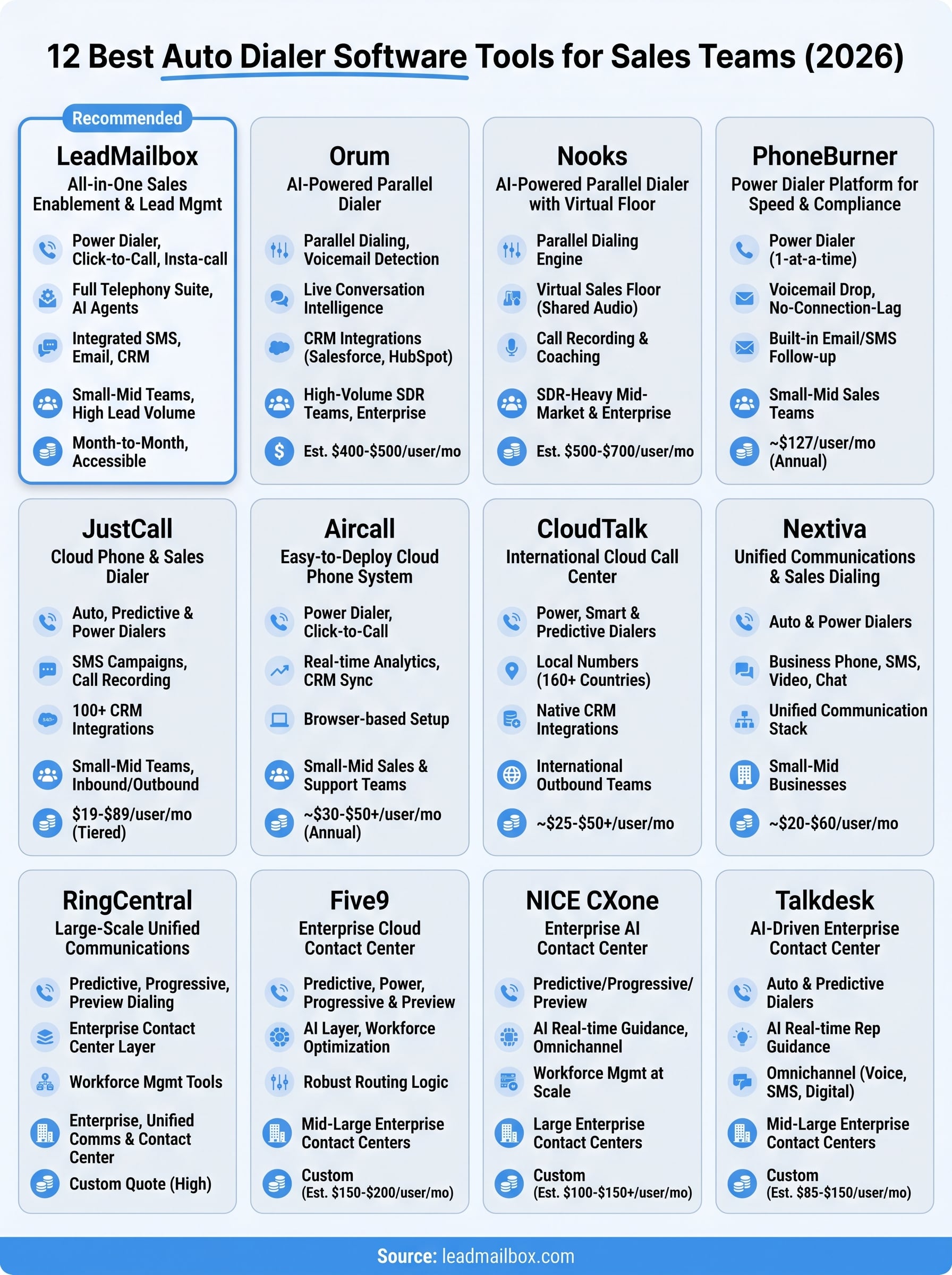
You now have a clear picture of the 12 best auto dialer software options available in 2026. The right call is not always the tool with the most features. It is the one that fits your team size, your budget, and your actual workflow. Enterprise platforms like Five9, NICE CXone, and Talkdesk make sense when you run a large contact center with dedicated IT resources. Parallel dialers like Orum and Nooks deliver volume for SDR-heavy teams with existing CRM stacks. For most small to mid-sized sales teams, the better move is a platform that combines dialing with lead management, SMS, and email in one place without the enterprise price tag.
If that description fits your team, LeadMailbox is worth a closer look. Month-to-month pricing, no long-term contracts, and a full telephony suite built around lead conversion mean you can start fast and stay flexible. See how LeadMailbox works for your team.