

12 Best Auto Dialer for Small Business Tools Compared (2026)
Manual dialing eats up hours that your sales team could spend actually selling. For small businesses running lean, every wasted minute on repetitive tasks chips away at revenue. That's exactly why finding the best auto dialer for small business operations has become a priority, the right tool can double or triple your team's call volume without adding headcount.
But picking the wrong dialer creates its own problems. Some are bloated with enterprise features you'll never touch. Others nickel-and-dime you with per-minute fees that balloon fast. And a few look great on paper but fall apart the moment you try to sync them with your existing lead sources or CRM. Small businesses need dialers that are powerful enough to compete but practical enough to actually use on day one.
At LeadMailbox, we've spent over 20 years building lead management and sales tools, including our own telephony suite with power dialer, click-to-call, and insta-call features, so we know what separates a good dialer from a great one. We used that experience to evaluate 12 of the top auto dialer tools on the market right now, comparing them on pricing, features, ease of use, and scalability for small teams.
Below, you'll find a straightforward breakdown of each option, what it does well, where it falls short, and which type of business it fits best.
1. LeadMailbox
LeadMailbox is a lead management and sales enablement platform built for small to mid-sized sales teams. It combines lead aggregation from multiple sources with a full telephony suite, meaning you get your dialing tools and your lead management in a single system rather than stitching together separate apps. The platform has been in the market since 2004, so it carries two decades of real-world refinement behind its feature set.
Best for
LeadMailbox fits best for small businesses and sales teams that generate leads from multiple channels and need to act on them fast. If your team handles high call volumes, runs outbound campaigns, and wants AI-powered communication tools without paying enterprise prices, this platform is built for your specific workflow rather than adapted from an enterprise product.
Dialer types and standout features
LeadMailbox includes three distinct dialer modes: a power dialer for working through call lists automatically, click-to-call for manual rep control, and insta-call for connecting with a new lead the moment they come in. That last feature matters more than it might seem - response speed is one of the biggest factors in lead conversion, and insta-call lets you reach a prospect while they're still actively engaged.
Contacting a lead within the first five minutes increases the likelihood of conversion dramatically compared to waiting even an hour, making insta-call a genuinely useful feature rather than a marketing label.
The platform also includes AI agents that can handle incoming calls, respond to text messages, and draft emails on your behalf. That means your reps spend their time on conversations that move deals forward, not on triage tasks that drain their day.
Integrations and workflow fit
LeadMailbox integrates with hundreds of lead partners, which makes it practical if you buy leads from external sources. Instead of manually importing spreadsheets or copy-pasting contact data, incoming leads drop directly into your pipeline. The platform also supports SMS and email campaigns from the same interface, so your team isn't switching between tools mid-outreach.
For small teams looking for the best auto dialer for small business use without managing a disconnected software stack, that unified approach removes a lot of daily friction. You configure lead sources once, and the system handles routing from there.
Pricing and what to watch
LeadMailbox runs on a month-to-month subscription model, which is a real advantage for small businesses that can't justify annual contracts. You can scale up or down as your team changes without absorbing a penalty.
One thing worth noting: the range of features means there's a real learning curve if you want to use the platform fully. Teams that only need basic dialing won't feel that as much, but if you plan to use the AI agents, campaign tools, and lead integrations together, set aside time for proper onboarding. The support infrastructure that comes with 20-plus years in the market is solid, but you'll get the most out of LeadMailbox by configuring it around your actual sales process from day one rather than treating it as a plug-and-play solution.
2. CloudTalk
CloudTalk is a cloud-based call center software built primarily for sales and customer support teams. It positions itself as a scalable voice solution with a clean interface and a strong focus on call analytics, making it a solid option for small teams that want to track performance without managing complex infrastructure.

Best for
CloudTalk works best for small businesses that prioritize inbound and outbound calling in roughly equal measure. If your team handles both sales outreach and customer support calls, CloudTalk's routing and queue features give you more flexibility than a purely outbound-focused dialer would.
Dialer types and standout features
CloudTalk includes a power dialer and a predictive dialer, both of which let your reps move through lists faster than manual dialing. Its smart dialer automatically builds call queues from your contact data, which saves time on list prep before a campaign. The platform also offers AI-powered call transcription and sentiment analysis, which is useful if you want to coach reps based on actual call data rather than gut instinct.
If you run a small sales team and want visibility into which calls convert and why, CloudTalk's analytics layer is one of the more detailed options in this price range.
Integrations and workflow fit
CloudTalk connects with major CRM platforms including HubSpot, Salesforce, and Pipedrive, and it handles two-way data sync reasonably well. Call logs, recordings, and outcomes write back to your CRM automatically, which keeps your pipeline data accurate without manual entry. For teams searching for the best auto dialer for small business use that plays well with an existing CRM setup, this is a real strength.
Pricing and what to watch
CloudTalk starts at around $25 per user per month on its entry-level plan, with higher tiers unlocking the predictive dialer and advanced analytics. One limitation worth flagging: the predictive dialer sits behind higher-tier plans, so if that feature is a priority, your monthly costs will climb faster than the base price suggests. International calling rates also vary significantly by country, so review the rate card carefully before committing if your team dials outside the US.
3. JustCall
JustCall is a cloud-based phone system and sales dialer designed specifically for fast-moving sales teams. It combines outbound calling tools with a built-in SMS platform, making it a practical choice for small businesses that run both call and text-based outreach from the same rep workflow.
Best for
JustCall fits teams that run outbound sales alongside ongoing customer communication across multiple channels. If your reps regularly follow up via SMS after a call or need a single tool to handle both channels without switching apps, JustCall's combined approach saves real time in a typical workday.
Dialer types and standout features
JustCall offers a power dialer, predictive dialer, and dynamic dialer, giving your team flexibility depending on your campaign type. The dynamic dialer is particularly useful because it pulls contacts directly from your CRM and builds call queues automatically, so your reps start dialing faster without building lists by hand. The platform also includes AI-powered call scoring and coaching tools, which flag moments in recorded calls where a rep could improve their pitch or objection handling.
For small businesses hunting for the best auto dialer for small business use with built-in coaching capability, JustCall's AI layer gives team leads a way to improve rep performance without sitting in on every call.
Integrations and workflow fit
JustCall connects with over 100 CRM and business tools, including HubSpot, Salesforce, Zoho, and Pipedrive. The two-way sync works reliably for most major platforms, and call outcomes, recordings, and notes push back to your CRM automatically after each call ends. This makes it a low-friction addition to an existing tech stack rather than a system you have to build your workflow around.
Pricing and what to watch
JustCall starts at around $29 per user per month on its base plan, but the AI features and predictive dialer require higher-tier plans that push costs noticeably higher. Teams with tight budgets should map out which features they actually need before selecting a plan, since the entry price understates what most growing sales teams will end up paying in practice.
4. Kixie
Kixie is a sales engagement platform built around phone and SMS outreach for revenue teams. It targets small to mid-sized businesses that want tight CRM integration alongside their dialing tools, rather than managing those as separate systems.
Best for
Kixie works well for small sales teams that rely heavily on CRM data to guide their outreach. If your reps work out of HubSpot or Salesforce day-to-day and want their dialing activity logged automatically without extra steps, Kixie's native integration approach handles that without requiring manual work after each call.
Dialer types and standout features
Kixie includes a power dialer and a multi-line predictive dialer, with the multi-line option letting reps dial several numbers simultaneously and connect to the first live answer. That kind of parallel dialing can significantly cut the idle time your reps spend waiting between connections during a heavy outbound session.
The platform also features local presence dialing, which displays a local area code to prospects when your rep calls. That one feature alone can meaningfully lift answer rates on outbound campaigns, since people are far more likely to pick up a number that looks familiar.
For small businesses evaluating the best auto dialer for small business use with a practical answer rate advantage, local presence dialing is one of the more effective tools Kixie brings to the table.
Integrations and workflow fit
Kixie connects directly with HubSpot, Salesforce, Pipedrive, and several other CRM platforms, and the sync runs both ways. Call outcomes, recordings, and voicemail drops log back to your CRM automatically after each interaction. Your reps can initiate calls directly from a CRM contact record, which keeps them in one interface rather than toggling between tabs throughout their day.
Pricing and what to watch
Kixie starts at around $35 per user per month on its entry plan, with the multi-line predictive dialer and advanced automation features sitting on higher tiers. One thing to flag: the per-user cost scales quickly for teams that need the full feature set, so calculate your total against your actual headcount before committing. Kixie also charges separately for certain add-ons, so review the full pricing breakdown carefully to avoid surprises on your first bill.
5. Orum
Orum is an AI-powered parallel dialer built specifically for outbound sales teams that need to maximize live conversations per hour. Unlike traditional power dialers that call one number at a time, Orum dials multiple numbers simultaneously and connects your rep only when a live person answers, skipping voicemails, bad numbers, and disconnected lines automatically.

Best for
Orum fits high-volume outbound sales teams that have already refined their pitch and need a tool focused on putting more live prospects on the line each day. If your primary goal is maximizing talk time rather than managing inbound traffic or running multi-channel campaigns, Orum is built around exactly that use case.
Dialer types and standout features
Orum's core product is its AI parallel dialer, which calls several numbers at once and hands the call to your rep the moment a real person picks up. The system uses AI to detect voicemails and answering machines in real time, so your reps spend virtually no time waiting through recordings that lead nowhere.
For any team evaluating the best auto dialer for small business outbound use, Orum's live conversation rate is one of the highest available, which directly translates to more pipeline built per rep per day.
The platform also includes real-time coaching tools that let a manager listen in on active calls and whisper guidance to the rep without the prospect hearing. That feature speeds up onboarding considerably for new hires who need live feedback before they develop consistent habits on their own.
Integrations and workflow fit
Orum connects with Salesforce, HubSpot, Outreach, and Salesloft, pulling contact data and writing call outcomes back automatically after each session. If your team already works inside one of those platforms, Orum fits into your existing workflow without requiring significant reconfiguration on your end.
Pricing and what to watch
Orum does not publish pricing publicly, which means you need to go through a sales conversation before knowing your actual cost. Based on its market positioning, Orum targets mid-market and enterprise buyers, so small businesses with tight budgets may find it expensive compared to other options on this list. Push for a clear per-seat breakdown before committing to anything.
6. PhoneBurner
PhoneBurner is a cloud-based power dialer and sales acceleration platform built for outbound sales teams that want to increase call volume without adding complexity. It focuses on a straightforward premise: reduce the dead time between live conversations so your reps spend more of their shift actually talking to prospects.
Best for
PhoneBurner works best for small sales teams that run consistent outbound campaigns and want a dialer that's fast to set up and easy to use from day one. If your team doesn't need a full CRM replacement and just wants a reliable dialing engine with solid workflow tools, PhoneBurner fits that use case well without forcing you to learn a complicated system first.
Dialer types and standout features
PhoneBurner runs a power dialer that can call up to 80 contacts per hour per rep, which puts more live conversations in your team's day without requiring parallel dialing. It includes voicemail drop, letting reps leave a pre-recorded message with a single click instead of recording the same message live on every unanswered call. That feature alone recovers a meaningful chunk of time during a heavy dial session.
For small businesses looking for the best auto dialer for small business use with minimal setup friction, PhoneBurner's ability to get a rep dialing within minutes of signing up is a genuine advantage over tools that require extensive configuration before your first call goes out.
Integrations and workflow fit
PhoneBurner connects with Salesforce, HubSpot, Zoho, and several other CRM platforms, and it supports custom integrations through its API for teams with specific workflow requirements. Call results, recordings, and notes sync back to your CRM automatically, keeping your pipeline data current without asking reps to handle manual data entry between calls.
Pricing and what to watch
PhoneBurner starts at around $140 per user per month, which sits on the higher end for small teams watching their software budget. The pricing includes unlimited minutes on US calls, which actually makes the per-call cost reasonable at volume. That said, the monthly rate can be a barrier for very small teams dialing at lower frequency where the unlimited minutes benefit doesn't fully offset the cost.
7. RingCentral
RingCentral is a unified communications platform that bundles voice, video, messaging, and contact center tools into a single system. Rather than positioning itself as a standalone dialer, it targets businesses that want to consolidate their entire communication stack under one roof, which shapes both its strengths and its limitations for outbound sales teams.
Best for
RingCentral suits small businesses that need a full business phone system alongside outbound calling capability. If your team also handles inbound customer calls, internal messaging, and video meetings, RingCentral covers all of that from one platform instead of requiring separate subscriptions for each function. Teams that prioritize a broad communication toolset over a dialer-first experience will find the most value here.
Dialer types and standout features
RingCentral's contact center add-on includes a predictive dialer and a progressive dialer, giving sales teams the automation they need to move through call lists without manual dialing between each contact. The platform also supports voicemail drop and call recording as standard features, which keeps reps moving during high-volume sessions without slowing down to record messages live on every unanswered call.
For teams evaluating the best auto dialer for small business use within a broader communications platform, RingCentral's ability to handle outbound dialing alongside inbound routing in one system reduces the number of separate tools your team has to manage day-to-day.
Integrations and workflow fit
RingCentral connects with Salesforce, HubSpot, Zendesk, and Microsoft Teams, and its open API supports custom integrations for teams with specific workflow requirements. Call activity logs back to your CRM automatically after each session, which keeps your contact records current without asking reps to handle manual data entry between calls.
Pricing and what to watch
RingCentral's core plans start at around $20 per user per month, but the dialer features your sales team actually needs live inside the contact center product, which carries a separate and noticeably higher price. Before assuming the base plan covers outbound dialing automation, confirm exactly which features come with each tier. The total cost can climb quickly once you layer contact center seat licenses on top of the standard communication plan.
8. Nextiva
Nextiva is a unified business communication platform that bundles VoIP calling, CRM-lite features, video conferencing, and team messaging under a single subscription. It targets small to mid-sized businesses that want to replace multiple communication tools with one consolidated system, though its outbound dialing features are less prominent than some dedicated dialers on this list.
Best for
Nextiva fits best for small businesses that handle a significant volume of inbound customer calls alongside their outbound sales work. If your team fields support inquiries, appointment requests, or service calls while also running outbound campaigns, Nextiva's routing and queue tools handle both sides of that workload without requiring a separate platform for each.
Dialer types and standout features
Nextiva includes auto dialer and power dialer functionality within its sales communication tools, letting your reps work through contact lists without manually entering each number. The platform also features voicemail drop and call recording as standard offerings, which keeps your reps moving at pace during outbound sessions without losing time on routine tasks they repeat dozens of times each day.
For teams comparing the best auto dialer for small business options within a full communication stack, Nextiva's built-in conversation analytics give you visibility into call outcomes without bolting on a separate reporting tool.
Integrations and workflow fit
Nextiva connects with Salesforce, HubSpot, Zoho CRM, and Microsoft Teams, and it supports a range of third-party integrations through its app marketplace. Call data and activity logs sync back to your connected CRM automatically after each session, reducing the manual data entry that typically slows reps down between calls.
Pricing and what to watch
Nextiva's plans start at around $30 per user per month, with higher tiers unlocking the more advanced sales automation and analytics features. One thing worth noting is that the dialer capabilities sit on mid and upper-tier plans, so the base price understates what a typical sales team will actually pay. Confirm which specific features come with each plan before choosing a tier, since the feature walls between levels are meaningful for outbound-heavy teams.
9. Zoom Phone
Zoom Phone is the VoIP calling product within Zoom's broader communication platform. Most businesses already know Zoom for video meetings, but the phone product extends that infrastructure into full cloud calling with outbound dialing features, making it a natural consideration for teams that already live inside Zoom's ecosystem throughout their workday.
Best for
Zoom Phone fits best for small businesses that already use Zoom for meetings and internal communication. If your team runs daily standups, client calls, and sales reviews through Zoom Video, adding Zoom Phone lets you consolidate your voice communication into the same platform rather than managing a separate phone system alongside it.
Dialer types and standout features
Zoom Phone includes a power dialer through its sales-focused add-on, letting your reps work through contact lists without manually entering each number between calls. The platform also supports voicemail drop and automatic call recording, both of which reduce the repetitive tasks that slow reps down during a high-volume outbound session.
For teams evaluating the best auto dialer for small business use within a platform they already pay for, Zoom Phone's integration with the broader Zoom workspace reduces the software sprawl that frustrates many small sales teams.
Integrations and workflow fit
Zoom Phone connects with Salesforce, HubSpot, and Microsoft Teams, and Zoom's marketplace includes a range of third-party app connections for teams with more specific workflow requirements. Call logs and recordings sync back to connected CRM platforms automatically, which keeps your contact records accurate without asking reps to handle data entry manually between calls.
Pricing and what to watch
Zoom Phone starts at around $10 per user per month as an add-on to an existing Zoom plan, which makes it one of the lower entry points on this list. The catch is that the power dialer and advanced sales features require additional paid tiers, so the headline price understates what an outbound-focused sales team will actually pay. If dialing automation is your primary need rather than a secondary feature, a dedicated dialer may deliver better value than building up from Zoom Phone's base.
10. MightyCall
MightyCall is a virtual phone system designed specifically for small businesses and solo operators who need professional calling infrastructure without the complexity of enterprise-level software. It focuses on giving small teams a clean, affordable way to handle both inbound and outbound calls from a single platform, with enough dialing automation to support outbound campaigns without overwhelming users who just need the basics.

Best for
Small businesses, solo operators, and micro-teams that need a professional phone presence alongside basic auto-dialing capability will find MightyCall appropriately scoped for their operation. If you want to run structured outbound call campaigns without paying for features built around 50-person call centers, this platform keeps your toolset lean and your monthly bill manageable.
Dialer types and standout features
MightyCall includes a multi-line power dialer that lets your reps work through contact lists with less manual effort between each call. The platform also offers call recording, voicemail drop, and a built-in CRM with basic contact management, which means smaller teams can track their outreach history without purchasing a separate CRM just to get that visibility.
For teams evaluating the best auto dialer for small business use with a built-in contact manager, MightyCall removes the need for a separate CRM subscription at the entry level of your sales stack.
Integrations and workflow fit
MightyCall supports integration with Zapier, which opens connections to hundreds of third-party apps without requiring custom development work on your end. For small businesses that already use tools like Google Workspace or HubSpot, Zapier bridges the gap between MightyCall and your existing workflow without a significant technical lift.
Pricing and what to watch
MightyCall starts at around $15 per user per month, making it one of the more affordable options on this list for teams watching their budget carefully. One limitation worth flagging is that the dialer and automation features are relatively basic compared to dedicated outbound platforms like PhoneBurner or Orum. If your primary goal is maximizing call volume through advanced parallel dialing, MightyCall may feel underpowered once your team grows beyond a handful of reps.
11. Five9
Five9 is a cloud contact center platform built around enterprise-grade dialing and AI-assisted workflows. It offers a comprehensive set of inbound and outbound tools, advanced analytics, and intelligent call routing, but its design and pricing reflect a primary focus on larger call center operations rather than lean small business sales teams.
Best for
Five9 fits best for growing small businesses that expect to scale toward mid-market volume and want a platform capable of handling that transition without forcing a system migration later. If your team already runs a structured outbound operation with multiple agents and needs sophisticated routing alongside dialing automation, Five9 gives you the room to expand without switching platforms when your headcount doubles.
Dialer types and standout features
Five9 includes a predictive dialer, power dialer, progressive dialer, and preview dialer, giving your team more dialing modes than most tools on this list. The predictive dialer uses AI to adjust call pacing in real time based on agent availability and current answer rates, which keeps live connection rates high during heavy outbound sessions without your team manually adjusting settings mid-campaign.
For teams evaluating the best auto dialer for small business use with a clear growth trajectory, Five9's range of dialing modes means you're unlikely to outgrow the platform's core capabilities as your headcount increases.
Integrations and workflow fit
Five9 connects with Salesforce, Microsoft Dynamics, ServiceNow, and Zendesk, covering the CRM and service platforms most established sales teams already run. Call outcomes and recordings sync back automatically to your connected systems after each session, keeping your contact data current without asking reps to handle manual entry between calls.
Pricing and what to watch
Five9 does not publish standard pricing publicly, and its cost structure reflects enterprise-level contracts rather than the flexible month-to-month models most small businesses prefer. Budget for a significantly higher per-seat cost than most tools on this list, and expect a longer sales and onboarding process before your team places its first call. If your operation is still early-stage, the complexity and cost may outweigh the capability advantage that Five9 carries over more practically scoped alternatives.
12. Calley
Calley is a lightweight auto dialer app designed for solo reps and very small teams that need a no-frills way to work through call lists faster. It strips the feature set down to its essentials, making it one of the most accessible entry points into automated dialing for businesses that are just starting to formalize their outbound calling process.
Best for
Calley works best for solo operators, freelancers, and micro-teams that need a simple dialing tool without committing to a complex platform. If you're running outbound calls as one part of a broader sales effort and don't need advanced analytics or multi-rep management tools, Calley gives you the automation benefit at a fraction of the cost of larger platforms.
Dialer types and standout features
Calley runs an auto dialer that calls through your contact list sequentially, connecting your rep to the next number the moment a call ends. The mobile app lets your team dial from any device, which is useful if your reps work remotely or split their time between office and field. Calley also includes basic call notes and outcome logging directly within the app, so you capture what happened on each call without switching to a separate tool.
For anyone comparing the best auto dialer for small business use at the lowest possible price point, Calley's free tier gives you a working dialer with real call list functionality before you spend a dollar.
Integrations and workflow fit
Calley supports CSV import for contact lists, which covers the basics for teams that manage their leads in spreadsheets. Native CRM integrations are limited compared to most tools on this list, so if your team works out of HubSpot or Salesforce, you'll need to handle contact exports manually or use a third-party connection to bridge the gap.
Pricing and what to watch
Calley offers a free plan for individual users, with paid plans starting at a low monthly rate for small teams. The trade-off is straightforward: the feature ceiling is low, and teams that grow beyond a handful of reps or need advanced dialing modes, real-time analytics, or deep CRM sync will outgrow the platform quickly. It works as a practical starting point, not a long-term solution for sales operations with real growth targets.
Final picks and next steps
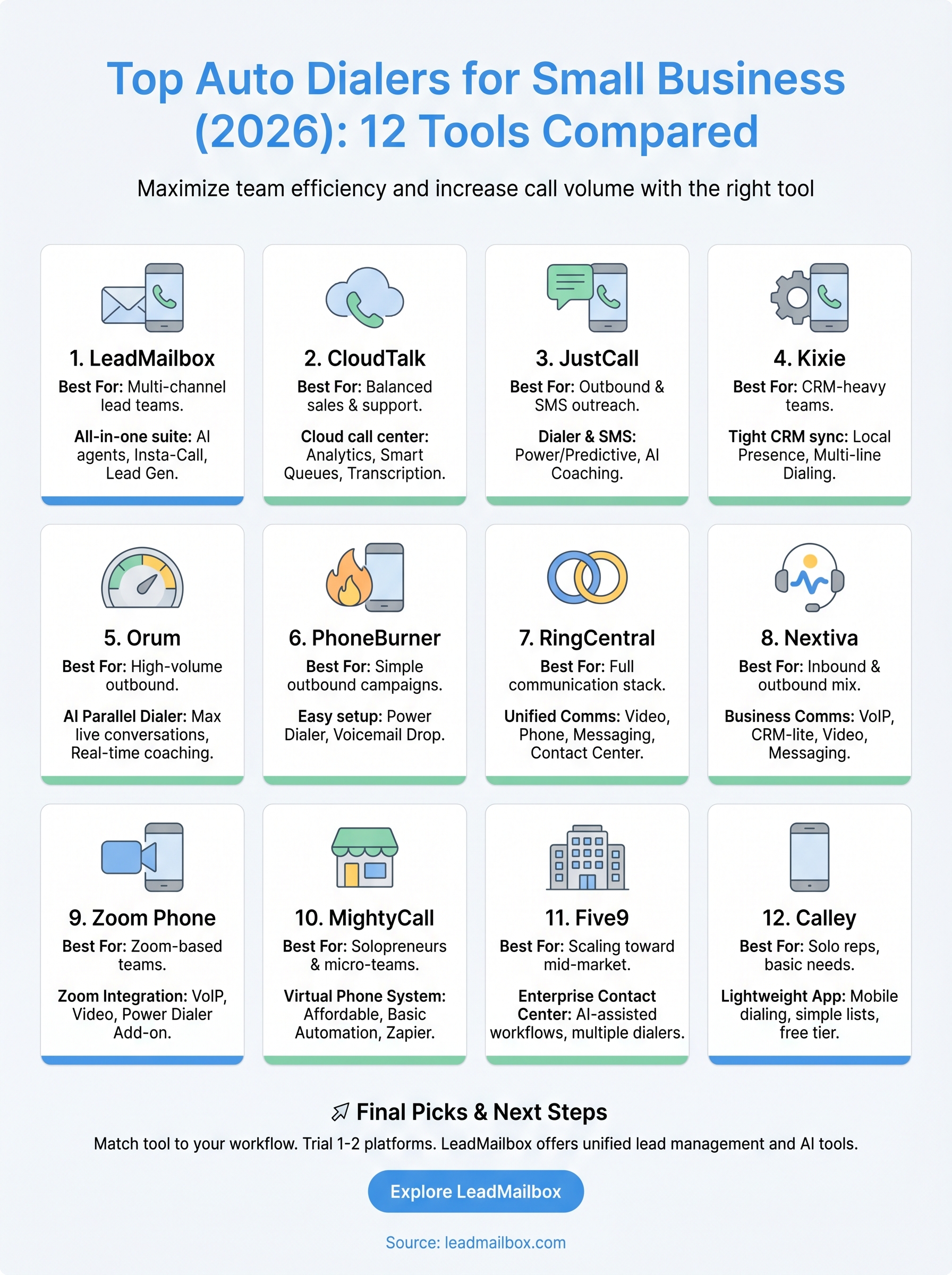
No single tool wins for every team, but the pattern across this list is clear. If you need a lightweight entry point, Calley or MightyCall work for solo reps and micro-teams. If your priority is maximum call volume through parallel dialing, Orum and Kixie compete at the top. For teams that want a unified system covering lead management, dialing, SMS, email, and AI-powered communication without patching together separate tools, LeadMailbox is the strongest fit for finding the best auto dialer for small business operations that need everything working together from day one.
Your next move is to match this list against your actual workflow. Look at where your leads come from, how many reps you have, and which channels you rely on most. From there, pick one or two platforms to trial before committing. If you want to see how LeadMailbox handles your full sales workflow, explore LeadMailbox's platform and start with a real evaluation.